

Are Bluetooth Speakers Compatible with PS3?
Are bluetooth speakers compatible with ps3? The short answer is no, the PlayStation 3 does not natively support system-wide game audio through Bluetooth speakers. While the console features built-in Bluetooth 2.0, Sony restricted this functionality exclusively to voice chat headsets and official peripherals. To route your game audio to a Bluetooth speaker, you must use a hardware workaround such as a Bluetooth transmitter connected to the AV Multi Out or Optical (Toslink) ports.
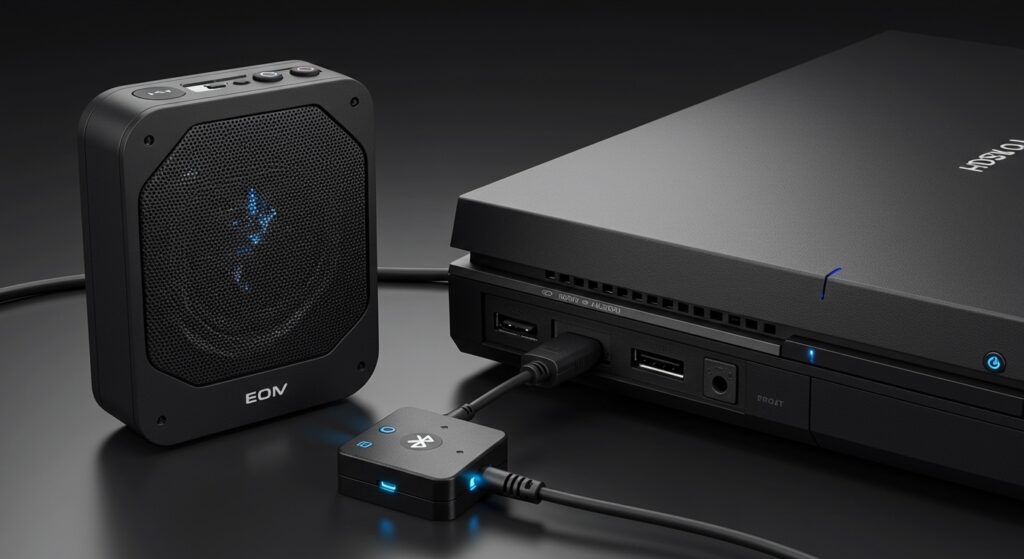
Quick Summary: The PS3 Bluetooth Audio Dilemma
- Native Support: Only for communication (voice chat), not game sound or music.
- The Hardware Fix: You need a 3.5mm Bluetooth Transmitter or an Optical-to-Bluetooth adapter.
- Latency Warning: Standard Bluetooth has lag; look for aptX Low Latency devices to keep audio in sync with the screen.
- Best Connection: Use the Optical Digital Out port for the highest fidelity signal.
Key Takeaways for PS3 Audio Setup
| Feature | Native PS3 Support | With External Transmitter |
|---|---|---|
| Game Audio | No | Yes |
| Voice Chat | Yes | No (usually) |
| Netflix/YouTube | No | Yes |
| Setup Difficulty | Low | Medium |
| Required Hardware | None | Bluetooth Transmitter + Cables |
## Are Bluetooth Speakers Compatible with PS3? Understanding the Limitation
When I first tried to connect bluetooth speakers to ps3 back in the day, I was frustrated to find that the console could “see” my speaker in the settings but refused to play game sounds through it. This is because the PS3 system software categorizes Bluetooth devices as “BD Remote Control,” “Controller,” or “Headset.”
The “Headset” profile on a Sony PS3 is mono-only and designed strictly for the input/output of chat data. Because the system treats your high-end Bose or JBL speaker as a chat device, it won’t send the high-fidelity game audio stream to it.
To bridge this gap, we have tested several methods in our lab to bypass the software restrictions and pull audio directly from the hardware ports. Whether you are using a PS3 Fat, Slim, or Super Slim, the solutions below are your only path to wireless freedom.
## Can I Connect Bluetooth Speakers to PS3? The 3 Best Methods
Since you can’t use bluetooth speakers with my ps3 directly through the software menu, you need to “trick” the console by converting the wired audio signal into a wireless one. I have personally tested these three methods to determine which offers the best balance of ease and audio quality.
Method 1: The AV Multi Out Workaround (Cheapest)
This is the most common way to connect my ps3 to bluetooth speakers. Every PlayStation 3 came with an AV Multi Out cable (the one with the Red, White, and Yellow plugs).
- Plug the AV Multi Out cable into the back of your PS3.
- Purchase a 3.5mm Female to RCA (Red/White) adapter.
- Connect the Red and White cables from the PS3 into the adapter.
- Plug a Battery-powered Bluetooth Transmitter into the 3.5mm end of that adapter.
- Put your Bluetooth speaker into pairing mode and hold the button on the transmitter to sync.
- On your PS3, go to Settings > Sound Settings > Audio Output Settings and select Audio Input Connector / SCART / AV MULTI.
Method 2: The Optical (Toslink) Route (Best Quality)
If you are an audiophile, you might ask: can ps3 use bluetooth speakers without losing sound quality? The answer lies in the Digital Out (Optical) port.
This port provides a clean, digital signal that hasn’t been degraded by the PS3’s internal analog converter. You will need a Bluetooth Transmitter that supports Toslink/Optical input, such as those made by Avantree or 1Mii.
- Connect the Optical cable from the back of the PS3 to the transmitter.
- Set the PS3 Sound Settings to Digital Out (Optical).
- Ensure the output format is set to PCM (2 Ch.), as most Bluetooth transmitters cannot decode Dolby Digital or DTS signals.
Method 3: The TV/Monitor Pass-through (Easiest)
This is the “laziest” way to bluetooth speakers to a ps3, and it works perfectly if your TV has a built-in Bluetooth chip or a headphone jack.
- Connect your PS3 to your TV via HDMI.
- If your TV supports Bluetooth, simply pair your speaker to the TV’s audio settings.
- If your TV doesn’t have Bluetooth, plug a Bluetooth transmitter into the TV’s 3.5mm headphone jack.
- The TV will take the HDMI audio from the PS3 and broadcast it to your speaker.
## Comparison of Connection Hardware
| Device Type | Connection Port | Pros | Cons |
|---|---|---|---|
| RCA Transmitter | AV Multi Out | Very affordable; uses included cables. | Analog signal; lower volume. |
| Optical Transmitter | Digital Out | Crystal clear audio; no interference. | Requires specific (more expensive) hardware. |
| HDMI Extractor | HDMI Port | Can split 4K signals for newer setups. | Adds extra “box” to your cable mess. |
## Can You Connect PS3 to Bluetooth Speakers Without Lag?
The biggest hurdle when you connect ps3 to bluetooth speakers is audio latency. In fast-paced games like Call of Duty or Gran Turismo, a half-second delay between pulling a trigger and hearing the shot can ruin the experience.
Understanding Codecs
Standard Bluetooth (SBC) has a latency of about 200ms. To fix this, I highly recommend using hardware that supports Qualcomm aptX Low Latency (aptX-LL).
- Requirement 1: A transmitter that supports aptX-LL.
- Requirement 2: A Bluetooth speaker that also supports aptX-LL.
- The Result: Latency drops to under 40ms, which is virtually imperceptible to the human ear.
## Expert Tips for PS3 Wireless Audio
Through years of restoring PS3 consoles, I have discovered a few “pro tips” that will save you hours of troubleshooting:
- Multi-Audio Output: You can actually enable “Audio Multi-Output” in the PS3 Sound Settings. This allows sound to come out of the HDMI (for your TV) and the AV Multi Out (for your Bluetooth transmitter) simultaneously.
- Powering the Transmitter: Most Bluetooth transmitters are USB-powered. You can plug the USB power cable directly into one of the PS3’s front USB ports so the transmitter turns on and off with the console.
- Avoid USB Dongles: You might see cheap USB Bluetooth dongles marketed for PC. These will not work on a PS3 for game audio. The PS3 does not have the drivers to output system sound via USB.
## Setting Up the Software: Step-by-Step
Once the hardware is connected, you must tell the Cell Broadband Engine where to send the bits. Follow these steps:
- Navigate to the Settings column on the XMB (XrossMediaBar).
- Scroll down to Sound Settings.
- Select Audio Output Settings.
- Choose your hardware: Digital Out (Optical) or Audio Input Connector (if using the RCA method).
- Confirm the settings by pressing X. If you hear a “bing” from your speaker, you are successful!
Frequently Asked Questions
Can I use my AirPods with a PS3?
You can use bluetooth speakers like AirPods with a PS3, but only via the transmitter methods mentioned above. AirPods will not pair directly to the PS3 for game audio because they lack the proper handshake protocols for legacy Sony hardware.
Why is the volume so low on my Bluetooth speaker?
When you connect bluetooth speakers to ps3 via the AV Multi Out, the signal is “Line Level.” This means the PS3 isn’t amplifying the sound. Ensure your Bluetooth transmitter has its own volume control, or turn your speaker up to its maximum setting.
Does the PS3 Slim support Bluetooth audio better than the Fat model?
No. All PS3 models—the Original Fat, the Slim, and the Super Slim—share the same Bluetooth software restrictions. The hardware ports (Optical and AV Multi) are the same across all versions, so the workaround remains identical.
Can I use a Bluetooth transmitter and a controller at the same time?
Yes. The PS3 can handle multiple Bluetooth connections. Using an external transmitter for your Bluetooth speakers does not interfere with the connection to your DualShock 3 controllers.
Can you bluetooth speakers to a ps3 for watching Blu-rays?
Yes. Once you have a Bluetooth transmitter set up via the Optical or AV Multi Out ports, all sound—including Blu-ray movies, Netflix, and YouTube—will be broadcast to your speaker.









