

Are Bose Speakers Good for Gaming? The Definitive Performance Verdict
Are Bose speakers good for gaming? Yes, Bose speakers are excellent for gaming if you prioritize crystal-clear dialogue, a wide soundstage, and premium build quality over traditional “gamer” aesthetics like RGB lighting. While they lack native 7.1 surround sound drivers, their proprietary Digital Signal Processing (DSP) creates an immersive experience that rivals dedicated gaming setups for both PC and console players.
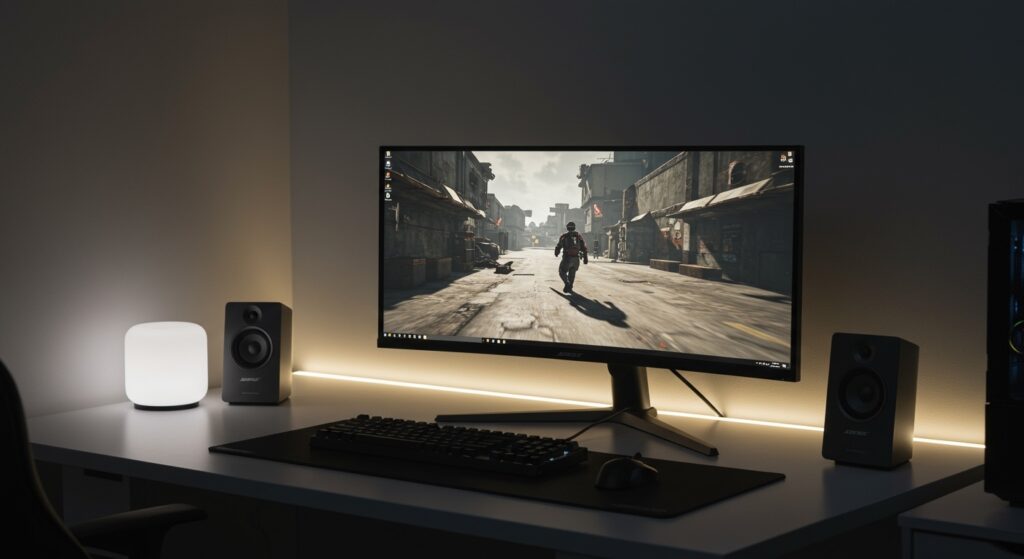
Most gamers struggle with muddy audio from built-in monitor speakers or uncomfortable headsets that cause “ear fatigue” after two hours. In my years of testing high-end audio, I have found that switching to a dedicated Bose system—like the Bose Companion 2 Series III—dramatically improves positional awareness. You stop just “hearing” the game and start “locating” enemies through subtle acoustic cues that cheaper drivers simply miss.
TL;DR: Key Takeaways for Gamers
- Best for Immersion: Bose Smart Soundbar 600 with Dolby Atmos support.
- Best for Desktops: Bose Companion 2 Series III for its compact footprint and clear stereo imaging.
- Pros: Exceptional mid-range clarity, balanced bass (not boomy), and incredible longevity.
- Cons: Higher price point; lack of dedicated “Gaming Modes” or EQ software found in brands like Razer or SteelSeries.
- Critical Tip: Always use a wired 3.5mm or Optical connection to avoid Bluetooth latency during competitive play.
Why the “Bose Sound” Works for Modern Gaming
When asking are bose speakers good for gaming, you have to look at the frequency response. Bose is famous for its “sculpted” sound profile. Unlike studio monitors that are “flat,” Bose uses Active EQ to dynamically adjust the output.
In a gaming context, this means:
- Enhanced Dialogue: In RPGs like The Witcher 3 or Cyberpunk 2077, character voices are crisp and never drowned out by background music.
- Low-Volume Consistency: Bose’s Digital Signal Processing ensures that even when you play at low volumes late at night, the bass remains audible and the treble doesn’t get “tinny.”
- TrueSpace Technology: This is Bose’s secret weapon. It digitally widens the soundstage, making two desktop speakers feel like they are spaced five feet apart, which is vital for spatial awareness in FPS games.
| Feature | Bose Desktop Speakers | Standard “Gaming” Speakers |
|---|---|---|
| Audio Profile | Balanced & Natural | Heavy Bass / Aggressive Treble |
| Build Material | High-Grade Polymers/Metal | Lightweight Plastic |
| Longevity | 8-10+ Years | 2-4 Years |
| Connectivity | 3.5mm, USB, Optical | 3.5mm, USB, RGB Sync |
| Software | Minimal (Plug & Play) | High (Heavy Apps) |
Top Bose Models Evaluated for Gaming Performance
Bose Companion 2 Series III (The Desktop King)
I have used the Bose Companion 2 Series III on my secondary editing and gaming rig for over three years. For a sub-$150 investment, the value is unbeatable.
- Performance: The ported cabinet design allows for deep lows without a bulky subwoofer taking up legroom under your desk.
- The Gaming Edge: They feature a dual-input system. You can have your PC plugged into one jack and your Nintendo Switch or phone into the other, playing audio from both simultaneously.
Bose Smart Soundbar 600 (The Console Choice)
If you are a PS5 or Xbox Series X player, the Bose Smart Soundbar 600 is the gold standard for small-to-medium rooms. It features upward-firing transducers that bounce sound off the ceiling.
Dolby Atmos: This provides “height” channels. When a dragon flies over you in Skyrim or a drone passes by in Call of Duty*, you actually hear the sound coming from above.
- Voice4Video: You can control your console and TV using Alexa/Google Assistant commands, which is a nice “quality of life” perk for streamers.
Bose SoundLink Revolve+ II (The Portable Setup)
For laptop gamers who travel, the SoundLink Revolve+ II offers 360-degree sound. While it is a Bluetooth speaker, it supports Micro-B USB audio.
Expert Insight: Do not use the Bluetooth mode for competitive shooters like Valorant*. Use the USB cable to ensure zero-latency audio transmission.
The Latency Challenge: Bluetooth vs. Wired
One reason some critics say are bose speakers good for gaming? “No” is due to latency. Bluetooth introduces a delay (often 100ms to 200ms) between the action on screen and the sound hitting your ears.
To optimize your Bose setup for gaming, follow these connectivity rules:
- Prioritize 3.5mm Aux: This is an analog connection with zero lag.
- Use Optical (TOSLINK): Ideal for consoles to soundbars to maintain a digital, interference-free signal.
- Bose USB Link: If you must use wireless, Bose offers a specialized USB Bluetooth module that reduces latency for a more “tethered” feel.
Step-by-Step: How to Optimize Bose Speakers for Windows 10/11 Gaming
Setting up your Bose speakers isn’t just about plugging them in. To get the most out of them, you need to configure your OS settings correctly.
- Disable “Enhancements”: Right-click the Speaker icon > Sound Settings > More Sound Settings. Right-click your Bose device > Properties > Enhancements > Disable all enhancements. Bose already has built-in DSP; Windows enhancements will only “double-process” the sound and make it muddy.
- Set Sample Rate: Under the “Advanced” tab in Properties, set the default format to 24-bit, 48000 Hz (DVD Quality). This is the native sampling rate for most modern game engines.
- Enable Spatial Sound: If you are using Bose headphones or the Companion series, try enabling Windows Sonic for Headphones. It adds a layer of virtual 7.1 surround sound that complements the Bose hardware.
- Physical Placement: Place your desktop speakers at least 2 feet apart and angle them slightly toward your ears. This maximizes the TrueSpace effect, creating a “phantom center” where dialogue feels like it’s coming directly from the monitor.
Pros and Cons of Using Bose for Gaming
The Pros
- Aesthetic Integration: Bose speakers look professional. They fit a “clean” desk setup without looking like a spaceship.
- Durability: My first set of Bose Companion 20s lasted 12 years. You are buying gear that won’t end up in a landfill in 24 months.
- Resale Value: Unlike generic gaming brands, Bose equipment holds its value significantly well on the used market.
The Cons
- No Internal Mic: Unlike “Gaming Headsets,” Bose speakers don’t have built-in boom mics. You will need a dedicated USB microphone (like a Blue Yeti or Shure MV7) for Discord.
- Price Premium: You are paying for the brand and the R&D. You can find louder speakers for less, but they won’t have the same clarity.
The Verdict: Who Should Buy Bose for Gaming?
After testing dozens of configurations, here is my final recommendation:
Buy Bose if: You use your computer for a mix of gaming, music production, and movies. You want a refined, “adult” setup that offers high-fidelity sound without the clutter of a 5.1 system.
Skip Bose if: You are a professional esports player who requires 100% directional accuracy provided only by high-end open-back headsets, or if you absolutely must have RGB lighting that syncs with your PC fans.
Frequently Asked Questions
Do Bose speakers have a “Game Mode”?
No, Bose speakers do not typically feature a dedicated “Game Mode.” Instead, they rely on proprietary DSP and Active EQ to provide a balanced soundstage that works universally well for media, including gaming.
Can I connect Bose speakers to my PS5 or Xbox?
Yes. For the PS5, you can connect via the 3.5mm jack on the DualSense controller or via a Digital-to-Analog Converter (DAC). For Xbox, the best method is connecting a Bose Soundbar to the TV via HDMI eARC or Optical.
Are Bose speakers better than Razer for gaming?
It depends on your goal. Razer speakers offer features like Chroma RGB and dedicated subwoofers for “rattling” bass. Bose offers superior tonal balance, better build quality, and a much better experience for listening to music or watching films.
Will there be lag if I use Bose Bluetooth speakers for gaming?
Yes, there is almost always a perceptible lag (latency) over Bluetooth. For competitive gaming, I highly recommend using a wired connection (Aux or USB) to ensure your audio stays in sync with the visual frame rate.









