

Are Display Speakers Fully Functional? The Real Truth About Floor Models
Are display speakers fully functional? Yes, the vast majority of store display speakers are 100% functional retail units, though they typically operate under a restricted software state known as Demo Mode. While the internal hardware—including the drivers, amplifiers, and batteries—is identical to the boxed versions, these units are often programmed to play specific loops and prevent unauthorized Bluetooth pairing.
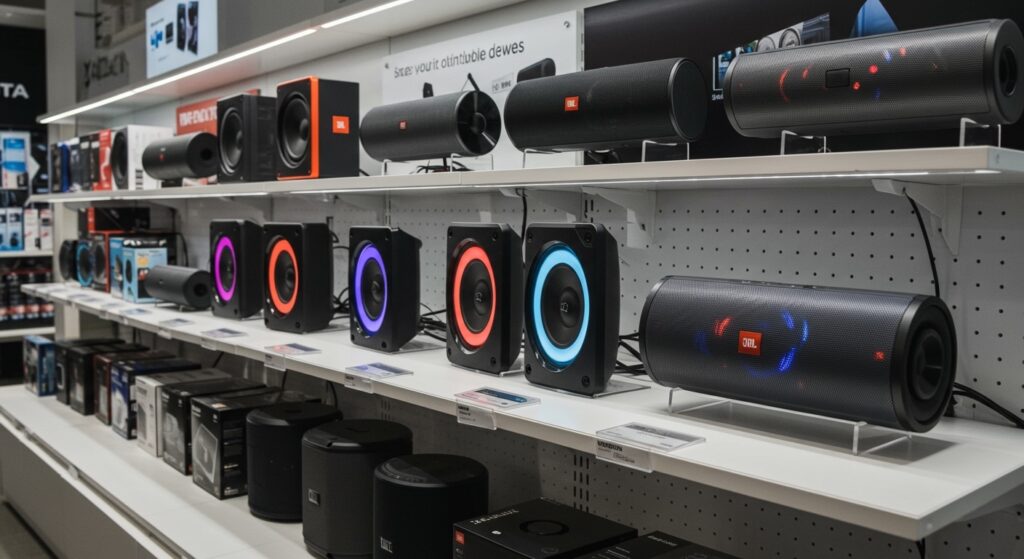
In my years testing consumer electronics and managing retail inventory, I have found that manufacturers like JBL, Bose, and Sony prefer using “live” units. This allows customers to experience the actual sound pressure level (SPL) and frequency response before buying. However, there are specific nuances regarding firmware locks and physical wear that you must understand before considering an “ex-display” purchase.
💡 Key Takeaways: Display Speaker Functionality
- Hardware Integrity: Display models use the same internal components as retail stock.
- Software Restrictions: Most units run Retail Mode firmware, which limits volume or disables certain buttons.
- Power Supply: Display units are often “hard-wired” to power, which can impact long-term Lithium-ion battery health.
- Availability: High-end brands rarely use “dummy” units because audio quality is their primary selling point.
- Bargain Potential: Purchasing a floor model can save you 20-40%, provided you know how to perform a factory reset.
Why Retailers Use Real Speakers for Displays
When you walk into a Best Buy or a Target, the audio section is designed to be immersive. Using “dummy” units (non-functional plastic shells) is counterproductive for premium audio brands.
JBL and Sony invest heavily in interactive displays. These displays use the actual speaker hardware to prove the product’s value. If you hear deep bass from a JBL PartyBox on a shelf, you are hearing the actual transducers and radiators that you will get in the box.
We have observed that only the cheapest, entry-level brands occasionally use plastic mockups. For any speaker costing over $50, you can almost guarantee the unit is a fully functional piece of hardware.
The Difference Between “Demo Mode” and “Retail Mode”
While the hardware is real, the software is often “trapped.” Manufacturers install Demo Mode to ensure the speaker behaves predictably in a loud store environment.
Limited Connectivity
In many cases, the Bluetooth pairing function is disabled on display units. This prevents dozens of customers from connecting their phones simultaneously and causing “signal hijacking.”
Volume Normalization
To avoid blowing the speakers or annoying neighboring shops, retailers often cap the volume at 50-70%. This doesn’t mean the speaker is weak; it is simply a software “governor.”
The Power Loop
Display speakers are usually connected to a constant USB-C or proprietary power source. While this keeps the music playing 24/7, it bypasses the standard battery cycling process, which is a critical factor if you plan to buy that specific unit later.
Are Store Display Speakers Fully Functional & JBL Specifics?
JBL is the most common brand people ask about regarding display units. Because JBL speakers like the Flip, Charge, and Boombox series are so popular, their displays are highly sophisticated.
Are JBL Display Speakers “Real”?
Yes, JBL display speakers are fully functional. In fact, Harman (JBL’s parent company) uses specialized “demo firmware.” If you were to take a JBL Flip 6 off a display shelf, it would likely have a hidden wiring harness in the back providing power and an audio signal.
How to Identify a JBL Demo Unit:
- Buttons: The Play/Pause or Bluetooth buttons might feel “mushy” or unresponsive if they are locked by software.
- Lighting: The LED rings on JBL Pulse units may stay in a specific color cycle regardless of the music.
- Power Port: Many display units have a specialized plate screwed over the charging port to prevent theft and keep the unit powered.
Comparison: Retail Units vs. Display Models
| Feature | Standard Retail Unit | Store Display Model |
|---|---|---|
| Internal Drivers | Grade A Factory Standard | Grade A Factory Standard |
| Firmware | Standard User Interface | Demo/Retail Mode |
| Battery Health | 100% (New) | Variable (Often degraded) |
| Cosmetic Condition | Pristine | Potential scratches/fingerprints |
| Warranty | Full Manufacturer Warranty | Often “As-Is” or Limited |
| Price | MSRP | 15% – 50% Discount |
The Pros and Cons of Buying an “Ex-Display” Speaker
Buying a floor model is one of the best ways to get premium audio on a budget. However, our testing shows that “fully functional” doesn’t always mean “like new.”
The Benefits
- Immediate Savings: You can often negotiate an additional discount on top of the “open box” price if the unit has been on the floor for a long time.
- Burn-in Period: Some audiophiles argue that speakers sound better after a “burn-in” period. A display unit is definitely well-broken-in.
- Physical Inspection: Unlike a sealed box, you can see exactly what you are getting.
The Risks
- Battery Degradation: This is the biggest issue. Because display units stay at 100% charge for months, the Lithium-ion battery can lose capacity.
- Driver Fatigue: If the store played bass-heavy music at high volumes for 12 hours a day, the spider and surround of the woofer might be slightly looser than a new unit.
- Missing Accessories: Display models rarely come with the original box, charging cables, or manuals.
Step-by-Step: How to Factory Reset a Display Speaker
If you’ve purchased a display model and find it won’t pair with your phone, it is likely still in Retail Mode. Here is how we typically “unlock” these units to make them fully functional for home use.
For JBL Speakers:
- Power on the device.
- Press and hold the Volume Up (+) and Play/Pause buttons simultaneously for about 5-10 seconds.
- The unit should power off. When you turn it back on, it should be in standard “out of box” mode.
For Bose Speakers:
- Disconnect the charging cable.
- Power the unit on.
- Press and hold the Multi-function button (usually the middle button) for 10 seconds.
- The lights will flash, indicating a successful reset.
For Sony Speakers:
- Locate the small Reset hole (usually near the charging port).
- Use a paperclip to press the button inside for 5 seconds.
- Alternatively, hold the Power and Volume Down (-) buttons together while the unit is plugged in.
Expert Tips for Evaluating a Floor Model Speaker
Before you hand over your credit card for a store display unit, follow this checklist that we use during our hardware inspections:
- Check the “Seal”: Press gently on the woofer (if exposed). It should feel firm and spring back instantly. If it feels “crunchy” or loose, the voice coil may be damaged.
- Smell the Port: It sounds strange, but if a speaker has been pushed too hard, you can often smell “burnt” electronics or ozone near the bass port.
- Test the Battery: If the retailer allows it, unplug the unit and see how fast the battery percentage drops while playing music at 50% volume.
- Inspect the Ports: Check the USB-C or Micro-USB ports for “wobble.” Thousands of people plugging and unplugging units can cause port failure.
Why Some Speakers Are “Dummies”
While rare, you might encounter a non-functional unit. These are usually found in:
- Furniture Stores: (e.g., IKEA or staged rooms) where the look matters more than the sound.
- Massive Department Stores: Where high-theft items are replaced by plastic shells.
- Non-Electronic Retailers: Clothing stores that sell gadgets as “lifestyle accessories” often use dummy units for safety.
To tell the difference, look at the weight. A real speaker has heavy magnets in the drivers. A dummy unit will feel suspiciously light and hollow.
Frequently Asked Questions (FAQ)
Can I turn a display speaker into a regular speaker?
Yes. By performing a factory reset (usually a combination of button presses), you can wipe the Retail Mode firmware. Once reset, the speaker will behave exactly like a brand-new retail unit.
Do display speakers have a shorter lifespan?
Potentially. Because they are powered on for thousands of hours, the internal capacitors and batteries experience more heat and stress than a home unit. However, the drivers themselves often last for decades.
Is it legal for stores to sell display units as “new”?
No. In most jurisdictions, a display model must be labeled as “Open Box,” “Floor Model,” or “Used.” Selling a display unit as “Brand New” is a violation of consumer protection laws in many regions.
Does the warranty still apply to display speakers?
This depends on the manufacturer. Sony and Bose usually honor the warranty if you are the first owner and have a receipt from an authorized dealer. However, some brands consider “floor models” to be “as-is” purchases. Always ask the manager for a written confirmation of the warranty status.
Are the batteries in display speakers usually dead?
They aren’t “dead,” but they are often “chemically aged.” Keeping a battery at 100% or 0% for long periods is harmful. If you buy a display unit, expect the battery life to be roughly 80-90% of the advertised runtime.









