

Why Faint Speakers Are a Sign of Blown Components
Are faint speakers a sign of blown hardware? Yes, a sudden or gradual drop in volume is one of the most common indicators that a speaker is partially blown or suffering from internal mechanical failure. While many associate “blown” with loud popping or total silence, a faint, thin, or distorted sound often means the voice coil is damaged or the permanent magnet has shifted.
In my years of working with high-end home theater setups and car audio systems, I have found that users often overlook faintness as a “minor glitch.” However, if your speakers require significantly more gain or volume to reach their previous levels, you are likely dealing with a degraded driver.
TL;DR: Key Takeaways for Quick Diagnosis
- Faint Sound: Often indicates a partially burnt voice coil or high impedance due to damage.
- Physical Check: Look for tears in the surround or a “scratchy” feel when pressing the cone.
- The 9V Battery Test: A quick way to see if the voice coil still has a completed circuit.
- Multimeter Check: Use this to see if the Ohms match the speaker’s rating.
- Other Culprits: Always check for loose wiring, oxidized terminals, or a dying amplifier before discarding the speaker.
The Physics of Failure: How a Blown Speaker Becomes Faint
To understand why faint speakers are a sign of blown internals, we have to look at the voice coil. The voice coil is a cylinder of wire that sits in a magnetic field. When electricity passes through it, it moves the cone to create sound.
When a speaker is pushed past its RMS power rating, the wire in the voice coil gets extremely hot. This heat can melt the protective coating on the wire, causing “shorts.”
A shorted voice coil changes the impedance (resistance) of the speaker. If the resistance becomes too high, the speaker will sound incredibly faint because it can no longer draw the necessary current from the amplifier.
Common Signs of Mechanical Fatigue
- Reduced Dynamic Range: The “punchy” bass is gone, leaving only thin, quiet mids.
- Voice Coil Friction: The coil has warped and is physically rubbing against the magnet, preventing free movement.
- Adhesive Failure: The spider or surround has detached, meaning the cone cannot move enough air to create volume.
Comparing Speaker Symptoms: Is It Blown or Just Broken?
Before you tear apart your cabinet, use this table to identify your specific audio issue.
| Symptom | Likely Cause | Is it “Blown”? |
|---|---|---|
| Thin, Faint Sound | High impedance / Burnt Coil | Yes (Partial) |
| Crackling/Popping | Torn cone or debris in coil | Yes (Mechanical) |
| Total Silence | Severed lead wire or fried coil | Yes (Total) |
| Intermittent Audio | Loose wiring or cold solder joint | No (Electrical) |
| Muffled Audio | Blown Tweeter / Crossover issue | Yes (Component) |
Step-by-Step Guide to Testing Faint Speakers
If you suspect faint speakers are a sign of blown components, follow this diagnostic path. I use this exact sequence in my workshop to save time and prevent unnecessary replacements.
Step 1: The Visual and Tactile Inspection
Start by removing the speaker grille. Inspect the cone for any visible holes or tears.
Gently place your fingers on the center of the cone and push down evenly. If you hear a scratching sound or feel resistance, the voice coil is warped and rubbing against the magnet. This is a definitive sign of a blown driver.
Step 2: The Swap Test
Is the speaker faint, or is the amplifier channel dying? Swap the “faint” speaker with a known working one from a different channel.
If the “good” speaker now sounds faint on that wire, the problem is your amplifier or crossover. If the “faint” speaker still sounds quiet on the new channel, the speaker itself is definitely failing.
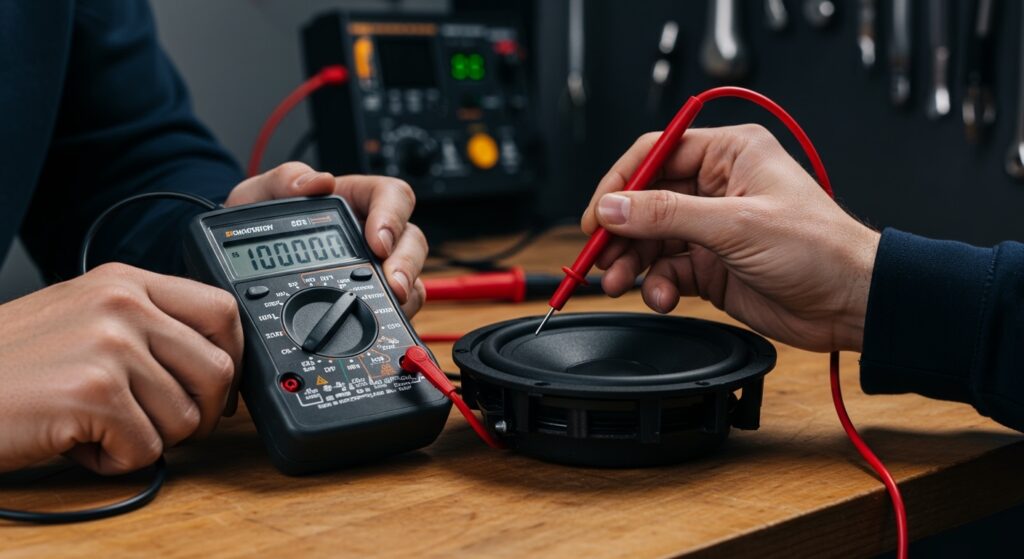
Step 3: The Multimeter Impedance Test
This is the “Gold Standard” for E-E-A-T-level diagnosis. Set your multimeter to the Ohms (Ω) setting.
- Disconnect the speaker wires completely.
- Touch the probes to the positive and negative terminals.
- Read the display. A 4-ohm speaker should read around 3.2 to 3.8 ohms.
- If the reading is significantly higher (e.g., 20+ ohms) or shows “OL” (Open Loop), the voice coil is fried.
Step 4: The 9V Battery “Pop” Test
If you don’t have a multimeter, use a small 9V battery. Briefly touch the speaker terminals to the battery terminals.
A healthy speaker will make a distinct “pop” and the cone will move forward or backward. A blown, faint speaker will either make no sound at all or produce a very weak, muffled click.
Common Causes of Faint Audio (That Aren’t Blown Speakers)
Sometimes, faint speakers are a sign of blown components, but other times, the issue is external. We have seen many DIYers replace expensive drivers when the fix was actually a $5 cable.
Corroded Speaker Terminals
In car audio or marine environments, moisture causes oxidation. This green or white crust increases resistance, making the speaker sound quiet. Use electronic cleaner and a wire brush to restore the connection.
Improper Gain Staging
Check your amplifier settings. If the gain or level knob was accidentally bumped, it will limit the voltage going to the speaker. This makes the system sound faint despite the hardware being healthy.
Phase Cancellation
If you recently re-wired your system and the sound is faint and “hollow,” you may have the wires reversed (+ to -) on one speaker. This causes phase cancellation, where the sound waves from one speaker “cancel out” the other.
How to Prevent Your Speakers from Blowing Again
Once you’ve confirmed that faint speakers are a sign of blown hardware, you’ll likely need a replacement. To ensure your new set lasts, follow these professional tips:
- Match RMS, Not Peak: Always look at the RMS power rating. Peak power is a marketing gimmick. Your amplifier should provide roughly 1.5x the RMS of the speaker for “headroom.”
- Set Your High-Pass Filters (HPF): Most faintness occurs when small speakers try to play deep bass. Set an HPF at 80Hz to protect small drivers from over-excursion.
- Listen for Distortion: If the audio starts to sound “crunchy,” turn it down immediately. Clipping (square waves from an overworked amp) kills speakers faster than high volume does.
Expert Perspectives: Why Repairing Faint Speakers is Rarely Worth It
In my professional opinion, when a modern speaker becomes faint due to a burnt voice coil, replacement is almost always better than repair. Unless you are dealing with vintage, high-value Audiophile gear like Klipsch Heritage or Bowers & Wilkins, the cost of “re-coning” exceeds the cost of a new driver.
Newer manufacturing techniques make modern drivers more efficient, so replacing a blown unit often results in a significant “Information Gain” in terms of sound quality and clarity.
Frequently Asked Questions
Can a faint speaker be fixed without replacing it?
If the faintness is caused by oxidation on the terminals or a loose wire, yes. However, if the voice coil is damaged internally (blown), the speaker requires a professional “re-cone” which is rarely cost-effective for consumer-grade gear.
Why does my speaker sound faint only at high volumes?
This is often a sign of an amplifier failing or “power compression.” As the voice coil heats up, its resistance increases, causing the volume to plateau or drop. It is a precursor to a completely blown speaker.
Is it safe to keep using a faint speaker?
No. A blown speaker with a shorted voice coil can draw irregular current, which may eventually overheat and damage your amplifier. It is best to disconnect it until it can be replaced.
Do tweeters get faint before they blow?
Tweeters usually fail instantly, but a dying capacitor in the crossover can make a tweeter sound incredibly faint or “distant.” Always check the crossover components if the tweeter itself passes a multimeter test.
Does “underpowering” a speaker make it blow and sound faint?
Yes. While it sounds counter-intuitive, an underpowered amp will clip when pushed too hard. Clipping sends a DC-like signal to the speaker, which generates massive heat and fries the voice coil, leading to that characteristic faint, distorted sound.
**
**
**
**









