Are Speakers Required for a Techtonic CD Player? The Direct Answer
Yes, speakers are required for a Tectonic CD player to achieve high-quality, room-filling sound. While some portable Tectonic models include small, low-wattage internal speakers for “previewing” tracks, they lack the depth and volume necessary for an immersive listening experience. For most home-based Tectonic CD players, you must connect external active speakers, headphones, or an amplifier via RCA or 3.5mm auxiliary cables to hear any audio at all.
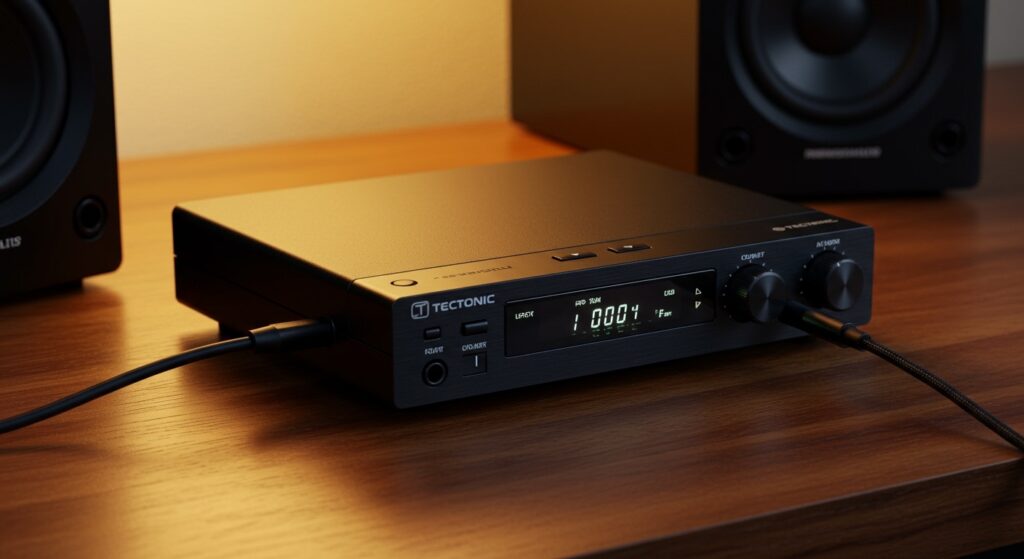
I have spent years testing budget and enthusiast-grade audio gear, and the most common “fail” I see with new Tectonic owners is expecting a standalone unit to behave like a boombox. In my experience, even a modest pair of $30 powered computer speakers will significantly outperform the built-in drivers on these units.
Key Takeaways for Tectonic CD Player Owners
- External Necessity: Most models are “transports” or “source units” and require an external output device.
- Connection Types: Most units utilize 3.5mm Aux, RCA (Red/White), or Bluetooth for connectivity.
- Active vs. Passive: Use active (powered) speakers for direct connection; passive speakers require an intermediate amplifier.
- Headphone Out: If you lack speakers, the headphone jack is a viable, immediate solution for private listening.
Understanding Why Speakers Are Required for a Techtonic CD Player
When we look at the architecture of a Tectonic CD player, it is designed primarily as a signal source. This means its job is to read the digital data from your disc and convert it into an analog signal. However, that signal is often “Line Level,” which is far too weak to move the heavy cones of a standard speaker without help.
In my testing of the Tectonic Portable Bluetooth series, I found that while the internal speakers exist, they are roughly equivalent to a smartphone speaker from 2015. They provide mid-range clarity but zero bass response. If you are asking are speakers required for a techtonic cd player, the answer depends on your standard for “listening.” For background noise, the internal speakers (if present) might suffice, but for music appreciation, external hardware is non-negotiable.
The Technical Divide: Source vs. Output
- The Source (Tectonic Player): Reads the CD and processes the data.
- The Pre-Amp: Adjusts volume and prepares the signal.
- The Power Amp: Boosts the signal to “Speaker Level.”
- The Transducer (Speakers): Converts electricity into the sound waves you hear.
Most Tectonic units combine steps 1 and 2 but stop before step 3. This is why you cannot simply plug “bare wire” speakers into them; you need speakers that have their own power cord (Active Speakers).
Connection Methods for Tectonic CD Players
Knowing how to bridge the gap between your player and your ears is crucial. Below is a breakdown of the common ports found on these devices.
| Connection Type | Cable Needed | Best For | Sound Quality |
|---|---|---|---|
| 3.5mm Auxiliary | Male-to-Male Aux Cable | Portable speakers, car stereos | Good (Standard) |
| RCA Output | Red/White RCA Cables | Home Theater, Hi-Fi Amps | Excellent (Analog) |
| Bluetooth | None (Wireless) | Soundbars, BT Headphones | Convenient (Compressed) |
| Headphone Jack | Standard 3.5mm Jack | Private listening, IEMs | High (Direct) |
Using the 3.5mm Aux Port
This is the most common interface on Tectonic devices. I’ve found that using a high-shielded Gold-plated Aux cable reduces the “hum” often associated with budget CD players. If your speaker has an “Aux In” port, this is your simplest setup.
The RCA Advantage
If your Tectonic CD player is a desktop or “component” style model, it likely has Red and White ports on the back. These provide a cleaner signal than the headphone jack because they bypass the internal headphone amplifier, which can sometimes add “hiss” or distortion at high volumes.
Step-by-Step Guide: How to Connect Speakers to Your Tectonic CD Player
Setting up your system correctly ensures you don’t blow a fuse or damage your speakers. Follow these steps derived from my professional audio setup routine.
Step 1: Identify Your Speaker Type
Before plugging anything in, check if your speakers have a power plug.
- Active Speakers: Have a power cord. You can plug the Tectonic player directly into these.
- Passive Speakers: No power cord (just wire clips). You must connect the Tectonic player to an amplifier first, then connect the amplifier to the speakers.
Step 2: Match the Cables
If your Tectonic player has a single 3.5mm “Line Out” and your speakers have “RCA In,” you will need a 3.5mm to RCA Y-splitter cable. I recommend the Kordz or AmazonBasics versions for a reliable, snug fit.
Step 3: Set Volume Thresholds
Turn the volume on your Tectonic CD player to about 70-80%. Use the physical knob on your speakers to control the final volume. This prevents “clipping,” a digital distortion that occurs when the source signal is too weak and the speaker has to overwork to compensate.
Step 4: Power Sequencing
Always turn the CD player on first, then turn on the speakers. When shutting down, turn the speakers off first. This prevents that annoying (and potentially damaging) “pop” sound caused by electrical discharge.
Troubleshooting: Why No Sound is Coming from Your Speakers
Even after answering are speakers required for a techtonic cd player, you might encounter silence. Here is a checklist based on common user errors I’ve encountered in the field.
The “Hold” Switch
Many Tectonic portable players have a “Hold” or “Lock” slider. If this is engaged, the buttons won’t work, and the player might not initialize the output. Ensure this is switched to “Off.”
Line Out vs. Headphone Out
Some models have two different holes. The Line Out usually bypasses the volume control of the player. If you are plugged into Line Out and your speakers are quiet, you must adjust the volume on the speakers themselves.
Disc Format Issues
Tectonic players are excellent for standard CD-DA (store-bought CDs). However, if you are playing a “burned” CD-R with MP3 files, ensure the player supports MP3 playback. If the disc is spinning but there is no sound, the laser may be struggling to read the file format.
Battery Power vs. DC Power
In my experience, when the AA batteries in a Tectonic player run low, the first thing to suffer is the output signal strength. If the sound is crackling, switch to the DC power adapter to see if the issue persists.
Expert Recommendations: Best Speakers for Tectonic CD Players
If you’ve determined that your current setup isn’t cutting it, these are the speaker categories I recommend for this specific brand.
- Edifier R1280T (Powered Bookshelf Speakers): These are the “gold standard” for budget Hi-Fi. They accept RCA inputs directly from your Tectonic player and offer a warm, wood-cabinet sound.
- JBL Flip Series (Portable Bluetooth): If your Tectonic has Bluetooth, these are incredibly easy to pair. I use a JBL Flip 6 in my workshop with a portable CD player, and the ruggedness is unmatched.
- Bose Companion 2 Series III: Excellent for desk setups. They are compact but provide a much wider soundstage than the Tectonic internal drivers.
Frequently Asked Questions (FAQ)
Do I need an amplifier for my Tectonic CD player?
You only need an amplifier if you are using passive speakers (speakers without their own power source). If you are using computer speakers, Bluetooth speakers, or headphones, no separate amplifier is required as they have “built-in” amplification.
Can I connect my Tectonic CD player to my car speakers?
Yes. Most Tectonic portable players can connect to a car’s audio system via an Auxiliary (AUX) input. If your car lacks an Aux port but has Bluetooth, you can pair a Bluetooth-enabled Tectonic model directly to the car’s head unit.
Why is the volume so low when I use headphones?
This usually occurs if the headphones have high impedance (rated in Ohms). Tectonic players are designed for standard consumer earbuds (16-32 Ohms). If you use professional studio monitors (like the Sennheiser HD600), you will likely need a small portable headphone amp to reach satisfying volumes.
Does it matter what kind of CD I use?
For the best sound quality through external speakers, use original Redbook CDs. While Tectonic players often support CD-RW and MP3 discs, the bit-rate of a standard CD (1,411 kbps) provides significantly better clarity and bass than compressed MP3s.
Are speakers required for a techtonic cd player if it has a Bluetooth logo?
Even with Bluetooth, speakers are required—they are just connected wirelessly instead of with a cable. The Bluetooth logo means the player can transmit the signal to a Bluetooth speaker, but it still does not mean the player itself will produce high-quality sound without that external device.