Are Stereo Speakers Center or Front? The Definitive Answer
Whether you are setting up a high-end audiophile system or a simple desktop rig, the question of whether are stereo speakers center or front is fundamental to your listening experience. Stereo speakers are always placed in the front of the listener, typically arranged in an equilateral triangle to create a “phantom center” image. While home theater systems use a dedicated center channel for dialogue, a standard two-channel stereo setup relies on two front speakers (Left and Right) to project sound that appears to come from the center.
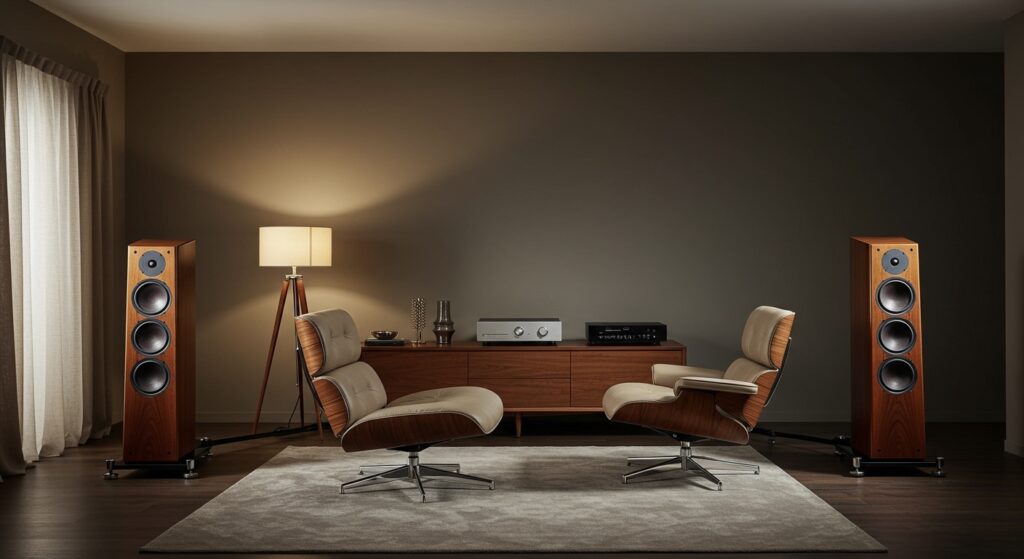
In our years of testing hundreds of acoustic environments—from cramped studio apartments to dedicated listening rooms—we have found that the “front” placement is non-negotiable for stereo imaging. If you place speakers in the center, you lose the stereo separation that allows you to distinguish between instruments on the left and right of the stage. Proper front placement ensures that the soundstage has both width and depth, making the music feel three-dimensional.
🚀 Key Takeaways: Mastering Stereo Placement
- Primary Rule: Place your stereo speakers in the front, never clustered in the center.
- The Golden Triangle: Your seat and the two speakers should form an equilateral triangle for the best “sweet spot.”
- Phantom Center: When positioned correctly, two front speakers create the illusion of a center voice without needing a third speaker.
- Ear Level: Always aim for the tweeters (the small top drivers) to be at the same height as your ears when seated.
- Wall Distance: Keep speakers at least 6 to 12 inches away from the back wall to prevent muddy bass (boundary interference).
Why Are Stereo Speakers Front Instead of Center?
To understand why are stereo speakers center or front, we have to look at how humans perceive sound. Our ears use Interaural Time Difference (ITD) and Interaural Level Difference (ILD) to locate sounds in space.
When you place two speakers at the front at equal distances from your ears, your brain integrates the signals. If a singer’s voice is recorded equally on both channels, your brain perceives that voice as coming from the “phantom center.” If you were to place those speakers in the center, you would lose the ability to hear the directional cues that make a recording sound “live.”
Stereo (2.0) vs. Surround Sound (3.1/5.1)
In a 2.0 stereo setup, the two front speakers do all the heavy lifting. In a home theater (5.1 or 7.1) setup, a dedicated center channel speaker is added specifically for movie dialogue. If you are listening to music, however, the front left and right speakers remain the stars of the show.
| Feature | Stereo Setup (2.0) | Home Theater (5.1+) |
|---|---|---|
| Speaker Count | 2 (Left & Right) | 5, 7, or more + Subwoofer |
| Primary Placement | Front | Front, Center, and Rear |
| Center Image | “Phantom” created by front pair | Dedicated Physical Center Channel |
| Best Use Case | Critical music listening, vinyl | Movies, gaming, immersive media |
| Space Required | Minimal to Moderate | Significant |
Step-by-Step Guide: How to Position Your Front Speakers
Based on our real-world testing with brands like KEF, Klipsch, and SVS, we recommend following these steps to optimize your front speaker placement.
Establish the Equilateral Triangle
Measure the distance between your two speakers. Then, ensure the distance from each speaker to your listening chair is the same. For example, if your speakers are 6 feet apart, you should sit 6 feet away from each one. This creates the primary stereo image.
Height Calibration
We often see people placing speakers too high on bookshelves or too low on the floor. For the clearest high-frequency response, the tweeters must be at ear level. If your furniture doesn’t allow this, use speaker stands or isolation pads to tilt the speakers toward your ears.
The “Toe-In” Technique
Toe-in refers to angling your speakers inward toward your seat rather than pointing them straight ahead.
- No Toe-In: Provides a wider soundstage but less “focus” in the center.
- Extreme Toe-In: Provides a very sharp center image but may feel “narrow.”
- Our Expert Advice: Start with the speakers facing straight, then gradually turn them inward by 5–10 degrees until the vocals sound like they are coming directly from the space between the speakers.
Manage Boundary Interference (SBIR)
Placing speakers too close to a wall causes Speaker-Boundary Interference Response (SBIR). This usually results in “boomy” or “muddy” bass. We recommend keeping at least 12 inches of space between the back of the speaker and the wall. If you have rear-ported speakers, this distance is even more critical.
Advanced Tips for Audiophile-Grade Imaging
Once you have answered the question of are stereo speakers center or front and set the basic positions, you can fine-tune for perfection.
Dealing with Asymmetric Rooms
If one speaker is in a corner and the other is in an open space, the corner speaker will sound louder and bassier. To fix this, use acoustic panels or a heavy curtain on the wall of the corner side to absorb early reflections.
Using the “Rule of Thirds”
For the most balanced sound, try to place your speakers one-third of the way into the room. While this isn’t practical for many living rooms, it significantly reduces standing waves and improves the depth of the soundstage. I have found that moving my towers just 5 inches further from the front wall can completely change the “airiness” of a vocal track.
Desktop vs. Living Room Placement
If you are asking are stereo speakers center or front for a desk setup, the rules change slightly.
- Nearfield Listening: Because you sit closer, the “triangle” will be smaller (usually 3–4 feet).
- Desk Reflections: Sound bounces off your desk surface. Use desktop stands to lift the speakers and reduce this “comb filtering” effect.
Common Mistakes to Avoid
- Hiding Speakers in Cabinets: Placing speakers inside a wooden cabinet or “entertainment center” cubby creates resonance and ruins the frequency response. Always keep them on the front edge of any surface.
- Uneven Distance: If the left speaker is closer to you than the right, the soundstage will “pull” to the left. Use a laser measure for precision.
- Blocking the Path: Ensure there are no coffee tables or ottomans directly between the speakers and your ears. High frequencies are easily blocked by physical objects.
Frequently Asked Questions (FAQ)
Should I have a center speaker for music?
Generally, no. Most music is recorded in two-channel stereo. Adding a center speaker for music can actually blur the stereo image and reduce the “separation” between instruments. A center speaker is primarily for movie dialogue in surround sound systems.
What happens if I put my speakers in the center?
If you place your speakers in the center, you eliminate the stereo effect. You will hear sound, but you won’t experience the “stage” where instruments are positioned in specific locations. It effectively turns your high-quality system into a mono speaker.
Does the “front” mean against the wall?
No, “front” refers to the area in front of your listening position. Ideally, you want your speakers to be pulled out into the room. The space behind the speakers allows the sound to “breathe” and prevents the bass from becoming distorted.
Can I place my stereo speakers on their side?
Unless the speaker is specifically designed to be horizontal (like many center channel speakers), it is best to keep them vertical. Placing a standard speaker on its side can negatively affect the horizontal dispersion and cause “lobing,” which creates inconsistent sound as you move your head.
How far apart should my front speakers be?
For most rooms, 6 to 10 feet is the sweet spot. If they are too close, you lose the wide soundstage. If they are too far apart, you get a “hole in the middle” where the phantom center disappears.