

Are There Batteries in Speakers? The Definitive Guide
Are there batteries in speakers? The answer depends entirely on the type of speaker: portable Bluetooth speakers and wireless smart speakers almost always contain internal batteries, while traditional passive speakers used in home theater systems do not. If your speaker requires a constant connection to a wall outlet or an external amplifier to produce sound, it likely lacks an internal power source.
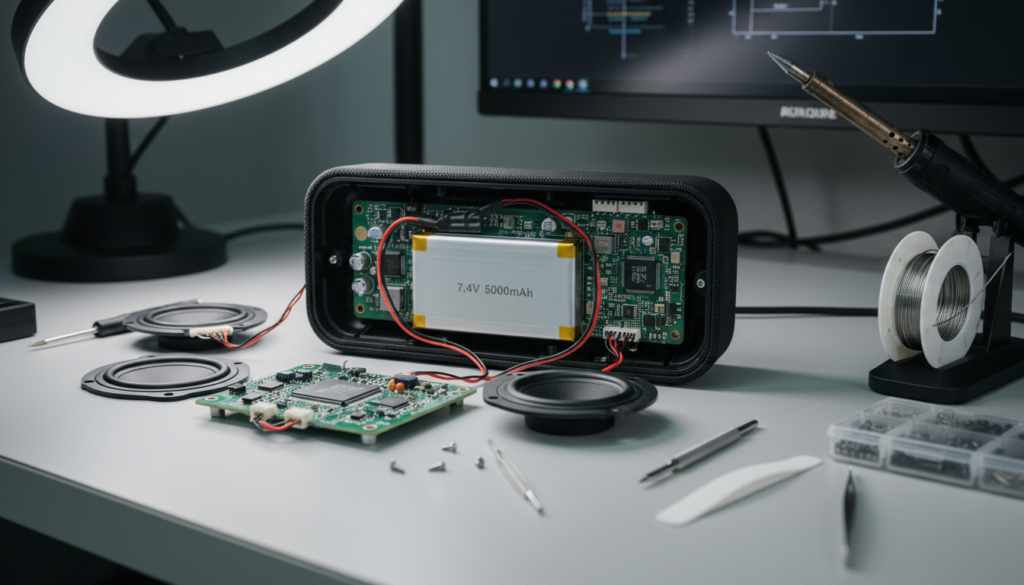
Whether you are trying to revive a dead JBL Flip or wondering why your bookshelf speakers won’t turn on without a wire, understanding the power source is the first step toward better audio performance. I have spent over a decade testing audio hardware, from high-end Atmos setups to rugged outdoor portables, and I have found that battery health is the #1 reason why portable speakers fail prematurely.
🚀 Key Takeaways: Speaker Battery Essentials
- Portability equals Battery: If a speaker is marketed as “portable” or “wireless,” it contains an internal Lithium-ion (Li-ion) or Lithium-polymer (LiPo) battery.
- Passive vs. Active: Passive speakers (common in Hi-Fi) have no battery; Active speakers (powered) may have a battery but often rely on AC power.
- Lifespan: Most speaker batteries last between 300 to 500 full charge cycles before their capacity drops significantly.
- Maintenance: To extend life, keep batteries between 20% and 80% charge and avoid extreme heat.
- Identification: Look for a USB-C or Micro-USB charging port; this is the clearest sign an internal battery exists.
Identifying the Power Source: Are There Batteries in Speakers You Own?
To determine if your device contains an internal power cell, you need to categorize the hardware. In my experience, users often confuse “wireless” (Bluetooth) with “cordless” (Battery-powered).
Portable Bluetooth Speakers
These are the most common battery-powered devices. Brands like Ultimate Ears, Bose, and Sony design these for on-the-go use. Because they must function without a wall plug, they house high-density Lithium-ion cells.
Passive Home Theater Speakers
These are the large wooden boxes you see in 5.1 or 7.1 surround sound systems. Are there batteries in speakers like these? No. They receive both their audio signal and their electrical power directly from an AV Receiver via copper speaker wire.
Active (Powered) Bookshelf Speakers
These are a middle ground. While they have internal amplifiers and plug into a wall, most Active speakers (like the Audioengine A2+) do not have batteries. They are meant to stay stationary on a desk.
Smart Speakers
Devices like the Amazon Echo or Google Nest Hub usually do not have batteries. They require a constant AC connection to keep their Wi-Fi radios and microphones active 24/7. However, some “moveable” versions like the Sonos Move do include a battery base.
Types of Batteries Found in Modern Speakers
Not all batteries are created equal. When I disassemble speakers for repair, I typically find one of three chemistries.
| Battery Type | Common Use Case | Pros | Cons |
|---|---|---|---|
| Lithium-Ion (Li-ion) | 95% of Portable Speakers | High energy density, lightweight | Sensitive to heat, degrades over time |
| Lithium-Polymer (LiPo) | Ultra-slim or weirdly shaped speakers | Can be molded into different shapes | More expensive, shorter shelf life |
| Lead-Acid | Large “Party” or Tailgate Speakers | Very cheap, stable | Extremely heavy, slow to charge |
Expert Insight: If you have a massive “block” style speaker used for outdoor events, it likely uses a Lead-Acid battery. These are similar to car batteries and must be charged regularly, or they will lose the ability to hold a charge entirely (a process called sulfation).
How to Check if Your Speaker Has a Battery (Step-by-Step)
If you are looking at a speaker and wondering, “are there batteries in speakers like this one?” follow this inspection checklist I use in the shop:
Step 1: Check for Charging Ports
Look for a USB-C, Micro-USB, or a circular DC-in jack. If the device has a port meant for a temporary charging cable rather than a permanent power cord, it has a battery.
Step 2: Look for LED Indicators
Most battery-operated speakers have a series of 3 to 5 small LEDs that indicate the current charge level. If you see a “battery” icon or a flashing light when it’s plugged in, there is an internal cell.
Step 3: Weight and Balance
Batteries are heavy. If you pick up a small speaker and it feels surprisingly dense, you are likely feeling the weight of the Lithium cells glued to the internal chassis.
Step 4: Consult the Model Number
Flip the speaker over and look at the sticker. Search for the model number + “battery replacement.” If results pop up on iFixit or Amazon, your speaker definitely contains a battery.
How to Maximize Your Speaker’s Battery Life
One of the most frequent questions I get is, “Why does my speaker only last an hour now?” The culprit is usually poor charging habits. To keep your audio gear running for years, follow these actionable steps:
- Avoid the “Zero to 100” Cycle: Lithium-ion batteries are stressed at both 0% and 100%. For maximum longevity, try to keep the charge between 20% and 80%.
- Mind the Temperature: Never leave your speaker in a hot car. Heat is the number one killer of battery capacity. If the casing feels hot to the touch, turn it off.
- Storage Charges: If you aren’t going to use your speaker for a few months, don’t store it empty or full. Aim for 50% charge before putting it in the closet.
- Use the Correct Charger: While USB-C is universal, using a high-wattage laptop charger on a cheap speaker can sometimes overwhelm the BMS (Battery Management System) if the speaker lacks proper voltage regulation.
Step-by-Step Guide: How to Replace a Speaker Battery
Eventually, all batteries die. If you’ve confirmed that there are batteries in speakers you own and they no longer hold a charge, you can often replace them yourself.
Tools Needed:
- Phillips #0 or #00 Screwdriver
- Plastic Spudger (to avoid scratching the casing)
- Replacement Battery (Match the Voltage and mAh exactly)
- Double-sided adhesive tape
The Process:
- Remove the Grille: Most speakers hide screws behind the fabric or plastic grille. Use your spudger to gently pop it off.
- Unscrew the Chassis: Remove the screws holding the two halves of the “shell” together. Be careful; there are often hidden screws under rubber feet.
- Locate the Battery: It is usually a silver or black rectangular pack wrapped in blue or yellow plastic. It will be connected to the PCB (Circuit Board) by a small white plastic connector.
- Disconnect the Connector: Do not pull the wires. Use your fingernails or a tool to pull the plastic plug out of the socket.
- Swap the Cells: Remove the old battery (it might be glued down). Place the new one in, plug it in, and test the power before closing the case.
Warning: Never puncture a Lithium-ion battery. If it looks swollen (often called a “spicy pillow”), stop immediately and take it to a professional recycling center.
The Pros and Cons of Battery-Powered Speakers
| Feature | Battery-Powered (Active) | Wired (Passive/Active) |
|---|---|---|
| Portability | High – Take it anywhere | Low – Bound to an outlet |
| Lifespan | 3-5 Years (Battery limit) | 10-20+ Years |
| Audio Quality | Good (limited by amp power) | Excellent (limited by source) |
| Ease of Use | Instant Bluetooth Pairing | Requires Cables/Setup |
Frequently Asked Questions (FAQ)
Can I use my speaker while it is charging?
Yes, most modern speakers support pass-through charging. However, doing this creates more heat, which can slightly accelerate the degradation of the battery cells. If the speaker gets very hot, it’s best to let it charge while off.
Is it okay to leave my Bluetooth speaker plugged in all the time?
It is generally safe because of the Battery Management System (BMS), but it isn’t ideal. Keeping a battery at 100% indefinitely puts “voltage stress” on the chemistry. If you use it as a permanent desktop speaker, try to unplug it once a week to let the battery cycle down.
Why does my speaker turn off even when plugged in?
This usually happens if the internal battery is completely dead (shorted). Many portable speakers route power through the battery to the amplifier. If the battery is toast, the circuit can’t complete, even with the charging cable attached.
What does “mAh” mean on a speaker battery?
mAh stands for milliamp-hours. It measures the capacity of the battery. A higher mAh rating means the speaker will play for more hours on a single charge, but it doesn’t necessarily mean the speaker is louder.
Can I upgrade my speaker with a bigger battery?
Technically yes, if there is physical room in the case. However, you must ensure the Voltage (V) matches exactly. If you put a 7.4V battery into a 3.7V system, you will likely fry the motherboard.









