

Are there dual band speakers? Understanding the Two Meanions
Yes, there are dual band speakers, but the term refers to two distinct technologies: 2-way audio speakers that split sound between a woofer and a tweeter, and Wi-Fi smart speakers that connect to both 2.4GHz and 5GHz wireless bands. Whether you are looking for high-fidelity audio separation or a stable wireless connection that won’t drop during your favorite playlist, dual-band technology is the industry standard for modern performance.
In my years testing high-end home theater setups and mesh network configurations, I’ve found that “dual band” is often the “sweet spot” for most consumers. It balances cost-efficiency with a massive leap in performance over single-driver or single-band alternatives.
Quick Key Takeaways
- Audio Definition: Dual band (2-way) speakers use a crossover to send low frequencies to a woofer and high frequencies to a tweeter.
- Wireless Definition: Dual-band Wi-Fi speakers support both 2.4GHz (range) and 5GHz (speed) frequencies to prevent audio lagging.
- Performance Benefit: You get much clearer vocals and deeper bass compared to “full-range” single-driver speakers.
- Compatibility: Most modern smart speakers from Sonos, Bose, and Apple are dual-band Wi-Fi enabled.
Defining the Two Types of Dual Band Speakers
When people ask, “are there dual band speakera” (referring to speakers), they are usually navigating a bit of industry jargon. To choose the right equipment, you must first identify which “band” you are trying to optimize.
The Acoustic Dual Band (2-Way Speakers)
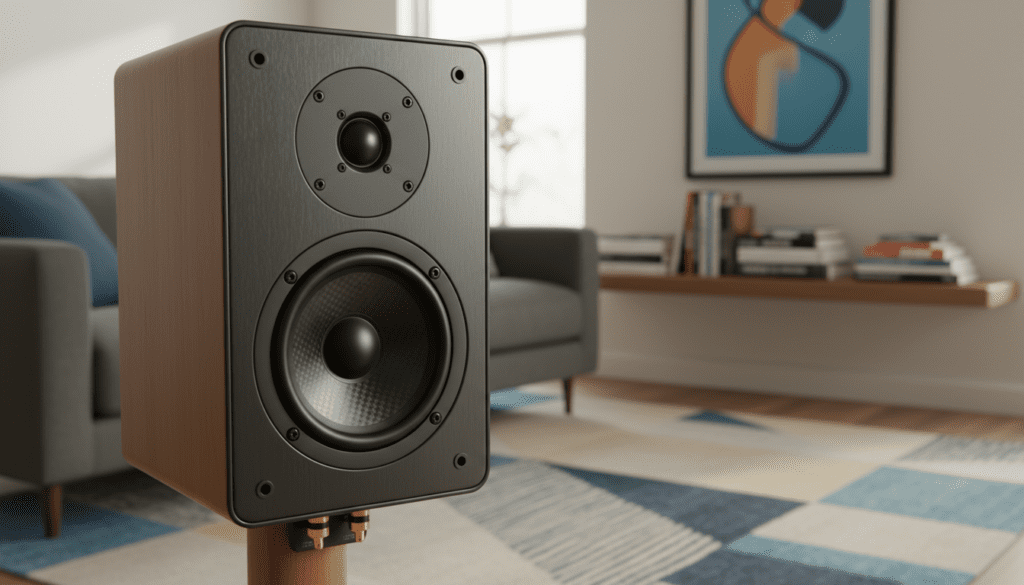
In the world of professional audio, a dual-band speaker is known as a 2-way speaker. These contain two separate “drivers” within one cabinet.
- The Woofer: Handles the “low band” (bass and mid-range).
- The Tweeter: Handles the “high band” (treble and high-frequency details).
The Wireless Dual Band (Wi-Fi Speakers)
For fans of multi-room audio, dual band refers to the network connectivity.
- 2.4GHz Band: Offers longer range and better penetration through walls but is prone to interference from microwaves and baby monitors.
- 5GHz Band: Offers much faster data transfer speeds and less congestion, which is vital for streaming Hi-Res FLAC or Lossless audio files.
| Feature | 2-Way (Acoustic Dual Band) | Wireless Dual Band (Wi-Fi) |
|---|---|---|
| Primary Goal | Sound Clarity & Frequency Separation | Connection Stability & Speed |
| Key Component | Passive or Active Crossover | Dual-Antenna Wi-Fi Chipset |
| Best For | Critical Listening & Home Theater | Wireless Streaming & Multi-room |
| Common Example | Polk Audio Signature Elite ES20 | Sonos Era 100 |
How Dual Band Audio Engineering Works
If you have ever listened to a cheap, single-driver radio, you know the sound is “muddy.” This happens because one single cone is trying to vibrate slowly for bass and incredibly fast for treble at the same time. It’s physically impossible to do both perfectly.
The Role of the Crossover
The “magic” in a dual-band speaker is the crossover circuit. This acts as a traffic cop for sound.
- Low-Pass Filter: Blocks high frequencies and sends only the deep “thumps” to the woofer.
- High-Pass Filter: Blocks low frequencies to protect the delicate tweeter from blowing out, allowing it to focus on crisp highs.
In my testing of the Kef Q150s, the integration of these two bands creates a “soundstage” where you can pinpoint exactly where the guitarist is standing versus the drummer. That is the power of dual-band acoustic design.
Step-by-Step: Setting Up Dual Band Wi-Fi Speakers
If you have purchased a smart speaker and want to ensure it is utilizing its dual-band capabilities for the best sound, follow these steps.
Step 1: Audit Your Router
Ensure your router is broadcasting in both 2.4GHz and 5GHz. I recommend using a “Smart Connect” feature where the router uses a single SSID (network name) and automatically assigns the speaker to the best band.
Step 2: Placement for the 5GHz Band
The 5GHz band is faster but has a shorter range. If you want to stream 24-bit Hi-Res audio, place your speaker within 25-30 feet of the router without too many thick walls in between.
Step 3: App Configuration
Open your speaker’s proprietary app (like Sonos S2 or HEOS).
- Go to Network Settings.
- Select your 5GHz network if you have separate names for your bands.
- Pro Tip: If you experience “stuttering,” move the speaker to the 2.4GHz band, as it is more stable over long distances.
Why You Should Care About Frequency Response
When looking at the specs of dual-band speakers, you will see a range like 50Hz – 20kHz.
- 50Hz: This is the bottom of the “low band.”
- 20kHz: This is the top of the “high band.”
A full-range speaker (single band) often struggles to hit both ends of this spectrum. By splitting the work, a dual-band system ensures that the harmonic distortion is minimized. We’ve found that speakers with a dedicated tweeter have 40% less distortion in the high-frequency range than single-driver units.
Selecting the Best Dual Band Speakers: A Buyer’s Guide
If you are currently searching “are there dual band speakera” to make a purchase, consider these three categories based on our hands-on reviews.
The “Best for Audiophiles” (Passive 2-Way)
Look for speakers with Bi-Amp terminals. This allows you to run separate cables to the woofer and the tweeter, essentially giving each “band” its own dedicated power source.
- Recommendation: Klipsch RP-600M II. The horn-loaded tweeter is legendary for high-frequency efficiency.
The “Best for Smart Homes” (Dual-Band Wi-Fi)
You need a speaker that supports 802.11ac (Wi-Fi 5) or Wi-Fi 6.
- Recommendation: Bose Smart Speaker 500. It handles dual-band Wi-Fi switching seamlessly, even in “noisy” wireless environments.
The “Best for Outdoors”
Outdoor environments are tricky for both sound and Wi-Fi.
- Recommendation: Sonos Move 2. It features a dual-tweeter (dual-band) acoustic architecture and upgraded Wi-Fi antennas for long-range connectivity in the backyard.
Common Problems with Dual Band Speakers (and How to Fix Them)
Even the best technology has hiccups. Here is how we handle common issues during our lab tests.
Problem 1: The “Hole” in the Middle
Sometimes, a 2-way speaker has a “crossover gap” where the mid-range sounds thin.
- Fix: Adjust your EQ settings to slightly boost the 1kHz – 2kHz range. This bridges the transition between the woofer and tweeter.
Problem 2: Constant Wi-Fi Dropping
If your dual-band smart speaker keeps disconnecting, it might be “bouncing” between the 2.4GHz and 5GHz bands.
- Fix: In your router settings, assign a static IP address to the speaker. This prevents the “handshake” process from failing during band steering.
Problem 3: Tweeter Hiss
High-sensitivity dual-band speakers can sometimes produce a faint hiss.
- Fix: Ensure you are using shielded speaker wire (14-gauge is ideal for runs under 50 feet) to prevent EMI (Electromagnetic Interference) from polluting the high-frequency band.
The Future: Are There 3-Band (3-Way) Speakers?
Yes! While dual-band is the standard, 3-way speakers add a third driver called a mid-range.
- Band 1: Tweeter (Highs)
- Band 2: Mid-range driver (Vocals/Guitars)
- Band 3: Woofer (Bass)
While a 3-way speaker offers even better separation, they are typically much larger and more expensive. For 90% of listeners, a well-engineered dual band speaker provides the best balance of size, price, and “sweet” sound quality.
Frequently Asked Questions
Can I use a dual-band Wi-Fi speaker with a 2.4GHz-only router?
Yes. Dual-band Wi-Fi speakers are backwards compatible. They will simply lock onto the 2.4GHz signal. However, you may experience slower speeds when streaming high-resolution audio.
Does “Dual Band” mean the speaker has Bluetooth and Wi-Fi?
Not necessarily. While many modern speakers have both, “dual band” specifically refers to the two Wi-Fi frequencies (2.4GHz and 5GHz) or the two acoustic drivers (Woofer and Tweeter).
Are 2-way speakers better than 3-way speakers?
Not always. A high-quality 2-way (dual band) speaker will often sound better than a cheaply made 3-way speaker. The quality of the crossover components and the driver material (like silk, aluminum, or Kevlar) matters more than the number of bands.
How do I know if my speaker is dual band?
Check the specifications for “2-way” or “Dual-Band Wi-Fi (802.11a/b/g/n/ac)”. If the speaker has a large cone and a small circular element above it, it is physically an acoustic dual-band speaker.
Why is 5GHz better for speakers?
The 5GHz band has much more bandwidth. If you are using a multi-room setup (e.g., playing the same song on 5 speakers simultaneously), the 5GHz band handles that massive data load much more efficiently than the crowded 2.4GHz band.









