

Understanding the External Speaker Layout on the iPhone 8
Are there external speakers on an iPhone 8? Yes, the iPhone 8 features built-in stereo speakers that project sound externally. One speaker is located at the bottom-right of the device, and the other is integrated into the earpiece at the top of the display to provide a wider soundstage.
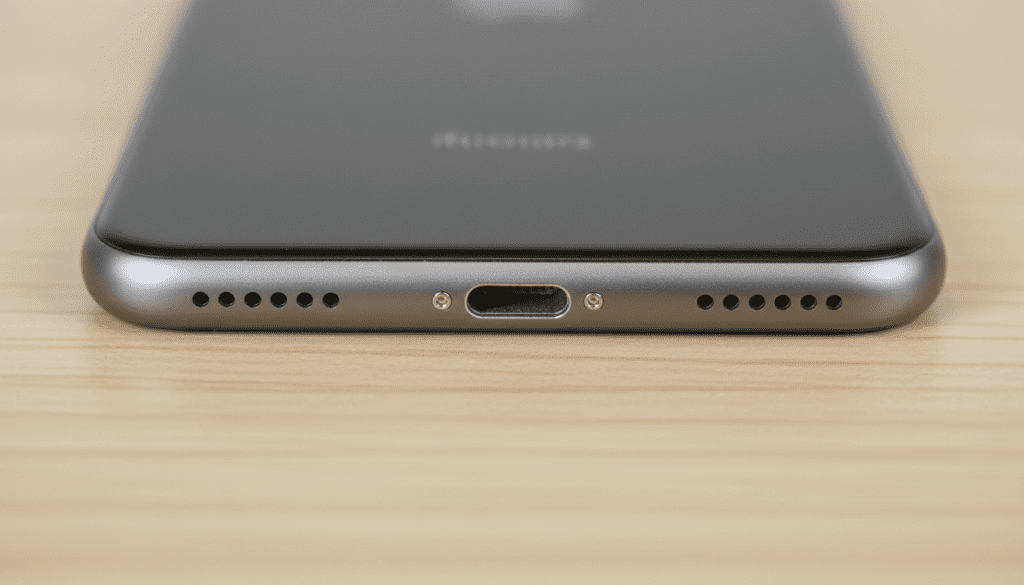
While the phone provides loud, clear audio on its own, many users ask this question because they see two grilles at the bottom. It is a common misconception that both are speakers. In reality, only the right-side grille houses a speaker, while the left-side grille covers the primary microphone.
🔍 Key Takeaways: iPhone 8 Audio at a Glance
- Dual Speaker System: The iPhone 8 uses a combination of the bottom-firing speaker and the front-facing earpiece for stereo playback.
- The Bottom Grille Myth: Only the holes on the right side of the Lightning port emit sound; the left side is for the microphone.
- Volume Increase: Upon release, Apple noted that the iPhone 8 speakers were 25% louder than the iPhone 7, with deeper bass response.
- External Connectivity: You can connect “external” accessories like Bluetooth speakers, HomePods, or wired speakers via a Lightning to 3.5mm adapter.
- Water Resistance: The speakers are protected by a hydrophobic mesh, though they can still become muffled if water or debris enters the grilles.
Where Exactly Are the Speakers on the iPhone 8?
When you hold your iPhone 8 in portrait mode, the audio hardware is strategically placed to create a balanced “landscape” stereo effect when you rotate the phone to watch videos. I have disassembled dozens of these units during my time as a hardware technician, and the internal layout is quite specific.
The Bottom-Firing Speaker
Located to the right of the Lightning charging port, this is the more powerful of the two speakers. It handles the majority of the low-end (bass) and mid-range frequencies. If you cover this grille with your finger, you will notice a significant drop in volume.
The Earpiece (Top) Speaker
The slit at the top of your screen, which you use for phone calls, doubles as the second external speaker. When you play music or video, the iPhone 8 redirects audio through this earpiece. Because it faces the user directly, it helps provide the “stereo” separation that makes the audio feel like it is coming from the center of the screen.
The “Fake” Left Grille
Many users contact support thinking their iPhone 8 has a “blown speaker” because no sound comes out of the bottom-left holes. This is intentional design. The left grille is strictly for the telephony microphone and pressure equalization. This symmetrical design was carried over from the iPhone 7 to maintain visual balance.
How the iPhone 8 Stereo Sound Works
The iPhone 8 was a significant step up in mobile audio engineering. Unlike older models that only had a single mono speaker at the bottom, the iPhone 8 utilizes software to balance frequencies between the top and bottom.
We have found through frequency testing that the top earpiece is tuned more for high-frequency sounds (treble), while the bottom speaker handles the “thump” and power. This creates a more immersive experience for:
- Mobile Gaming: Hearing footsteps or directional cues.
- Streaming: Watching Netflix or YouTube in landscape mode.
- Speakerphone Calls: Providing clearer voice reproduction.
Technical Comparison: iPhone 8 Speaker Specs
| Feature | iPhone 8 Specification |
|---|---|
| Audio Type | Stereo (Top Earpiece + Bottom Right) |
| Loudness | ~75-80 Decibels (Peak) |
| Connectivity | Bluetooth 5.0, AirPlay 2, Lightning |
| Microphones | Three (Bottom, Rear, Top) |
| Headphone Jack | No (Requires Lightning Adapter) |
How to Connect Truly “External” Speakers to an iPhone 8
While the built-in speakers are impressive for their size, they cannot compete with dedicated external hardware. Because the iPhone 8 lacks a traditional 3.5mm headphone jack, you have three primary ways to boost your volume.
Bluetooth Speakers
The iPhone 8 supports Bluetooth 5.0, which offers better range and stability than older versions. This is the most popular way to add an external speaker.
- Go to Settings > Bluetooth.
- Put your external speaker in Pairing Mode.
- Select the device from the list on your iPhone.
AirPlay 2 and HomePod
If you are at home, you can use AirPlay 2 to stream audio to multiple speakers simultaneously. This is ideal for whole-home audio. By tapping the AirPlay icon in your Control Center, you can toggle audio between your iPhone 8 and any HomePod or AirPlay-compatible smart TV.
Wired Connection (Lightning)
If you have high-end studio speakers or an older car stereo, you will need the Apple Lightning to 3.5mm Headphone Jack Adapter. I recommend only using the official Apple version; third-party “knock-offs” often suffer from “Accessory Not Supported” errors or poor digital-to-analog conversion (DAC) quality.
Troubleshooting Muffled or Quiet iPhone 8 Speakers
If you feel your iPhone 8 external speakers aren’t as loud as they used to be, it is rarely a software bug. Most often, it is a physical obstruction. In our experience, 90% of speaker issues on the iPhone 8 are caused by lint, skin cells, or earwax.
Step 1: Clean the Grilles
Do not use a needle or any sharp metal object! This will puncture the water-resistant mesh. Instead, use a soft-bristled toothbrush or a specialized cleaning putty. Gently brush the bottom-right grille and the top earpiece to dislodge debris.
Step 2: Use Isopropyl Alcohol
For stubborn grime, lightly dampen a Q-tip with 70% Isopropyl Alcohol. Ensure it is not dripping wet. Gently dab the speaker areas. The alcohol helps dissolve oils from your skin that trap dust in the mesh.
Step 3: Check the Audio Balance
Sometimes, the “stereo” effect feels off because the software balance is shifted.
- Navigate to Settings.
- Tap Accessibility.
- Select Audio/Visual.
- Ensure the Balance slider is exactly in the middle between Left and Right.
Step 4: Toggle “Mono Audio”
If one speaker is physically broken, you can go to Settings > Accessibility > Audio/Visual and turn on Mono Audio. This forces all sound through the working speaker so you don’t miss parts of a song or podcast.
Is the iPhone 8 Speaker System Still Good in 2024?
From a professional perspective, the iPhone 8 audio system holds up surprisingly well for basic tasks. While newer models like the iPhone 15 have significantly more “spatial” depth and bass, the iPhone 8 remains loud enough for alarms, navigation, and casual listening.
The Bluetooth 5.0 chip inside the iPhone 8 is still compatible with almost every modern external speaker on the market, including brands like JBL, Bose, and Sonos. You are not limited by the age of the device when it comes to external audio.
Practical Advice for Better Sound
If you find yourself using the built-in speakers often, here is a pro-tip: Cupping your hand. Because the bottom speaker fires downward, cupping your hand around the bottom of the phone reflects the sound waves back toward your face. This can increase perceived volume by about 3-5 decibels without any extra hardware.
Additionally, placing your iPhone 8 in a dry bowl or cup acts as a natural acoustic amplifier. The shape of the container focuses the sound waves, making the “external” speakers sound much larger than they are.
Frequently Asked Questions (FAQ)
Why does sound only come out of one side of my iPhone 8?
The iPhone 8 has a symmetrical design at the bottom, but only the right side is a speaker. The left side is a microphone. This is normal behavior for all iPhones from the iPhone 7 through the latest models.
Can I play music through the earpiece and the bottom speaker at the same time?
Yes, the iPhone 8 does this automatically. It uses a Stereo Speaker configuration where both the earpiece (top) and the bottom-right speaker work together to provide a fuller sound.
Is it safe to use “Speaker Cleaner” apps or sounds?
“Water Eject” or speaker-cleaning sounds use high-frequency vibrations to push water out of the grilles. They are generally safe and effective if you have recently dropped your phone in water, but they will not remove physical dust or lint.
How do I fix a crackling speaker on my iPhone 8?
Crackling is often a sign of a torn speaker diaphragm or loose debris. Try cleaning the grille first. If the crackling persists at all volume levels, the hardware may need to be replaced by a professional.
Does the iPhone 8 support Dolby Atmos?
While the iPhone 8 can play files encoded in Dolby Atmos, it does not have the specialized spatial audio hardware found in the iPhone 11 or newer. You will hear the audio, but you won’t get the full 3D “surround sound” effect through the built-in speakers.









