

Are There Speakers for Old TVs? Upgrading Your Legacy Audio Setup
Yes, are there speakers for old tvs? Absolutely—you can upgrade any aging television’s audio using external computer speakers, modern soundbars, or vintage Hi-Fi systems. Whether you have a 1990s CRT TV or a first-generation Plasma screen, you can bypass thin, tinny internal speakers by using the RCA (Red and White) outputs or a 3.5mm headphone jack.
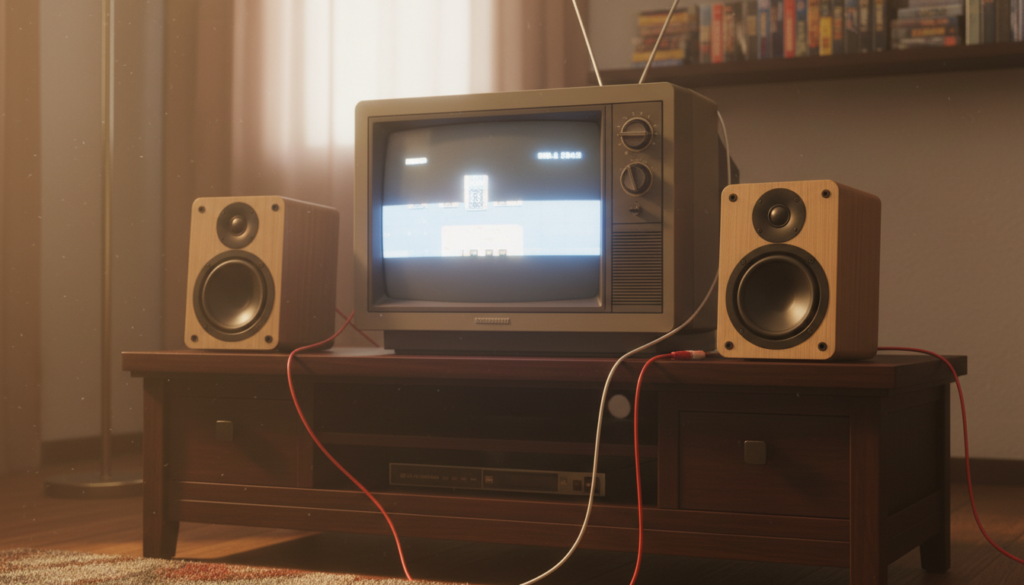
In my years of restoring retro gaming setups and home theaters, I have found that even the most basic powered speakers can provide a 500% improvement over factory sound. The secret lies in identifying your specific port type and using a cheap Digital-to-Analog Converter (DAC) if you want to bridge the gap between old and new technology.
Key Takeaways: Quick Guide to Old TV Speakers
- Check for Analog Ports: Look for RCA (Red/White) jacks or a 3.5mm headphone port on the back or side of the TV.
- Active vs. Passive: Use Active (Powered) speakers to avoid needing a separate, bulky amplifier.
- The DAC Solution: If your TV only has Optical (Toslink) but your speakers are old, use a Digital-to-Analog Converter.
- Adapter Magic: Most connections can be solved with a simple RCA-to-3.5mm Y-cable.
- Retro Gaming: For CRT TVs, shielded speakers are essential to prevent magnetic interference with the screen.
Identifying the Audio Outputs on Your Old Television
Before you buy equipment, you must identify exactly what your TV is capable of outputting. Older televisions were designed before HDMI ARC existed, meaning they rely on physical copper connections to move sound.
RCA Audio Outs (The Red and White Plugs)
The most common output on 80s, 90s, and 2000s TVs is the RCA Stereo Output. These are circular jacks, usually color-coded Red (Right channel) and White (Left channel). We recommend checking if these are labeled “Fixed” or “Variable,” as this determines if your TV remote will control the external volume.
The 3.5mm Headphone Jack
Many smaller old TVs include a standard Headphone Out port. This is the easiest way to connect are there speakers for old tvs because you can use standard PC speakers or even a portable Bluetooth speaker via an AUX cord.
Coaxial and Optical (Early Digital)
If you have a high-end “Old” TV from the mid-2000s, you might see a square Toslink (Optical) port or a single orange Coaxial port. These send digital signals that require a DAC to work with older analog speakers.
| Port Type | Connection Style | Signal Type | Best For |
|---|---|---|---|
| RCA | Red/White Circular | Analog | Vintage Receivers / Active Speakers |
| 3.5mm Jack | Small Pin (AUX) | Analog | Computer Speakers / Headphones |
| Optical | Square Plastic | Digital | Modern Soundbars / Home Theater |
| SCART | Large Multi-pin | Analog/Video | European Retro Hardware |
The Best Speaker Types for Vintage Televisions
When searching for are there speakers for old tvs, you have three primary categories to choose from. Each has pros and cons depending on your technical skill and available space.
Powered (Active) Bookshelf Speakers
In my experience, Active Bookshelf Speakers like those from Edifier or PreSonus are the “Goldilocks” solution. They have built-in amplifiers, meaning you plug them directly into the wall and then into your TV.
Why they work:
- They often include RCA inputs natively.
- They provide a rich, full-range sound that beats any built-in speaker.
- No extra receiver or “stack” of gear is required.
Multimedia PC Speakers
If you are on a budget, simple Logitech or Creative PC speakers are excellent. Because they use a 3.5mm jack, they are plug-and-play with almost any TV made in the last 30 years. I often use these for small retro gaming corners where space is limited.
Vintage Hi-Fi Receivers and Passive Speakers
For the ultimate “Period Correct” setup, we suggest finding a 70s or 80s Stereo Receiver (like Pioneer or Marantz). You connect the TV’s RCA Out to the Receiver’s “Video” or “Aux” input. This allows you to drive large, floor-standing speakers for a true cinematic experience.
Step-by-Step Guide: How to Connect Speakers to an Old TV
Connecting your audio doesn’t have to be complicated. Follow these steps to ensure a clean, hum-free signal.
Step 1: Locate the “Audio Out” Section
Ensure you are using the OUTPUT ports, not the INPUT ports. Many users mistakenly plug speakers into the “Component In” or “AV In” ports, which will result in no sound. Look specifically for the word OUT.
Step 2: Choose Your Cable
- If your TV has RCA and your speakers have RCA: Use a standard Male-to-Male RCA Cable.
- If your TV has RCA and your speakers have a 3.5mm plug: Use an RCA-to-AUX (Female) Adapter.
- If your TV has a Headphone Jack and your speakers have RCA: Use a 3.5mm-to-RCA Y-Cable.
Step 3: Configure TV Audio Settings
Go into your TV’s menu system using the original remote. Look for “Audio” or “Sound” settings. If possible, set the internal speakers to OFF. This prevents the “echo effect” caused by the TV speakers and external speakers playing at the same time.
Step 4: Test for Ground Loop Hum
If you hear a low buzzing sound, it’s likely a Ground Loop. I recommend plugging both the TV and the speakers into the same power strip to equalize the electrical potential.
Using Modern Soundbars with Legacy TVs
Many people ask, “Are there speakers for old tvs that look modern?” Yes, you can use a Soundbar, but there is a catch. Most modern soundbars use HDMI ARC or Optical, which old TVs lack.
The Solution: The Digital-to-Analog Converter (DAC)
To use a modern soundbar with an old TV, you need a small box called a DAC.
- Connect the RCA Cables from the TV to the Input of the DAC.
- Connect an Optical Cable from the Output of the DAC to the Soundbar.
- Note: This setup usually requires the soundbar to have its own remote, as the TV cannot communicate volume data through a DAC.
Special Considerations for CRT (Tube) TVs
If you are using a Cathode Ray Tube (CRT) television for retro gaming (like a Sony Trinitron), you must be careful about Magnetism.
Magnetic Shielding is Crucial:
Old TVs use electron beams to create an image. Most modern speakers have large magnets that are not shielded. If you place unshielded speakers too close to a CRT, you will see purple or green “blooms” on the screen. This can permanently damage the tube.
Expert Tip: Always look for speakers labeled as “Magnetically Shielded” if they are going to sit within 12 inches of a tube television. Many older Bose VideoRooms or Computer Speakers from the early 2000s are shielded by design.
Common Problems and Expert Solutions
The Volume Doesn’t Change with the Remote
This happens when using a Fixed Line Out. Since the TV is sending a “full strength” signal, the TV remote won’t affect it. You will need to use the volume knob on the speakers themselves or a separate remote.
There is a Delay (Lip Sync Issues)
Digital processing in some converters can cause a slight delay. If you experience this, we recommend using a purely Analog connection (RCA to RCA) to ensure zero-latency audio.
The Sound is Only Coming Out of One Side
This is usually a faulty RCA cable or a dirty jack. In my workshop, I use DeoxIT or 99% Isopropyl Alcohol on a Q-tip to clean the oxidation off old TV ports. This usually restores the second channel immediately.
Frequently Asked Questions
Can I use Bluetooth speakers with an old TV?
Yes, but you need a Bluetooth Transmitter. Plug the transmitter into the TV’s 3.5mm headphone jack or RCA ports. The transmitter will then pair with your wireless speakers or headphones.
Do I need an amplifier for my old TV speakers?
If you are using Passive Speakers (the kind with just raw wire clips on the back), then yes, you need an Amplifier or Receiver. If you are using Active Speakers (they plug into a power outlet), no amplifier is needed.
Will any soundbar work with a 20-year-old TV?
Most will, provided you have the right adapter. If your soundbar only has an HDMI input and no Optical or AUX input, it will be very difficult to connect to an old TV. Always look for a soundbar with an AUX (3.5mm) In for the easiest setup.
Why does my old TV sound so bad?
Older TVs used very small, downward-firing or rear-firing drivers encased in plastic. Over time, the foam surrounds on these speakers rot away, causing rattling and distortion. Upgrading to external speakers is the only permanent fix.









