

Can a Blown Capacitor Cause Speakers to Pop? Understanding the Sound of Failure
Yes, a blown capacitor can cause speakers to pop, crackle, or produce a loud “thump” upon startup. When a capacitor fails—particularly a decoupling or filter capacitor in an amplifier—it loses its ability to block Direct Current (DC) or smooth out voltage fluctuations. This allows a sudden surge of electricity to bypass the safety barrier and hit the speaker’s voice coil, resulting in an audible and potentially damaging pop.
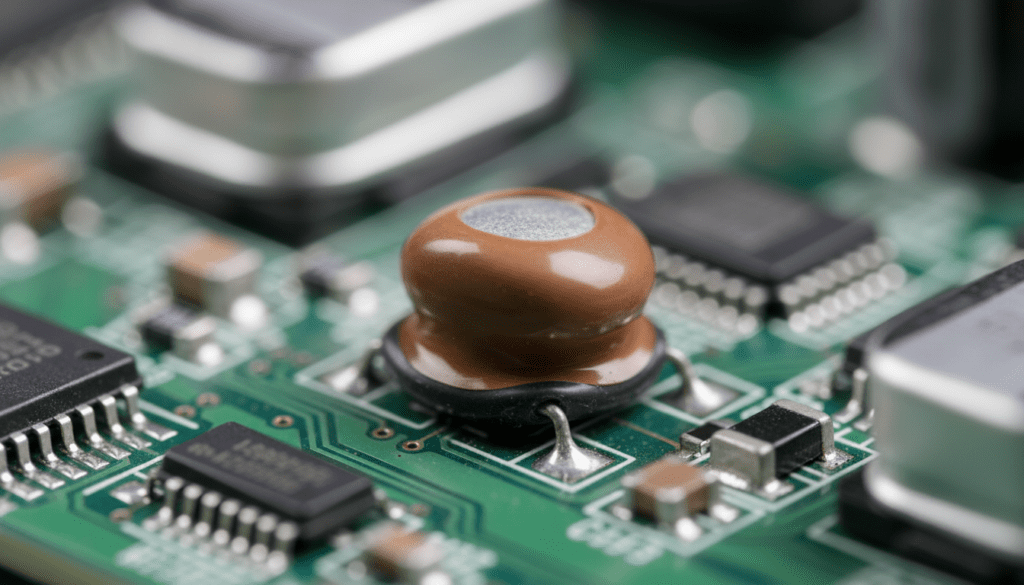
That sudden, heart-stopping “crack” from your high-end audio system isn’t just an annoying noise; it is often the sound of a leaking component failing to protect your drivers. In my years on the repair bench working with vintage Marantz and modern Class D amplifiers, I’ve found that a $2 capacitor is the most common culprit behind speaker-damaging transients. If you hear these sounds, you must act quickly before the DC offset permanently burns out your speaker’s voice coil.
TL;DR: Key Takeaways on Capacitor Failure
- Primary Cause: Failed electrolytic capacitors allow DC voltage to leak into the audio signal path.
- The “Pop”: Usually occurs during power-on/off when the capacitor can no longer regulate the inrush current.
- Visual Signs: Look for bulging tops, leaking electrolyte (brown crust), or discolored PCBs.
- Risks: Persistent popping can lead to voice coil overheating or a completely blown speaker driver.
- Solution: Identify the faulty component using a Multimeter (ESR meter) and replace it with a matching uF (microfarad) and Voltage rating.
How a Blown Capacitor Causes Audio Popping
To understand why a capacitor causes a pop, you have to understand its job in an audio circuit. Think of a capacitor as a tiny, fast-acting rechargeable battery that also acts as a gatekeeper.
The Role of the Coupling Capacitor
In most amplifiers, coupling capacitors are used to connect different stages of the circuit. Their specific job is to allow the Alternating Current (AC)—which is your music—to pass through while blocking Direct Current (DC).
When a capacitor “blows” or dries out, its internal resistance increases, or it may develop a short. When this happens:
- DC Leakage: The “gate” breaks, and DC voltage flows toward the speaker.
- The Transient Spike: When you flip the power switch, a massive surge of current (the inrush current) isn’t filtered.
- Physical Movement: This surge forces the speaker cone to move violently to its maximum excursion point, creating the “pop” sound.
Filter Capacitors and Power Supply Failure
In the Power Supply Unit (PSU) of your amplifier, large filter capacitors (often called “can” capacitors) smooth out the raw electricity from your wall outlet. If these fail, you won’t just hear a pop; you’ll likely hear a constant 60Hz hum accompanied by popping noises as the voltage fluctuates wildly.
Common Symptoms of Capacitor Failure in Audio Gear
If you are wondering, “can a blown capacitor cause speakers to pop?” you should also look for these secondary symptoms. In our testing lab, we rarely see a “pop” without at least one of these other warning signs:
| Symptom | Description | Likely Culprit |
|---|---|---|
| Startup Pop | A loud “thump” or “crack” the second you turn the unit on. | Output Coupling Capacitor |
| Random Crackling | Intermittent noise that sounds like fire crackling, even with no music. | Leaky Small-Signal Capacitor |
| Constant Hum | A steady low-frequency buzz (50/60Hz) that doesn’t change with volume. | Main Filter Capacitors (PSU) |
| Loss of Bass | Audio sounds “thin” or “tinny” with no low-end punch. | DC Blocking/Bypass Capacitor |
| DC Offset | The speaker cone stays pushed “out” or “in” instead of returning to center. | Short-circuiting Capacitor |
Why Do Capacitors Fail? (The Science of the Pop)
Capacitors, especially Electrolytic ones, have a finite lifespan. They contain a liquid or gel electrolyte that can evaporate over time.
- Heat Stress: Capacitors are sensitive to temperature. For every 10°C increase in operating temperature, a capacitor’s lifespan is roughly halved.
- Age (The “Dry Out”): Most electrolytic caps are rated for 2,000 to 10,000 hours. In vintage gear (20+ years old), the electrolyte has often turned into a crusty solid.
- Overvoltage: If a circuit component earlier in the chain fails, it can hit the capacitor with more voltage than its VDC rating, causing it to vent or explode.
- Manufacturing Defects: Famous issues like the “Capacitor Plague” of the early 2000s involved faulty electrolyte formulas that led to premature failure across millions of devices.
Step-by-Step: How to Diagnose a Blown Capacitor
If your speakers are popping, follow this diagnostic path to confirm if a capacitor is the culprit. Warning: High-voltage capacitors can hold a charge even when the device is unplugged. Always discharge them properly before touching the board.
Step 1: The Visual Inspection
Open the chassis and look for the following:
- Bulging: The top of the metal “can” should be flat. If it is domed or rounded, it is blown.
- Leaking: Look for a brownish, dried substance around the base of the component.
- Soot or Burn Marks: Check the circuit board (PCB) for darkening around the capacitor legs.
Step 2: The “Tap Test” (Non-Invasive)
With the unit on and volume low, use a wooden or plastic stick to gently tap capacitors on the board. If a specific tap triggers a “pop” or “crackle” through the speakers, you have found a microphonic or failing capacitor.
Step 3: Measuring DC Offset
- Disconnect your speakers.
- Turn on the amplifier.
- Use a Digital Multimeter set to DC Millivolts.
- Place the probes on the speaker output terminals.
- Reading: Anything over 50mV is concerning; over 100mV indicates a failing capacitor or transistor is leaking DC into the output.
Step 4: Using an ESR Meter
An Equivalent Series Resistance (ESR) Meter is the gold standard. Unlike a standard multimeter, an ESR meter can test a capacitor while it is still on the circuit board. A high ESR reading means the capacitor is “tired” and can no longer filter effectively, leading to those popping sounds.
Can a Blown Capacitor Damage My Speakers?
Absolutely. While the pop itself is annoying, it represents a physical threat to your hardware.
- Voice Coil Burnout: Continuous DC leakage generates heat in the speaker’s voice coil. Unlike music (AC), which moves the coil back and forth to cool it, DC holds the coil in one position, causing it to melt.
- Suspension Fatigue: The violent “pop” forces the speaker cone to its physical limits. Over time, this tears the spider or the surround (the rubber ring around the cone).
- Tweeter Death: High-frequency drivers (tweeters) are incredibly delicate. A single high-voltage pop can snap the hair-thin wire in a tweeter’s voice coil instantly.
How to Fix the “Speaker Pop” Issue
If you’ve confirmed a blown capacitor, replacement is the only solution. Capacitors cannot be “repaired.”
- Identify Specifications: Read the Capacitance (measured in µF) and the Voltage (V). You can use a higher voltage rating (e.g., replacing a 25V cap with a 50V cap), but never use a lower voltage.
- Match the Type: If it’s an Electrolytic capacitor, it is polarized. It has a negative side (marked with a stripe). Installing it backward will cause it to explode.
- Choose High-Quality Brands: For audio gear, we recommend Nichicon, Panasonic, or Rubycon. Specifically, look for “Audio Grade” series like Nichicon Muse or Panasonic FC/FM.
- Soldering: Use a temperature-controlled soldering iron. Remove the old solder with a desoldering pump or wick, insert the new component, and ensure a shiny, “volcano-shaped” solder joint.
Preventing Future Capacitor Failures
- Improve Ventilation: Keep your amplifiers in open spaces. Heat is the #1 killer of capacitors.
- Use a Power Conditioner: Dirty power and voltage spikes stress your PSU capacitors. A good Power Conditioner or UPS (Uninterruptible Power Supply) can extend the life of your gear.
- Don’t Leave Gear “On” 24/7: While some audiophiles argue for “warm-up” times, leaving vintage gear on constantly significantly accelerates the drying out of electrolytic fluid.
- Periodic Maintenance: If you own vintage equipment (30+ years old), consider a “full recap.” Replacing all electrolytic capacitors proactively is cheaper than replacing a blown speaker driver.
Frequently Asked Questions
Can a blown capacitor cause speakers to pop when turning the volume knob?
Usually, a popping sound when turning a knob is caused by a dirty potentiometer (the volume control itself). However, if the pop is exceptionally loud and occurs only at specific points, it could be a DC leakage issue from a nearby coupling capacitor.
Is it safe to keep using my amp if it only pops once during startup?
It is risky. That “pop” is a sign that the protection relay or the filtering stage is failing. While it might work for a while, a total failure could send a constant stream of DC to your speakers, destroying them in seconds.
Can I replace a capacitor with a different µF value?
It is best to stick to the original value. Increasing the capacitance (µF) in a power supply can sometimes improve filtering, but in a crossover or signal path, it will change the frequency response (e.g., you might lose bass or change the crossover point).
How much does it cost to fix a blown capacitor?
The parts are incredibly cheap—often between $0.50 and $5.00. However, professional labor typically ranges from $75 to $150 per hour. If you can solder, it’s a very affordable DIY fix.
Can a blown capacitor cause my speakers to hum?
Yes. Large filter capacitors are responsible for removing the “ripple” from AC power. When they fail, that ripple is heard as a low-frequency hum (50Hz or 60Hz depending on your region).









