

Connecting Your Audio: Can Bookcase Speakers Be Plugged Into a Mixing Board?
Yes, bookcase speakers can be plugged into a mixing board, but the connection method depends entirely on whether your speakers are active (powered) or passive (unpowered). If you have active speakers, you can connect them directly using the appropriate cables; however, if you have passive speakers, you must use an external amplifier between the mixing board and the speakers to avoid damaging your equipment.
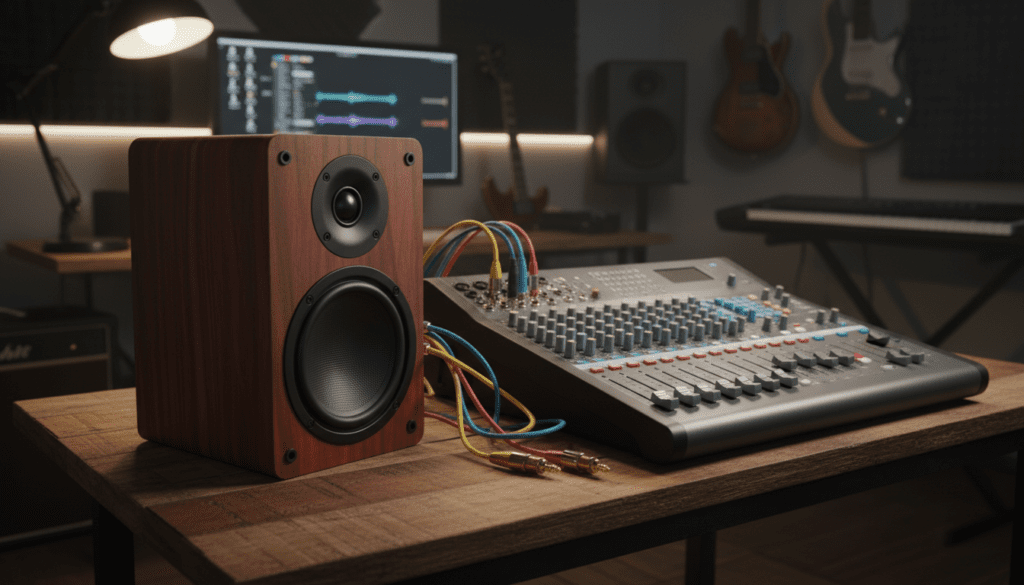
I have spent over a decade setting up home studios and live sound rigs, and I have seen many beginners make the mistake of plugging passive speakers directly into a mixer’s line-outs. This guide will walk you through the exact steps to ensure your setup sounds professional and stays safe from electrical issues.
Key Takeaways: Bookcase Speakers and Mixing Boards
- Active Speakers: Connect directly to the Main Out or Monitor Out of the mixer.
- Passive Speakers: Require an external power amplifier or a powered mixer.
- Cable Types: Most bookcase speakers use RCA, 1/4-inch TRS, or XLR connectors.
- Impedance Matching: Essential for passive setups to prevent overheating the amplifier.
- Signal Level: Mixers output Line Level signals, which are much stronger than Mic Level or Phono Level signals.
Identifying Your Gear: Active vs. Passive Bookcase Speakers
Before you buy a single cable, you must identify what type of bookcase speakers (often called bookshelf speakers) you own. In my experience, this is the most common point of confusion for new audio enthusiasts.
How to Tell if Your Speakers are Active (Powered)
Active speakers have a built-in amplifier. You can identify them by looking at the back of the cabinet:
- They have a power cord that plugs into a wall outlet.
- They feature a volume knob or power switch on the back or side.
- They typically have RCA, 3.5mm, or XLR inputs.
How to Tell if Your Speakers are Passive (Unpowered)
Passive speakers rely on an external source for power. You can identify them if:
- They have no power cord or “On/Off” switch.
- The only connections are binding posts or spring clips for raw speaker wire.
- They are usually lighter because they lack internal transformers and circuitry.
| Feature | Active Speakers | Passive Speakers |
|---|---|---|
| Power Source | Internal (Plugs into wall) | External (Needs an Amp) |
| Connection to Mixer | Direct (Line Level) | Indirect (Through Amp) |
| Portability | Heavy (Built-in Amp) | Lighter |
| Common Brands | Audioengine, Klipsch (Powered), Edifier | Polk, ELAC, KEF |
Step-by-Step: Can Bookcase Speakers Be Plugged into a Mixing Board Directly?
If you have active bookcase speakers, the process is straightforward. Because the mixing board outputs a Line Level signal and your speakers are designed to amplify that signal, they are a natural match.
Locate the Main Outputs on Your Mixer
Look for the section labeled “Main Out,” “Control Room,” or “Monitor Out.” Most modern mixers use XLR (three-pin) or 1/4-inch TRS (phone jack) outputs.
Check the Inputs on Your Speakers
Most consumer-grade bookcase speakers use RCA inputs (red and white) or a 3.5mm TRS (headphone jack) input. Professional studio monitors (which are essentially high-end bookcase speakers) will use XLR or Balanced 1/4-inch inputs.
Choose the Correct Cable
You will likely need one of the following “adapter” cables:
- Dual 1/4-inch TS to Dual RCA: The most common for home setups.
- Dual XLR to Dual RCA: Used for higher-end mixers.
- Single 1/4-inch TRS to 3.5mm: Used if your speakers only have a small auxiliary input.
Setting the Levels (Gain Staging)
To avoid distortion, follow this sequence:
- Turn the volume on your mixing board and speakers all the way down.
- Power on the mixer first, then the speakers.
- Set the speaker volume to about 50-75%.
- Slowly raise the Master Fader on the mixer until you reach your desired volume.
How to Connect Passive Bookcase Speakers to a Mixing Board
Can bookshelf speakers be plugged into a mixing board if they are passive? No, not directly. If you try to wire a passive speaker’s raw wire to a mixer’s line output, you will get almost zero sound, or worse, you could short-circuit the mixer’s output stage.
The Signal Chain Solution
To use passive speakers, you must follow this signal chain:
Mixer → Power Amplifier → Passive Speakers
Step 1: Connect Mixer to Amplifier
Use standard 1/4-inch or XLR cables to go from the Mixer Main Outs to the Amplifier Inputs.
Step 2: Connect Amplifier to Speakers
Use Speaker Wire (14-gauge or 16-gauge is standard) to connect the Amplifier Outputs to the Speaker Binding Posts. Ensure you match the polarity: Red to Red (+) and Black to Black (-).
Step 3: Impedance and Wattage Check
I always tell my clients to check the Ohms. Most bookcase speakers are 6-ohm or 8-ohm. Ensure your amplifier is rated to handle that load. If you use a 4-ohm amp with 8-ohm speakers, you’ll be safe, but the volume will be lower. Never do the reverse (4-ohm speakers on an 8-ohm-only amp) as you risk a fire or hardware failure.
Essential Cables for Your Setup
Using the wrong cable is the fastest way to introduce 60-cycle hum or “radio interference” into your audio. When asking can bookcase speakers be plugged into a mixing board, you must consider Balanced vs. Unbalanced signals.
- Balanced (XLR/TRS): These cables cancel out noise. Use these if your mixer and speakers both support them, especially for cable runs longer than 10 feet.
- Unbalanced (RCA/TS): Common for consumer bookcase speakers. Keep these cables under 10 feet to prevent “hissing” sounds.
Recommended Cable Configurations
| Connection Goal | Required Cable | Signal Type |
|---|---|---|
| Mixer (TRS) to Active Speaker (RCA) | Dual 1/4″ TS to Dual RCA | Unbalanced |
| Mixer (XLR) to Active Speaker (XLR) | Male XLR to Female XLR | Balanced |
| Mixer (TRS) to Power Amp (TRS) | 1/4″ TRS Patch Cable | Balanced |
| Power Amp to Passive Speaker | 14-AWG Oxygen-Free Copper Wire | Powered |
Pro Tips for the Best Audio Quality
When I’m setting up a booth or a home listening station, I follow these three “Golden Rules” to ensure the bookcase speakers perform at their peak.
Avoid Phantom Power
Many mixers have a +48V Phantom Power switch for condenser microphones. Never engage this on a channel that is sending audio to your speakers or receiving audio from an unbalanced source. While most modern outputs are protected, older mixers can occasionally “leak” voltage, which can pop a tweeter in a bookcase speaker.
Position for the “Sweet Spot”
Bookcase speakers are designed for “near-field” or “mid-field” listening.
- Angle: Tilt them inward toward your ears (toe-in).
- Height: The Tweeter (the small top speaker) should be at the same level as your ears.
- Decoupling: Use foam isolation pads to keep the speakers from vibrating the desk or shelf, which muddies the bass.
Understand the “Line Level” Difference
Mixing boards output Pro Line Level (+4 dBu), while many consumer bookcase speakers expect Consumer Line Level (-10 dBV). If your speakers sound distorted even at low volumes, your mixer is “hitting them too hard.” Lower the master fader on the mixer and rely more on the speaker’s internal volume knob.
Common Troubleshooting: No Sound or Distorted Audio
Even with the right gear, things can go wrong. Here is a quick checklist I use when troubleshooting a mixing board to speaker connection.
- Check the “Mute” Buttons: It sounds simple, but I’ve wasted hours troubleshooting only to find a single “Mute” or “Alt 3-4” button engaged.
- Verify the Source: Ensure the mixer is actually receiving signal. Look at the LED Meters. If they aren’t jumping, the issue is your input (laptop, mic, instrument), not the speakers.
- The “Tape Out” Alternative: If your Main Outs are busy, many mixers have an RCA Tape Out. This is a great way to connect bookcase speakers directly using a standard RCA-to-RCA cable.
- Listen for Ground Loops: If you hear a constant buzz, your mixer and speakers might be plugged into different wall outlets. Try plugging them into the same power strip to equalize the ground.
Frequently Asked Questions
Can I plug passive bookshelf speakers into a mixing board without an amp?
No. A standard mixing board does not provide enough electrical current to move the drivers of a passive speaker. You will likely hear nothing, or a very faint, distorted sound. You must use an external amplifier or a powered mixer.
Will connecting my speakers to a mixer make them louder?
If you have active bookcase speakers, a mixer gives you better control over the EQ and gain, but the maximum volume is still limited by the speaker’s built-in amplifier. For passive speakers, your volume is determined by the wattage of the external power amp you choose.
Can I use the headphone jack of the mixer to connect my speakers?
Yes. If you don’t have the right RCA or XLR cables, you can use a 3.5mm to RCA adapter plugged into the mixer’s headphone jack. However, this is not ideal for audio quality as headphone amps are designed for high-impedance loads, not the line-level inputs of speakers.
What is the difference between a mixing board and a powered mixer?
A standard mixing board only handles signal routing. A powered mixer has a built-in power amplifier. If you have a powered mixer, you can plug passive bookcase speakers directly into it using the “Speaker Out” jacks.









