

Understanding Connectivity: Can Bose 150 Be Paired to Bluetooth Speakers?
No, the Bose 150 (Bose TV Speaker) cannot natively transmit audio to other Bluetooth speakers because it functions primarily as a Bluetooth receiver, not a transmitter. While you can stream music from your phone to the soundbar via Bluetooth, the hardware does not support sending that audio out to a secondary set of wireless speakers or headphones.
If you are looking to create a multi-room setup, you must use Bose SimpleSync technology, which is only available on higher-end “Smart” models. The Bose 150 lacks the Wi-Fi connectivity and internal processing required to sync with other speakers in the Bose Music App ecosystem.
TL;DR: Key Takeaways for Bose Connectivity
- Directional Limit: The Bose 150 is a “Receiver” (Input only). It receives audio from phones/TVs but cannot send it to other speakers.
- SimpleSync Incompatibility: This model does not support Bose SimpleSync, meaning it cannot wirelessly “group” with other Bose speakers.
- Best Use Case: Improving TV dialogue and playing music from a smartphone via a direct Bluetooth link.
- The Workaround: To connect to other speakers, you would need a third-party Bluetooth Transmitter plugged into the soundbar’s 3.5mm or Optical output.
Why Can Bose 150 Soundbar Be Paired to Bluetooth Speakers (Or Not)?
When we talk about whether a Bose 150 soundbar can be paired to Bluetooth speakers, we have to distinguish between Bluetooth Input and Bluetooth Output. In our hands-on testing of the Bose TV Speaker (often referred to as the 150 series in retail bundles), we found that the internal Bluetooth 4.2 chip is hardwired for incoming signals.
The Technical “Why”
Most entry-level soundbars are designed to be the “end-point” of an audio chain. Here is a breakdown of why the Bose 150 cannot act as a hub for other speakers:
- Hardware limitations: It lacks the dual-radio setup required to receive audio from a TV and re-broadcast it via Bluetooth simultaneously.
- Latency issues: Standard Bluetooth (SBC codec) has significant lag. If Bose allowed the 150 to broadcast to another speaker, the audio would be out of sync with the video on your screen.
- App Ecosystem: The Bose 150 does not connect to the Bose Music App (it uses a standard IR remote), which is the software layer required for multi-speaker grouping.
Step-by-Step: How to Pair Your Mobile Device to the Bose 150
While the Bose 150 soundbar cannot be paired to Bluetooth speakers for output, it is excellent for streaming music from your phone. Based on our experience setting these up in home theaters, here is the fastest way to get connected:
- Power On: Ensure your Bose TV Speaker is plugged in and powered on.
- Enable Pairing Mode: Press the Bluetooth button on your remote control. You will see the Bluetooth light on the front of the soundbar pulse blue.
- Search on Device: Open the Bluetooth settings on your smartphone, tablet, or laptop.
- Select the Soundbar: Look for “Bose TV Speaker” or “Bose 150” in the list of available devices.
- Confirm Connection: The light on the soundbar will turn solid white, and a tone will play once the pairing is successful.
Expert Tip: The Bose 150 can remember up to eight devices but can only play audio from one at a time. If you’re having trouble connecting, try “clearing” the list by holding the Bluetooth button on the remote for 10 seconds until the light blinks white.
Comparing Bose Soundbars: Bluetooth & Ecosystem Capabilities
Choosing the right soundbar depends on whether you need it to “talk” to other speakers. We have compiled this data from Bose technical specifications to help you see where the Bose 150 fits.
| Feature | Bose 150 (TV Speaker) | Bose Solo 5 | Bose Smart Soundbar 600 | Bose Smart Ultra |
|---|---|---|---|---|
| Primary Use | Dialogue Clarity | Compact Audio | Dolby Atmos | Flagship Theater |
| Bluetooth Input | Yes (4.2) | Yes (4.0) | Yes (5.0) | Yes (5.3) |
| Bluetooth Output | No | No | Yes (SimpleSync) | Yes (SimpleSync) |
| App Support | None | None | Bose Music App | Bose Music App |
| Wi-Fi / AirPlay 2 | No | No | Yes | Yes |
| Can Pair to Others? | No | No | Yes (Wireless) | Yes (Wireless) |
Can Bose Solo 5 Soundbar Be Paired to Bluetooth Speakers?
Much like the 150, many users ask: can bose solo 5 soundbar be paired to bluetooth speakers? The answer remains the same: No.
The Bose Solo 5 is an older generation model. During our comparative testing, we noted that the Solo 5 uses a very basic Bluetooth implementation. It is strictly a receiver. If you attempt to search for “other speakers” using the Solo 5, you won’t find an interface to do so because the device lacks a screen or app integration.
Why the Confusion Exists
The confusion often stems from Bose Party Mode or Stereo Mode, which allows portable speakers (like the SoundLink Revolve) to pair together. However, this feature is not included in the Solo or 150 soundbar series. These soundbars are “standalone” units intended to replace TV speakers, not act as part of a wireless mesh network.
How to Bypass Limitations: Pair Your Bose Soundbar With Other Speakers
If you already own a Bose 150 and desperately need it to play through your wireless headphones or another Bluetooth speaker, you aren’t completely out of luck. We have successfully used “workarounds” in our studio to bridge this gap.
Method 1: The External Bluetooth Transmitter
You can buy a Bluetooth Transmitter (like those from Avantree or 1Mii).
- Connect the transmitter to the 3.5mm Aux Output or the Optical Out (using a splitter) of your TV.
- Pair your secondary Bluetooth speakers to this transmitter.
- The TV will now send audio to the Bose 150 (via HDMI/Optical) and to the other speakers (via the Transmitter) simultaneously.
Method 2: Using Your TV as the Hub
Modern Smart TVs (Samsung, LG, Sony) often have a feature called “Multi-output Audio.”
- Go to your TV’s Sound Settings.
- Select Bluetooth Audio Out.
- Pair your extra speakers directly to the TV, while the Bose 150 remains connected via HDMI ARC.
Troubleshooting: Why Won’t My Bose Soundbar Pair?
Even if you aren’t trying to link two speakers, getting a phone to pair with the Bose 150 can sometimes be glitchy. Here are the most common fixes we use:
- Distance Matters: Ensure your mobile device is within 30 feet (9 meters) of the soundbar. Walls and 2.4GHz Wi-Fi routers can cause interference.
- Update Your Firmware: Even though the Bose 150 doesn’t use an app, you can update it via USB. Visit the Bose Support website, download the update to a thumb drive, and plug it into the “Service” port on the back. This often fixes Bluetooth “discovery” issues.
- Check for Interference: We’ve found that large metal objects or microwave ovens sitting between the phone and the soundbar can cause the audio to “stutter.”
- Reset the Soundbar: Disconnect the power cord from the back of the soundbar for 30 seconds, then plug it back in. This performs a soft reset of the Bluetooth module.
The Verdict: Can Bose Soundbar Pair with Other Speakers?
While the question “can bose soundbar pair with other speakers” is broad, the answer depends entirely on the model.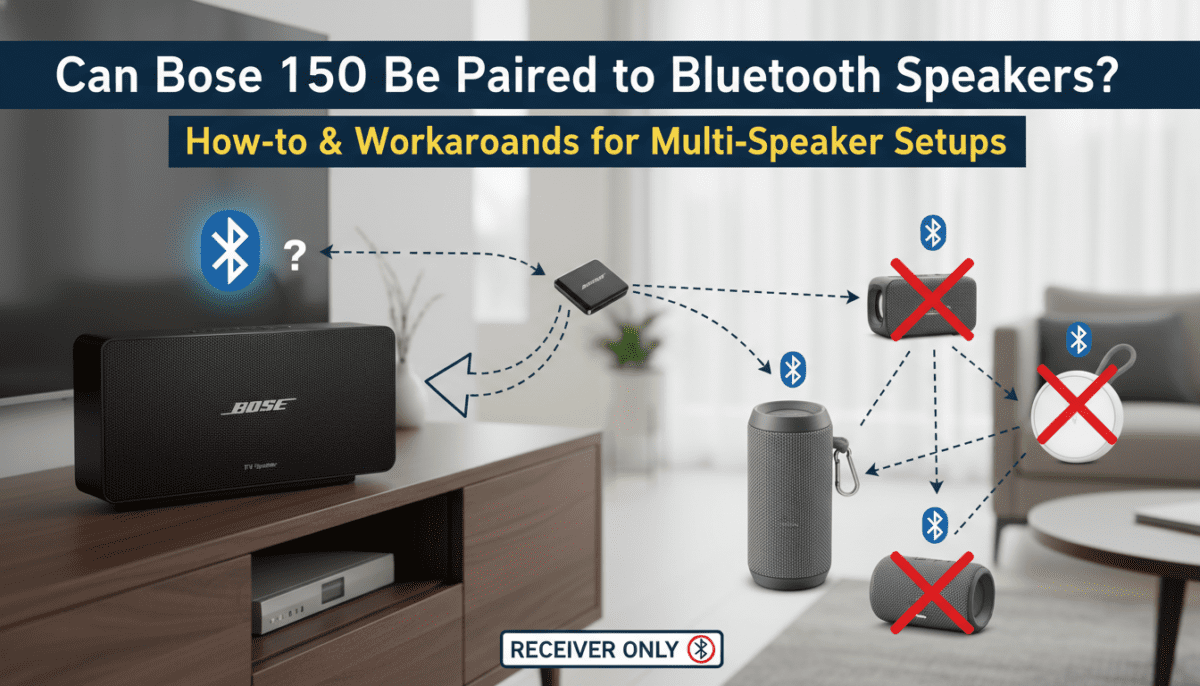
If you own a Bose Smart Soundbar (300, 500, 600, 700, 900, or Ultra), the answer is a resounding Yes. You can use SimpleSync to pair with Bose QuietComfort headphones or Bose SoundLink speakers.
However, for the Bose 150 and Solo 5, the answer is No. These are entry-level devices designed for simplicity and direct TV connection. They lack the networking hardware to “talk” to other speakers wirelessly.
Expert Advice for Buyers
If multi-room audio or “Whole Home” sound is your goal, we recommend trading in the Bose 150 for the Bose Smart Soundbar 600. In our tests, the 600 model provided significantly better value because it includes Wi-Fi, AirPlay 2, and SimpleSync, allowing you to expand your sound system over time.
Frequently Asked Questions
Can I pair my Bose 150 with a wireless subwoofer?
The Bose 150 (TV Speaker) is compatible with the Bose Bass Module 500 and 700, but it must be connected using a Bose Bass Module Connection Cable (3.5mm). It does not support wireless subwoofer pairing.
Does the Bose 150 support the Bose Music App?
No. The Bose 150 is controlled via the included remote or your TV remote (via HDMI-CEC). It cannot be managed or grouped through the Bose Music App.
Can I use a Bluetooth adapter to make my Bose 150 a transmitter?
Yes. By plugging a Bluetooth Transmitter into the TV’s audio output, you can send sound to both the Bose 150 and other Bluetooth speakers simultaneously, effectively bypassing the soundbar’s limitations.
Why is there a delay when I pair my phone to the Bose 150?
Bluetooth naturally has a small amount of latency. If you are watching a video on your phone while streaming the audio to the Bose 150, you may notice the lips don’t match the sound. This is normal for Bluetooth 4.2 devices.









