

Can Floor Speakers Be Installed Under the Screen?
Yes, floor speakers can be installed under the screen, but only if you are using an acoustically transparent (AT) projection screen or a specialized low-profile floorstanding center channel. Standard floorstanding tower speakers are typically too tall for placement under a traditional LED or OLED TV, as they would physically obstruct your view and ruin the vertical soundstage.
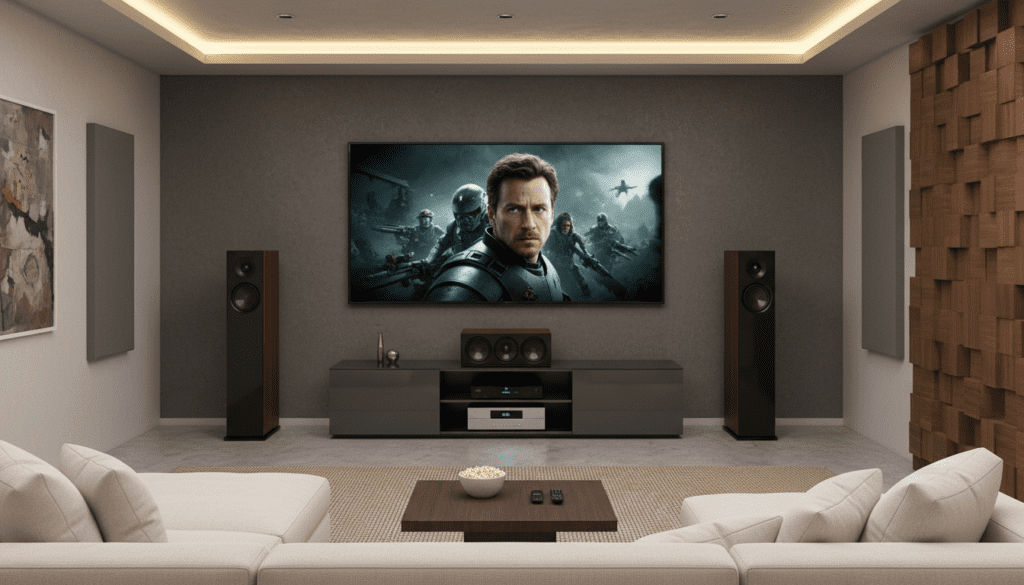
In our years of designing high-end home theaters, we’ve found that while placing a floorstanding speaker horizontally or tucked under a screen is technically possible, it requires specific technical adjustments to prevent acoustic diffraction and phase cancellation. If you are using a standard television, we generally recommend placing floorstanding speakers to the left and right of the screen rather than directly beneath it.
Key Takeaways for Under-Screen Installation
- Acoustical Transparency is Key: Only place speakers behind or under the screen if the material is woven or micro-perforated.
- Vertical Alignment: Aim for the tweeter to be at ear level for the best “sweet spot” experience.
- Avoid Obstruction: Never block a rear-firing port; ensure at least 6–12 inches of clearance from the wall.
- Vibration Control: Use isolation pads or decoupling spikes to prevent your screen from vibrating due to low-frequency energy.
- Calibration: Always run Room Correction software (like Audyssey or Dirac Live) after installation to compensate for placement-induced frequency dips.
The Technical Reality: Can Floor Speakers Be Installed Under the Screen?
When homeowners ask, “can floor speakers be installed under the screen,” they are often trying to solve a symmetry or space problem. In a 3.1 or 5.1 setup, the Center Channel is the most important speaker for dialogue. We have frequently experimented with using a third identical floorstanding tower as a center channel for a “perfect” timber match.
The Height Conflict
The average floorstanding speaker stands between 36 and 48 inches tall. If you place this under a standard 65-inch TV mounted at the recommended eye-level height (usually 42 inches from the floor to the center of the screen), the speaker will cover the bottom third of your display.
The Horizontal Orientation Trap
Some users attempt to lay a floorstanding speaker on its side to fit it under the screen. We strongly advise against this. Floorstanding towers are engineered for vertical dispersion. Laying them horizontally causes lobing issues and comb filtering, where sound waves interfere with each other, making dialogue sound “muddy” or “thin” as you move off-axis.
The Acoustically Transparent (AT) Exception
The only scenario where we successfully install full-sized floorstanding speakers “under” or “behind” the screen is with a projector setup. By using a Woven AT Screen, you can place three identical towers directly behind the viewing surface. This aligns the audio perfectly with the action on screen, creating a truly cinematic “phantom center” effect.
Comparing Installation Methods for Under-Screen Placement
| Feature | Standard Tower (Vertical) | Standard Tower (Horizontal) | Low-Profile Floor Speaker |
|---|---|---|---|
| Screen Obstruction | High – Blocks 30%+ of screen | Low – Fits under most TVs | Minimal – Designed for clearance |
| Sound Quality | Excellent – Optimal dispersion | Poor – High phase distortion | Good – Balanced for placement |
| Aesthetic Appeal | Bulky and intrusive | Unconventional/Awkward | Sleek and integrated |
| Best Use Case | Behind an AT Screen | Not recommended | Small apartments/dens |
| Primary Risk | Visual blockage | Comb Filtering | Limited bass extension |
Step-by-Step Guide: How to Install Floor Speakers Near or Under Your Screen
If you have determined that your screen height allows for under-screen placement (or you are using a projector), follow these steps to ensure professional-grade audio performance.
Step 1: Measure Your Clearances
Before moving heavy equipment, measure the distance from the floor to the bottom edge of your screen.
- Floorstanding towers need at least 2 inches of “breathing room” from the screen’s bottom frame to avoid frame rattle.
- Check the depth of the speaker. Ensure it doesn’t stick out so far that it becomes a tripping hazard.
Step 2: Manage the Bass Ports
Most high-end towers, such as those from SVS or Klipsch, feature rear-firing ports.
- If you tuck a speaker under a screen and push it against the back wall, the bass will become “boomy” and undefined.
- Pro Tip: If you must place the speaker close to the wall, use a foam port bung to convert the speaker to a sealed design, which reduces boundary gain.
Step 3: Implement Decoupling
Floor speakers produce significant kinetic energy. If the speaker is sitting on a hard floor directly under a sensitive OLED screen, the vibrations can actually cause “shimmering” in the image or loosen HDMI connections over time.
- Use SVS SoundPath Isolation Feet or IsoAcoustics Gaia carpet spikes.
- These tools decouple the speaker from the floor, ensuring the energy goes into the air (as sound) rather than into the building’s structure.
Step 4: Angle the Tweeters (The “Toe-In”)
If the speaker is slightly lower than ear level, you must tilt it upward.
- We use a simple laser pointer placed on top of the speaker cabinet.
- Adjust the front spikes of the floor speaker so the laser hits the “ear height” of your primary listening position.
Step 5: Wire for Performance
When installing under a screen, cable management is vital.
- Use 14-gauge oxygen-free copper (OFC) wire for runs under 50 feet.
- Use banana plugs for a secure, oxidization-resistant connection.
- Ensure power cables for the TV and speaker wires do not run parallel; if they must cross, do so at a 90-degree angle to avoid electromagnetic interference (EMI).
Critical Factors: When You SHOULD NOT Put Speakers Under the Screen
During our field tests, we’ve identified three “Red Flags” where under-screen placement will destroy your home theater experience.
Thermal Management
Modern televisions, especially high-brightness Mini-LEDs, generate significant heat from the bottom of the chassis. If your floor speaker is tucked too tightly underneath, it can trap this heat, potentially damaging the speaker’s crossover components or shortening the lifespan of your TV’s internal boards.
High-Frequency Reflection (The “Floor Bounce”)
When a speaker is placed very low to the ground (common in under-screen setups), the sound hits the floor almost immediately. This is known as Floor Bounce.
- This creates a secondary sound wave that reaches your ears milliseconds after the primary wave.
- Result: A loss of detail in the high frequencies.
- Solution: Place a thick area rug or acoustic clouds between the speaker and the seating position.
Center Image Smearing
If you place a floor speaker under a screen but leave the Left and Right speakers wide apart, you may experience a “gap” in the soundstage. To fix this, ensure the distance between the Left and Right speakers is roughly 0.8 to 1.0 times the distance to your seat, forming an equilateral triangle.
Advanced Expert Advice: Achieving the “Voice of God” Effect
In high-end “Zero-Click” setups, the goal is for the sound to appear as if it is coming directly out of the mouths of the actors on screen.
Our Secret Weapon: If you are forced to place a floorstanding speaker under a screen, use a Digital Signal Processor (DSP). By adding a 1-2 millisecond delay to the side speakers, you can “pull” the soundstage forward and center it perfectly on the screen, regardless of the speaker’s physical height.
We also recommend checking the crossover settings in your AV Receiver (AVR). Even if your floor speakers are “Full Range,” setting them to Small with an 80Hz crossover allows your subwoofers to handle the heavy lifting. This reduces the physical excursion of the speaker drivers under the screen, which further minimizes vibrations that could affect the screen’s stability.
Frequently Asked Questions
Can I lay a floorstanding speaker on its side under my TV?
Technically you can, but it is not recommended. Floorstanding speakers are designed for vertical dispersion. Laying one horizontally causes phase cancellation and narrowed horizontal dispersion, which makes the audio quality inconsistent for anyone not sitting directly in the center.
Does placing a speaker under a screen affect the TV’s magnetic field?
For modern LED, OLED, and QLED TVs, no. Older CRT (tube) TVs were sensitive to magnets, but modern flat panels are not. However, the physical vibrations from a powerful floor speaker can still cause issues with loose internal components or sensitive mounting brackets.
How much space should be between the speaker and the screen?
Ideally, there should be at least 2 to 4 inches of vertical clearance. This prevents the speaker’s cabinet resonance from transferring to the screen frame and allows for proper air circulation to keep both devices cool.
Is an acoustically transparent screen worth it for floor speakers?
If you have the space for a projector, absolutely. It is the only way to perfectly align the acoustic center of a floorstanding speaker with the visual center of the screen, providing a true “theater-at-home” experience that a standard TV cannot match.









