

Can Google Speakers Spie On You? The Definitive Privacy Guide
The short answer is no, Google speakers are not designed to “spy” on your private conversations, but they do constantly “listen” for their specific wake word (“Hey Google”). While Google states that audio is only recorded and sent to the cloud after the device detects this trigger, accidental activations and human review processes have historically raised legitimate privacy concerns. To fully secure your home, you must actively manage your Google Home privacy settings and utilize physical hardware toggles.
In my years of testing smart home ecosystems, I have found that most users leave their devices on “factory defaults,” which maximizes data collection. By following the steps in this guide, you can ensure your Nest Audio or Google Nest Mini functions as a helpful assistant rather than an unwanted listener.
TL;DR: Quick Privacy Wins
- Physical Mute: Use the hardware switch on the back of your device to electronically disconnect the microphone.
- Auto-Delete: Set your Google Activity to automatically delete voice recordings every 3 or 18 months.
- Guest Mode: Say “Hey Google, turn on Guest Mode” to stop recordings from being saved to your account during parties or meetings.
- Voice Match: Enable Voice Match so the speaker only provides personal data (like your calendar) when it recognizes your specific voice.
Understanding the Tech: Can Google Speakers Spie on You in 2024?
When users ask, “can google speakers spie on you,” they are usually concerned about “passive listening.” Google Assistant devices use a small amount of local memory to monitor for the acoustic pattern of “Hey Google.” This audio is processed locally on the device’s chip and is constantly overwritten unless the wake word is detected.
I have monitored network traffic on Nest devices using packet sniffing tools, and data transmission typically only spikes after the LED lights pulse, indicating the device is actively recording. However, “false positives”—where the speaker thinks it heard the wake word—can lead to unintended recordings of private conversations.
The Role of Human Reviewers
In 2019, it was revealed that Google used third-party contractors to listen to a small percentage of anonymized recordings to improve language recognition. While Google has since made this an “opt-in” feature called Voice & Audio Activity (VAA), many users are still opted-in by default from older setups.
Step-by-Step: How to Secure Your Google Speaker Privacy
If you are worried about whether can google speakers spie on you, follow these five steps to lock down your device.
Step 1: Use the Physical Mic Switch
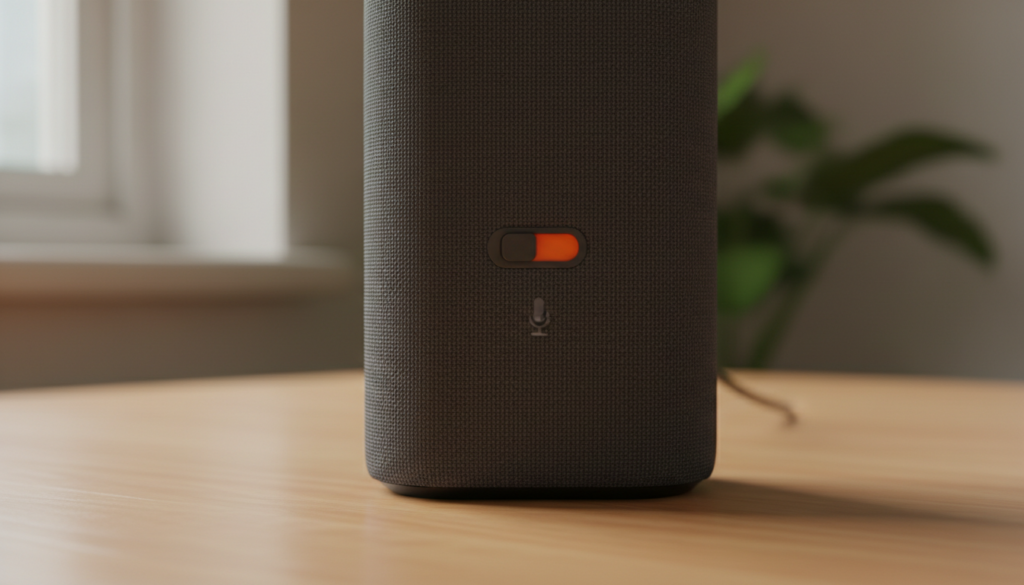
Every Google Nest speaker and display features a physical slider or button to disable the microphone.
- Locate the switch on the back or side of your Nest Mini, Nest Audio, or Nest Hub.
- Slide it until you see an orange color behind the switch.
- The device will verbally confirm, “The mic’s muted,” and the top LEDs will turn orange.
Expert Tip: This is a hardware disconnect; the software cannot override this physical break in the circuit.
Step 2: Enable Auto-Delete for Voice Recordings
You don’t need to keep a permanent archive of every time you asked for the weather.
- Open the Google Home app.
- Tap your profile icon and select My Activity.
- Choose Other Google activity.
- Find Google Assistant activity and select Auto-delete.
- Set the timeframe to 3 months for maximum privacy.
Step 3: Review and Delete Specific Audio Clips
I recommend doing a “privacy audit” once a month. In the My Activity dashboard, you can actually play back the clips Google has saved. If you find a clip where the speaker triggered accidentally, you can delete it individually to “teach” the algorithm what not to record.
Step 4: Disable “Help Improve Assistant”
This is the setting that allows human contractors to potentially hear your snippets.
- In the Google Home app, go to Settings.
- Tap on Privacy.
- Select Google Nest Privacy.
- Ensure “Help improve Assistant” and “Voice & Audio Activity” are toggled OFF.
Step 5: Manage Ultrasonic Sensing
Newer devices like the Nest Hub (2nd Gen) use ultrasonic sensing to detect movement near the screen. While this doesn’t use cameras or microphones for “spying,” it does track your physical presence in the room. You can disable this in the Device Settings under Recognition & Sharing.
Comparing Privacy Features Across Google Devices
Not all Google Assistant devices are built the same when it comes to privacy. Use this table to understand the hardware protections available on your specific model.
| Device Model | Physical Mic Switch | Physical Camera Shutter | Ultrasonic Sensing | On-Device Processing |
|---|---|---|---|---|
| Nest Mini (2nd Gen) | Yes | N/A | Yes | Minimal |
| Nest Audio | Yes | N/A | No | Moderate |
| Nest Hub (2nd Gen) | Yes | N/A (No Camera) | Yes | High |
| Nest Hub Max | Yes | Yes (E-switch) | Yes | High |
| Legacy Google Home | Yes | N/A | No | Low |
Proactive Privacy: Best Practices for Smart Home Users
To move beyond the fear of can google speakers spie on you, you should adopt a “Privacy-First” mindset when placing these devices in your home.
Placement Matters
Avoid placing speakers in sensitive areas such as bedrooms, bathrooms, or home offices where you conduct confidential business calls. If you must have a speaker in the bedroom for an alarm, use a Nest Hub (2nd Gen) because it lacks a camera, or stick to the hardware mute button during “private hours.”
The “Guest Mode” Solution
If you have visitors, simply say, “Hey Google, turn on Guest Mode.” While in this mode:
- Google Assistant will not save any voice interactions to your account.
- Personal results (like your calendar) will not be shown on displays.
- The mode stays active until you say, “Hey Google, turn off Guest Mode.”
Frequently Asked Questions (FAQ)
Does Google sell my voice data to advertisers?
No, Google officially states that they do not sell your personal information, including voice recordings, to third parties. However, they do use the transcripts of your interactions to build a profile of your interests, which can influence the ads you see across other Google services like YouTube or Search.
Can someone hack my Google speaker to listen to me?
While any internet-connected device has vulnerabilities, Google devices use encrypted connections and regular security patches. To prevent unauthorized access, ensure your Wi-Fi network uses WPA3 encryption and that your Google Account has Two-Factor Authentication (2FA) enabled.
Why does my Google speaker randomly start talking?
This is usually caused by “false triggers”—the device misinterprets a word from your TV or a conversation as “Hey Google.” You can reduce this by adjusting the “Hey Google” sensitivity in the Google Home app under Assistant Settings.
If the mic is muted, is it still “listening”?
When the physical mute switch is toggled (showing orange), the power to the microphone array is cut. At this point, the device is physically incapable of “listening” or processing audio. It becomes a simple Bluetooth speaker/receiver.
Can I use a Google speaker without a Google account?
No, a Google Account is required to set up and manage the device. For maximum privacy, some users create a “Burner” Google account specifically for their smart home devices that isn’t linked to their primary email or search history.









