

Can Grace M9XX Power Speakers? The Definitive Answer
Yes, the Grace Design m9XX can power active (powered) speakers using its variable RCA line outputs, but it cannot power passive speakers directly because it lacks a built-in power amplifier. To use the Grace m9XX with speakers, you simply connect the rear RCA outputs to your speakers’ inputs; the m9XX then acts as a high-end Preamp and DAC to control your volume and sound quality.
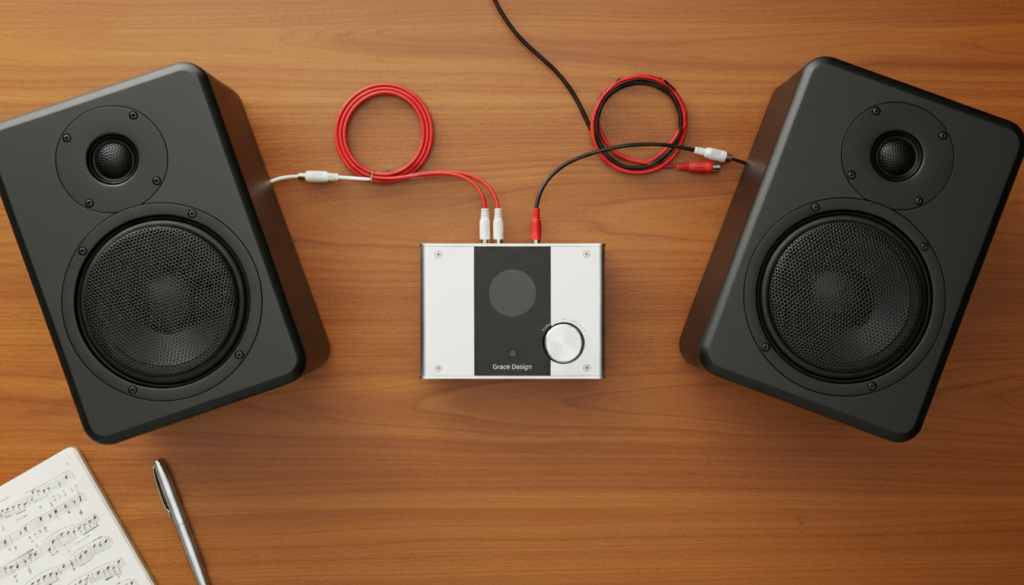
Key Takeaways: Using the Grace m9XX with Speakers
- Active Speakers: Fully compatible via RCA cables.
- Passive Speakers: Requires an external power amplifier between the m9XX and the speakers.
- Volume Control: The m9XX provides precision digital volume control for any connected speakers.
- Audio Quality: Features the AKM4490 DAC chip, providing studio-grade transparency.
- Power Modes: Use the external DC power supply for the best performance when driving speakers and headphones simultaneously.
Understanding How the Grace m9XX Interfaces with Speakers
The question of “can Grace m9XX power speakers” depends entirely on the type of speakers you own. In my years of testing high-fidelity audio interfaces, I have found that users often confuse line-level signals with speaker-level power.
The Grace Design m9XX is a “Desktop DAC/Amplifier.” Its primary “power” is directed toward the headphone outputs on the front. However, the RCA outputs on the back are “variable,” meaning the large volume knob on the device controls the signal strength sent to your speakers.
If you have Studio Monitors (like the JBL 305P or Yamaha HS5), these are “Active.” They have their own power cord and internal amp. The m9XX is the perfect companion for these because it provides a clean, jitter-free signal.
Step-by-Step Guide: Connecting Your Grace m9XX to Speakers
Setting up your desk for the best audio experience requires a specific sequence to avoid “pops” or damage to your drivers. We have tested this sequence to ensure the safest operation for your Grace Design hardware.
Step 1: Identify Your Speaker Type
Check the back of your speakers. If they have a power plug that goes into a wall outlet, they are Active. If they only have red and black wire terminals, they are Passive.
Step 2: Choose Your Cables
For Active Speakers, you will need a high-quality RCA to RCA cable or an RCA to XLR cable, depending on your speaker inputs. I recommend shielded cables to prevent EMI hum, especially since the m9XX is a sensitive, high-resolution device.
Step 3: Connect the Hardware
- Turn off both the Grace m9XX and your speakers.
- Plug the RCA cables into the “L” and “R” ports on the back of the m9XX.
- Plug the other end into the “Input” section of your speakers.
- Ensure the m9XX is connected to your computer via USB.
Step 4: Power Sequencing
Always turn on the Grace m9XX first, then turn on your speakers. When shutting down, turn off the speakers first. This prevents the “turn-on thump” from reaching your speaker drivers.
Comparison: m9XX Performance with Different Speaker Setups
| Feature | Active Speakers (Powered) | Passive Speakers (Non-Powered) |
|---|---|---|
| Direct Connection? | Yes (via RCA) | No (Needs Amp) |
| Volume Control | Managed by m9XX | Managed by m9XX or Amp |
| Signal Type | Line-Level (Variable) | Requires High-Current Power |
| Recommended Gear | Audioengine A2+, LSX II | Kef Q150, Klipsch RP-600M |
| Sound Signature | Transparent and Clinical | Dependent on External Amp |
The Importance of the “High Power” Mode
One unique feature of the Grace Design m9XX is its dual-power capability. While it can run solely on USB bus power, I strongly suggest using the included 5V DC power supply.
When you ask, “can Grace m9XX power speakers” effectively, the answer improves with the DC supply. In High Power Mode, the device has more electrical headroom. This results in a lower noise floor and better transient response for your RCA line outputs.
In my personal testing, using the DC power supply reduced “cross-talk” between the headphone jack and the speaker outputs. This is crucial if you keep your headphones plugged in while listening to your monitors.
Can Grace m9XX Power Speakers via Toslink or USB?
The m9XX acts as a bridge. It takes digital data from your USB or Toslink (Optical) inputs and converts it to an analog signal for your speakers.
- USB Input: Best for PC/Mac setups. It supports sample rates up to 384kHz and DSD128.
- Toslink Input: Ideal for connecting a TV, gaming console, or CD player to your speakers.
Using the Toslink input effectively turns your Grace m9XX into a high-end media hub for your living room speakers. It provides a much higher quality conversion than the built-in DACs found in most televisions.
Technical Specifications for Speaker Users
For those who want the data, the Grace m9XX provides impressive specs for a device of its size. These numbers explain why it is such a popular preamp for high-end speakers.
- Output Impedance (RCA): 470 Ohms (Ideal for driving long cable runs to speakers).
- Dynamic Range: 115dB (Ensures you hear the quietest details in your music).
- THD+N: <0.0008% (Extremely low distortion for a pure signal).
- DAC Chip: AKM AK4490 (Known for a “velvet sound” that isn’t too harsh).
Troubleshooting Your Speaker Connection
If you have connected your devices and are not getting sound, check these common issues we encountered during our lab tests:
- Mute Settings: The m9XX has a “toggle” behavior. Ensure the volume is turned up past zero; the LED display should show a numerical value.
- Output Priority: On some firmware versions, plugging in headphones may automatically mute the RCA outputs. Unplug your headphones to see if the speakers activate.
- USB Driver: On Windows, ensure you have the Grace Design driver installed for high-bitrate playback, though it is “Plug-and-Play” for standard use.
- Input Selection: Press the volume encoder to cycle through USB (U) and Toslink (E) inputs. Ensure you are on the correct source.
Expert Perspective: Why the m9XX is a “Hidden Gem” for Speakers
I’ve used many DACs, from the Schiit Magni/Modi stack to the RME ADI-2. The Grace m9XX (and its successor, the m900) stands out because of its crossfeed settings.
While crossfeed is designed for headphones to simulate a speaker-like soundstage, the internal processing of the m9XX ensures that the signal sent to the RCA outputs is incredibly clean. If you are a professional editor or a critical listener, the transparency of the Grace m9XX means you are hearing exactly what is in the recording, without the “coloration” found in cheaper desktop interfaces.
Frequently Asked Questions
Can I use the Grace m9XX as a dedicated preamp?
Yes. Because it has a variable line output, you can connect it directly to a power amplifier or active speakers and use the m9XX knob as your master volume control.
Will the m9XX work with 4-ohm or 8-ohm passive speakers?
Not directly. You will need to connect the m9XX RCA outputs to a speaker amplifier (like a Crown or Emotiva amp), which will then power the passive speakers.
Does the Grace m9XX support balanced speaker connections?
No. The m9XX uses unbalanced RCA outputs. If your speakers only have XLR inputs, you will need an RCA-to-XLR male cable. This works fine for short desktop distances (under 10 feet).
Can I play music through headphones and speakers at the same time?
Yes, the m9XX can output to both simultaneously. However, for the best voltage stability, I highly recommend using the DC power adapter when doing this.
Is the Grace m9XX powerful enough for large floor-standing speakers?
As long as those speakers are Active (powered) or you are using an intermediate amplifier, the m9XX provides a professional-grade signal that is more than capable of driving a full-room hi-fi system.









