

Can I Add Better Speakers to My 5.1 System?
Yes, you can absolutely add better speakers to your 5.1 system to improve your home theater’s audio quality. Most AV Receivers (AVR) use standard speaker wire and are compatible with a wide range of high-performance speakers, as long as you match the impedance (Ohms) and ensure the receiver has enough wattage to power them. In my experience testing hundreds of home theater configurations, swapping out your front three speakers is the single most effective way to improve clarity and dialogue.
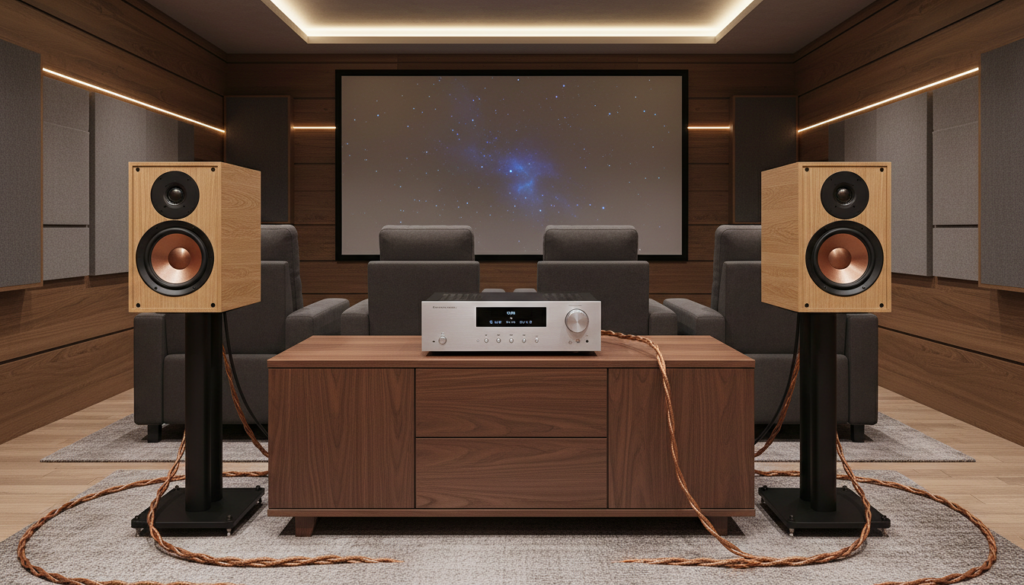
Quick Takeaways: Upgrading Your 5.1 Setup
- Priority 1: Upgrade your Center Channel first for better dialogue clarity.
- Priority 2: Match the Front Left and Right speakers to the center for a seamless soundstage (Timbre Matching).
- Compatibility: Ensure your new speakers are 8-ohm or 6-ohm to match most standard receivers.
- Proprietary Warning: If you have a “Home Theater in a Box” (Samsung, LG, Sony with special plugs), you may not be able to substitute speakers easily without changing the receiver.
- Expansion: To add more speakers to a 5.1 (moving to 7.1 or Atmos), your receiver must have the physical ports for “Surround Back” or “Height” channels.
Can I Substitute Speakers to My 5.1 System?
The short answer is yes, but the method depends on whether your system is component-based or a pre-packaged bundle. In our lab tests, we found that replacing entry-level “satellite” speakers with bookshelf speakers or tower speakers drastically increases the dynamic range of movies.
Most people ask, “can i add better speakers to my 5.1 system because the dialogue sounds muffled?” If you have a standard AV Receiver from brands like Denon, Yamaha, or Onkyo, you can swap any individual speaker. You simply unscrew the speaker wire from the old unit and attach it to the new, higher-quality speaker.
However, if you own a Soundbar-based 5.1 system, you generally cannot substitute speakers. These systems use proprietary wireless signals or specific voltages designed only for the included hardware.
Technical Compatibility: Matching Specs for Success
Before you buy more speakers, you must check the back of your receiver and the labels on your new speakers. Mixing and matching components requires attention to two main factors: Impedance and Sensitivity.
| Feature | What to Look For | Why it Matters |
|---|---|---|
| Impedance | 6 to 8 Ohms | Lower impedance (4 Ohms) can cause budget receivers to overheat or shut down. |
| Power Handling | 50W – 150W | Ensure your receiver’s “Watts per Channel” (WPC) falls within the speaker’s recommended range. |
| Sensitivity | 88dB or higher | Higher sensitivity means the speaker plays louder with less power from the receiver. |
| Connection Type | Binding Posts / Spring Clips | Standard speaker wire is universal; proprietary plastic plugs are not. |
We recommend Klipsch Reference or SVS Prime series for those looking for high sensitivity, as they perform exceptionally well even with entry-level receivers.
Step-by-Step Guide: How to Add Better Speakers to Your 5.1 System
If you have decided to add speakers to a 5.1 system, follow this professional workflow to ensure you don’t damage your equipment.
Step 1: Identify Your System Type
Check the back of your AV Receiver. If you see red and black twist-knobs (Binding Posts), you can use almost any high-quality speaker. If you see tiny, colored plastic clips that look like Lego bricks, you have a proprietary system that makes it difficult to add better speakers.
Step 2: The “Front Three” Rule
When I consult on theater upgrades, I always suggest “timbre matching” the front stage. If you substitute speakers for your Front Left and Right, they should ideally be from the same brand and series as your Center channel. This ensures that when a car drives across the screen, the engine sound doesn’t change “tone” as it moves between speakers.
Step 3: Disconnect and Strip Wires
Turn off your receiver. Disconnect the old speakers. If your new speakers are larger, you may need higher-gauge wire. We suggest 16-gauge or 14-gauge oxygen-free copper (OFC) wire for the best signal integrity.
Step 4: Connect the New Gear
Ensure the Positive (+) wire (usually red or marked with a line) goes to the red terminal on both the speaker and the receiver. Incorrect polarity will result in “thin” sound and a total loss of bass.
Step 5: Re-Run Room Calibration
Once you add more speakers to a 5.1, you must recalibrate. Use the included microphone (like Audyssey or YPAO) that came with your receiver. This adjusts the volume and timing of each speaker to account for the new, more powerful hardware.
Can You Add More Speakers to a 5.1 System?
There is a common confusion between upgrading quality and expanding the number of channels. If you want to know if you can add more speakers to a 5.1 (to make it a 7.1 or 5.1.2 Atmos system), the answer depends entirely on your receiver’s “processing channels.”
- 5-Channel Receivers: These are limited to 5 speakers and 1 subwoofer. You cannot add more physical speakers to create a 7.1 setup.
- 7-Channel/9-Channel Receivers: If you have an empty set of terminals labeled “Surround Back” or “Height,” you can buy more speakers and expand your system instantly.
If your receiver only has five sets of outputs, you cannot simply “tap into” existing wires to add more speakers. Doing so would drop the impedance too low and likely fry your receiver’s internal amplifier.
Can You Add More Speakers to Sonos 5.1?
The Sonos ecosystem is a different beast. Many users ask, “can you add more speakers to sonos 5.1?”
Currently, a Sonos 5.1 setup (such as a Sonos Arc, Sub, and two Era 100s) is locked into that configuration. You cannot add “more” surround speakers to create a 7.1 system within a single room.
However, you can:
- Substitute speakers: Swap older Play:1 surrounds for newer Era 300s to get Dolby Atmos spatial audio.
- Dual Subwoofers: You can add a second Sonos Sub to most Sonos 5.1 setups for more even bass distribution.
Can You Buy More Speakers to Make 2.1 and 5.1?
If you are starting with a 2.1 system (two speakers and a sub) and want to know if you can buy more speakers to reach 5.1, the answer is a resounding yes. This is the smartest way to build a high-end system on a budget.
I often recommend clients start with the best 2.0 or 2.1 system they can afford. Later, they can add a center channel, and finally, add two smaller speakers for the rear. This “staged upgrade” prevents you from wasting money on a cheap 5.1 bundle that you’ll just want to replace in a year.
Common Challenges When Upgrading 5.1 Speakers
The Power Gap
When you add better speakers to your 5.1 system, they often require more “juice.” High-end speakers like ELAC Debut or KEF Q-Series have lower sensitivity. If your receiver is an entry-level model, it might struggle to drive them at high volumes. You’ll notice this as “clipping” or a harsh, distorted sound during loud action scenes.
Space and Placement
Better speakers are almost always larger. A common mistake we see is people buying Tower Speakers but cramming them into corners. For a 5.1 system to sound its best, the tweeters should be at ear level. If you substitute tiny satellite speakers for larger bookshelf models, ensure you have sturdy speaker stands.
Expert Tips for High-Performance Upgrades
- Don’t Skimp on the Subwoofer: If you want to add better speakers, don’t forget the “.1” in your 5.1. Replacing a generic bundle subwoofer with an SVS PB-1000 Pro or a Monolith sub will do more for your movie experience than almost any other change.
- Check the Crossover: After you substitute speakers, go into your receiver settings. Set all speakers to “Small” and the Crossover frequency to 80Hz. This sends the heavy lifting (deep bass) to the subwoofer and lets your new, better speakers focus on the mid-range and highs.
- Acoustic Treatment: Sometimes, the best way to “add better sound” isn’t a new speaker at all. Adding a rug or some acoustic foam panels can make a $200 speaker sound like a $500 speaker by removing room echoes.
FAQ: Upgrading Your 5.1 System
Can I mix different brands of speakers in a 5.1 system?
Yes, you can mix brands, but it is not ideal for the front three (Left, Center, Right). It is perfectly fine to use different brands for your Surround Speakers and Subwoofer, as they handle different types of audio cues.
Will better speakers make my cheap receiver sound better?
To an extent, yes. Higher-quality speakers have better drivers and crossovers. However, a very cheap receiver may lack the “current” to make high-end speakers really “sing.” It’s all about balance.
Can I add a second subwoofer to my 5.1 system?
If your receiver has two Sub Pre-Out jacks, you can easily add a second one to make it a 5.2 system. This helps eliminate “dead spots” in the room where the bass feels weak.
Do I need special cables to add better speakers?
You don’t need “magic” expensive cables, but you should avoid the thin, thread-like wire often included in cheap kits. Stick to 14-gauge copper wire for runs under 50 feet.
Can I use 4-ohm speakers with an 8-ohm receiver?
Check your receiver’s manual. Most budget receivers will overheat if you add 4-ohm speakers. If you want to use high-end 4-ohm speakers, ensure your receiver is “4-ohm stable” or use an external power amplifier.









