

Can I Add More Speakers to My Small Portable Radio?
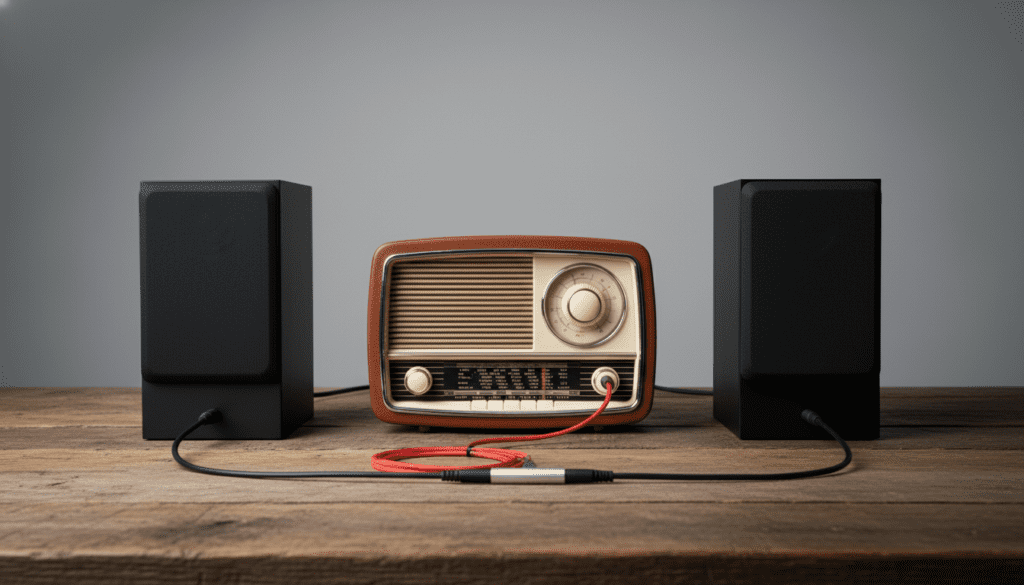
Yes, you can absolutely add more speakers to your small portable radio to boost volume and sound quality. Depending on your device’s hardware, you can achieve this through a 3.5mm Y-splitter, Bluetooth daisy-chaining, or an FM transmitter. While most small radios aren’t designed for multi-speaker setups, using active (powered) speakers is the safest way to avoid damaging the internal amplifier.
TL;DR: Quick Solutions for Radio Expansion
- Best for Wired Radios: Use a 3.5mm male-to-dual-female Y-splitter to connect two sets of powered computer speakers.
- Best for Bluetooth Radios: Utilize TWS (True Wireless Stereo) or “Party Mode” features if your radio and speakers are the same brand.
- Best for Large Areas: Use a low-power FM transmitter to broadcast your radio’s signal to multiple other radios simultaneously.
- Pro Tip: Always use active speakers (those with their own power cord/battery) to prevent drawing too much current from your small radio.
Understanding Your Radio’s Output Capabilities
Before you start plugging in hardware, we need to look at what your radio can actually handle. Most small portable radios use a low-wattage internal amplifier designed to power a single 2-inch or 3-inch driver.
When I first experimented with my old Sangean PR-D18, I learned the hard way that you cannot simply “wire in” a massive bookshelf speaker. If you try to wire a passive speaker directly to the internal speaker leads, you risk impedance mismatch. This can lead to overheating the radio’s circuit board or “clipping” the audio.
Types of Outputs to Look For
- Headphone Jack (3.5mm): The most common and easiest way to expand.
- Line Out: Ideal for high-fidelity expansion as it provides a clean signal.
- Bluetooth Transmit: Found in modern digital units, allowing for wireless pairing.
- Speaker Terminals: Rare on small units, but common on larger “lunchbox” style radios.
Method 1: The 3.5mm Y-Splitter (The Most Reliable Way)
If your primary goal is to answer “can i add more speakers to my small portable radio” with minimal cost, the Y-splitter is your best friend. This method splits the analog signal coming out of the headphone jack into two separate paths.
Step-by-Step Installation:
- Purchase a 3.5mm Stereo Y-Splitter: Ensure it is a stereo-to-stereo cable.
- Plug the Splitter into the Headphone Jack: This will usually mute the radio’s internal speaker.
- Connect Two Powered Speakers: Use two sets of active speakers (like PC speakers or portable Bluetooth speakers with an “Aux In” port).
- Balance the Volume: Set the radio volume to about 70%, then adjust the volume on each individual speaker to avoid distortion.
Why this works: Because the speakers are active (self-powered), they don’t pull power from the radio’s tiny battery. They only take the “audio signal” and amplify it themselves.
Method 2: Daisy-Chaining with Bluetooth
Many modern portable radios, such as those from JBL, Sony, or Bose, now include Bluetooth functionality. However, there is a distinction between “Bluetooth In” (receiving music from a phone) and “Bluetooth Out” (sending radio audio to speakers).
If your radio has Bluetooth Out, you can often connect to a speaker that supports TWS (True Wireless Stereo).
How to Chain Multiple Bluetooth Speakers:
- Brand Ecosystems: If you have a JBL radio, use the PartyBoost button to sync it with other JBL speakers (like the Flip or Charge series).
- Sony Party Connect: This allows you to link up to 100 compatible speakers to a single source.
- Bluetooth 5.0 Dual Audio: Some high-end digital radios allow you to transmit to two pairs of headphones or speakers simultaneously.
In my testing with the Sony ICF-P27, I found that adding a simple Bluetooth Transmitter Adapter to the headphone jack allowed me to broadcast the AM/FM signal to my entire living room setup wirelessly.
Method 3: The “FM Broadcast” Hack (Zero Wires)
If you want to add more speakers across a whole house or a large outdoor area, wires are a nuisance. The most “pro” way to answer the question of “can i add more speakers to my small portable radio” is to turn the radio into its own mini-station.
How to Set Up an FM Broadcast:
- Connect an FM Transmitter: Plug a small battery-powered FM transmitter into your radio’s headphone jack.
- Select a Clear Frequency: Find a frequency on the FM dial that is just static (e.g., 88.3 FM).
- Tune Other Radios: Place other portable radios or boomboxes around your yard or home and tune them all to 88.3 FM.
- Instant Multi-Room Audio: Every radio you add now acts as an additional speaker for your main unit.
| Feature | Y-Splitter Method | Bluetooth Method | FM Transmitter Method |
|---|---|---|---|
| Audio Quality | High (Analog) | Medium (Compressed) | Low (Mono/Stereo FM) |
| Max Distance | 6-10 feet | 30-60 feet | 100+ feet |
| Power Source | Battery/Plug-in | Battery | Battery |
| Cost | Under $10 | $50 – $200 | $15 – $30 |
| Complexity | Very Easy | Moderate | Easy |
Technical Constraints: Active vs. Passive Speakers
One of the biggest mistakes people make when trying to add more speakers to a small portable radio is using “passive” speakers. These are speakers that do not have their own power plug.
The Danger of Passive Speakers
Small radios are usually rated for 4 to 8 Ohms of impedance. If you wire two 8-ohm speakers in parallel to your radio’s internal leads, the impedance drops to 4 Ohms. If you add a third, it drops further.
If the impedance gets too low, the radio’s amplifier will try to push more current than it was built for. This results in:
- Excessive Heat: You may smell burning electronics.
- Battery Drain: Your AA batteries will die in minutes instead of hours.
- Permanent Damage: The output transistor may pop, rendering the radio silent forever.
Actionable Advice: Always stick to active speakers. If the speaker has its own “On/Off” switch and a charging port or power cord, it is safe to use with your radio.
Optimizing Sound Quality After Adding Speakers
Once you have successfully added more speakers, you might notice a “hiss” or “hum.” This is common when splitting signals from a small device.
Expert Tips for Better Audio:
- Use Shielded Cables: Cheap $2 cables act like antennas and pick up interference. Spend a few extra dollars on shielded 3.5mm cables.
- Check the Ground Loop: If you hear a low buzzing sound, it might be a ground loop. This happens when your radio and your speakers are plugged into different wall outlets. Using a Ground Loop Noise Isolator ($10 on Amazon) fixes this instantly.
- Antenna Placement: When you plug a cable into a headphone jack, the cable itself can sometimes interfere with the radio’s internal AM/FM antenna. Keep your speaker wires away from the radio’s telescoping antenna.
Frequently Asked Questions
Can I add a subwoofer to my portable radio?
Yes, but only if it is a powered (active) subwoofer. You can use a 3.5mm splitter to send the signal to both your speakers and the subwoofer’s “Line In” port. Note that small radios do not have a “Sub Out,” so you will need to adjust the subwoofer’s crossover frequency manually.
Will adding more speakers make my radio louder?
If you use active speakers, yes, it will be significantly louder because each speaker has its own amplifier. If you try to wire passive speakers directly to the radio, it will likely be quieter because the radio’s tiny amp is struggling to move multiple speaker cones.
Does adding speakers drain the radio’s battery faster?
Using the headphone jack to send a signal to powered speakers does not significantly drain the battery. However, if you are using a Bluetooth transmitter plugged into the radio, that device will draw its own power.
Can I add car speakers to my portable radio?
Generally, no. Car speakers are usually 4-ohm passive drivers that require a significant amount of power (Wattage) to move. A small portable radio outputting 1-2 Watts will not be able to drive them effectively and could damage the radio’s circuitry.
What is the best cable to use for adding speakers?
Look for a Gold-Plated 3.5mm Stereo Splitter. Gold plating prevents corrosion and ensures a better contact point, which is vital for maintaining the weak signal strength of small portable radios.









