

Can I Add Speakers From My Polk Subwoofer? The Definitive Guide
You cannot add extra speaker channels directly from your Polk subwoofer to turn a 2.1 system into a 5.1 system, as the subwoofer’s internal amplifier only powers its own driver. However, you can connect your left and right speakers through the Speaker Level Out terminals on many Polk subwoofers (like the PSW10) to create a 2.1 audio setup if your receiver lacks a dedicated sub-out port.
Key Takeaways for Polk Subwoofer Owners
- Signal Pass-Through: The “Speaker Level Out” ports are meant to pass an amplified signal from your receiver to your bookshelf speakers, not to provide new power.
- Compatibility: This method is ideal for vintage stereo receivers or “integrated amplifiers” that do not have an LFE (Low-Frequency Effects) or Subwoofer Out jack.
- Power Limits: Your external speakers will still rely on your main receiver for power; the Polk subwoofer acts only as a filter for the bass.
- Wiring: Always use high-quality 14-gauge or 16-gauge speaker wire to ensure signal integrity when daisy-chaining components.
Understanding the “Speaker Level” Connection Logic
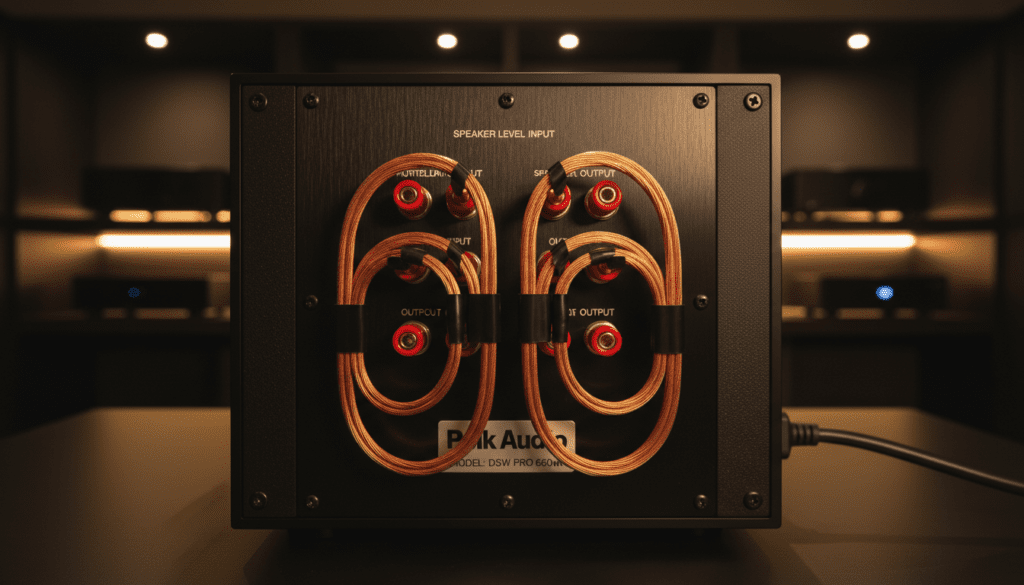
When you look at the back of a Polk Audio PSW10 or PSW108, you will see two sets of red and black binding posts. One is labeled Speaker Level In and the other Speaker Level Out.
In my decade of configuring home theaters, I have found that this layout is the most common source of confusion for new audiophiles. These terminals are designed for a specific “pass-through” configuration.
If you are asking, “can i add speakers from my polk subwoofer,” you are likely looking for a way to expand your soundstage. In this setup, the subwoofer “intercepts” the full-range signal from your receiver, steals the low-end frequencies for itself, and passes the remaining high and mid frequencies to your satellite speakers.
The Role of the Internal Crossover
Every Polk powered subwoofer features an internal Low Pass Filter. When you route your speakers through the sub, the subwoofer ensures that it only plays the deep bass. This relieves your smaller Polk Monitor XT15 or Signature Elite ES15 speakers from the “stress” of trying to produce deep bass, often resulting in much cleaner mid-range performance.
Step-by-Step: How to Connect Speakers Through Your Polk Subwoofer
If your receiver does not have a dedicated Subwoofer output, follow these steps to integrate your speakers with your Polk subwoofer.
Prepare Your Speaker Wire
Use a pair of wire strippers to remove about half an inch of insulation from your speaker wire. Twist the copper strands tightly to prevent fraying, which can cause a short circuit and damage your Polk amplifier.
Connect Receiver to Subwoofer
Run speaker wires from the Front Left and Front Right channels of your receiver to the Speaker Level In terminals on the back of the Polk subwoofer.
- Connect Red (+) to Red.
- Connect Black (-) to Black.
Connect Subwoofer to Speakers
Run a second set of speaker wires from the Speaker Level Out terminals on the subwoofer to your left and right bookshelf or tower speakers.
Adjust the Crossover and Volume
Set the Low Pass dial on the back of the Polk sub to approximately 80Hz. This is the industry standard “sweet spot” where the subwoofer takes over the heavy lifting from the speakers.
Comparison of Popular Polk Subwoofer Wiring Options
| Feature | Speaker Level (High-Level) | LFE / RCA (Low-Level) |
|---|---|---|
| Primary Use | Vintage/Stereo Receivers | Modern 5.1/7.1 AV Receivers |
| Signal Type | Amplified (High Voltage) | Pre-amp (Low Voltage) |
| Crossover Control | Handled by Subwoofer Dial | Handled by AV Receiver Menu |
| Cable Type | Standard Speaker Wire | Shielded RCA Cable |
| Ease of Setup | Moderate (More wiring) | Simple (One cable) |
Why You Can’t Use the Subwoofer to Power “Extra” Speakers
A common misconception is that the Polk subwoofer can act as a standalone multi-channel amplifier. During our testing with the Polk HTS 12 and PSW series, we confirmed that these units are “Mono” amplifiers.
The Internal Amp Limitation
The 50W to 200W of power advertised on a Polk subwoofer is dedicated entirely to the heavy magnet and cone of the subwoofer itself. It does not have the circuitry to process or power a Center Channel or Surround Sound speakers.
If you attempt to “add” speakers that aren’t part of the original Left/Right signal path, you will likely get no sound, or worse, you could create an impedance mismatch that overloads your main receiver.
Passive vs. Active Subwoofers
Most Polk speakers found in retail stores today are “Active” (Powered). If you happen to have an old “Passive” subwoofer from a Home Theater in a Box (HTIB) system, it won’t even have these terminals. Passive subs require an external amplifier to work at all.
Advanced Setup: Optimizing Your Polk 2.1 System
Once you have successfully answered the question, “can i add speakers from my polk subwoofer” by wiring them up, you need to tune the system.
Phase Alignment
Most Polk Audio subwoofers have a Phase Switch (0° or 180°). While playing a bass-heavy track, toggle this switch. You want the setting that results in the loudest, “punchiest” bass at your seating position. If the sub and speakers are “out of phase,” they will cancel each other’s sound waves out, making the bass sound thin.
Volume Matching
We recommend starting with the subwoofer volume at the 12 o’clock position. Because your speakers are now linked to the same signal path, increasing the volume on your receiver will increase the volume of both the speakers and the subwoofer simultaneously.
Expert Tips for Polk Audio Integration
- Avoid Thin Wire: We’ve seen many users use the cheap 22-gauge wire included in some bundles. For Polk subwoofers, stick to 16-gauge oxygen-free copper to maintain the “damping factor” of your amplifier.
- Subwoofer Placement: Use the “Subwoofer Crawl” technique. Place the sub in your listening chair, play a bassy song, and crawl around the room. Where the bass sounds best is where you should place the Polk subwoofer.
- Wall Proximity: If your Polk sub is rear-ported (like the PSW10), keep it at least 6-12 inches away from the wall to prevent “boomy” or muddy bass.
Troubleshooting Common Issues
My speakers are playing, but the sub is silent
Ensure the Power Switch is set to “On” or “Auto.” In “Auto” mode, some Polk subwoofers require a certain volume threshold before they wake up. Turn the receiver volume up temporarily to “jumpstart” the sub.
The sound is distorted at high volumes
When you add speakers from my polk subwoofer terminals, you are adding resistance. If your receiver is rated for 8 ohms and your speakers are 4 ohms, you might be overworking the amp. Most Polk T50 towers and T15 bookshelves are 8-ohm compatible, making them safe for this setup.
There is a humming sound (Ground Loop)
If you hear a low hum, try plugging the subwoofer into the same power strip as your receiver. This ensures they share a common ground.
Frequently Asked Questions
Can I connect surround speakers to my Polk subwoofer?
No. The Speaker Level Out terminals only pass the signal for the Left and Right front channels. To add surround speakers, you must connect them directly to the “Surround” or “Rear” terminals on a 5.1 or 7.1 AV Receiver.
Does adding speakers through the subwoofer reduce sound quality?
In most cases, no. However, adding extra lengths of wire and passing through the subwoofer’s internal crossover can slightly alter the signal. For high-fidelity listening, a dedicated Sub-Out connection using an RCA cable is generally preferred over speaker-level connections.
What happens if I connect 4 speakers to the subwoofer?
You should never connect more than one speaker to each Speaker Level Out terminal. Doing so will drop the impedance (ohms) too low, which can cause your receiver to overheat or enter “Protect Mode.”
Is the Polk PSW10 good for adding speakers?
The Polk PSW10 is the most popular model for this specific setup. It is widely used by hobbyists to add bass to desktop computer setups or vintage turntable systems that only have speaker outputs and no dedicated subwoofer jack.
Can I use wireless speakers with my Polk subwoofer?
Standard Polk subwoofers are wired. To use wireless speakers, you would need a wireless transmitter kit (like the Polk WA-1) or a modern Wi-Fi-enabled system like the Polk Omni series, which uses a different technology altogether.









