Connecting Your Sonos Soundbar to Outdoor Speakers: The Definitive Guide
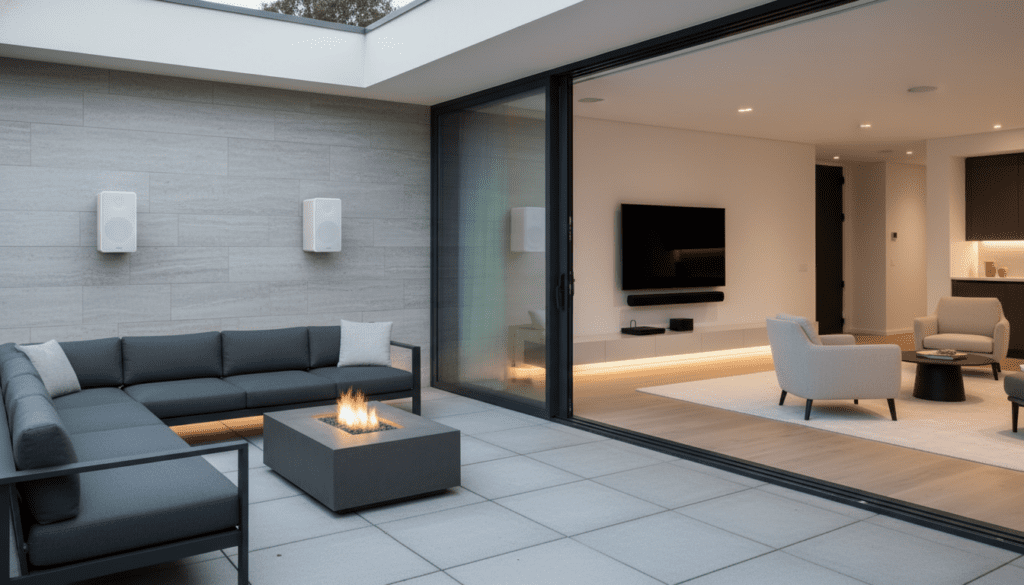
You absolutely can connect Sonos outdoor speakers to a sound bar, but there is a specific hardware requirement you must meet. Because Sonos soundbars (like the Arc, Beam, or Ray) do not have physical speaker outputs, you must use a Sonos Amp to bridge the gap. By connecting your passive outdoor speakers to the Sonos Amp, you can “Group” them with your soundbar via the Sonos S2 app to play the same audio simultaneously throughout your home and patio.
Key Takeaways: Sonos Soundbar Connectivity
- Hardware Required: You need a Sonos Amp to power passive outdoor speakers.
- Connection Method: The Soundbar and Amp connect wirelessly over your Wi-Fi network.
- Grouping vs. Bonding: Outdoor speakers are usually “Grouped” for synchronized music, not “Bonded” as rear surrounds.
- App Control: Use the Sonos S2 app to manage volume independently for the patio and living room.
- Expert Pro Tip: For the best experience, use Sonos Architectural Speakers by Sonance, which allow for Trueplay tuning when paired with the Amp.
Can I Connect Sonos Outdoor Speakers to Sound Bar?
The short answer is yes, but the execution depends on understanding the Sonos ecosystem. In my years of installing high-end home audio, I’ve seen many users frustrated when they realize the Sonos Arc doesn’t have “Speaker Out” terminals.
Sonos soundbars are all-in-one units. To bring outdoor speakers into the mix, you need a Sonos Amp. The Amp acts as the brain for your “dumb” (passive) outdoor speakers, giving them the smart features and wireless connectivity needed to talk to your soundbar.
Once the Sonos Amp is wired to your outdoor speakers and added to your Wi-Fi, it appears as a separate “Room” in your app. You then use the Grouping feature to sync the soundbar audio with the outdoor speakers. This is perfect for hosting parties where you want the big game or background music to follow guests from the couch to the deck.
How to Get Surround with Sonos Bar and Speakers
While most people want outdoor speakers for music, many ask: can i connect surround speakers to sonos soundbar for a theater experience? Yes, you can.
When you want a true 5.1 or 7.1.4 setup, you “Bond” speakers to the soundbar. This is different from “Grouping.” Bonding tells the system that the extra speakers are specifically for Rear Left and Rear Right channels.
Compatible Surround Options
- Sonos Era 100 or Era 300: The most common wireless choice.
- Sonos One (Gen 1, Gen 2) or One SL: The classic choice for smaller rooms.
- Sonos Amp: If you have high-quality in-ceiling or in-wall speakers, the Amp can drive them as surrounds.
- IKEA SYMFONISK: A budget-friendly way to get surround with sonos bar and speakers.
Note: You cannot use the Sonos Move or Sonos Roam as permanent surround speakers because they require a constant Bluetooth/Wi-Fi handshake that these portable models aren’t designed to maintain in a bonded theater state.
Can I Use Front Speakers with Sonos Soundbar?
A common point of confusion is whether you can i use front speakers with sonos soundbar. The answer is no.
In a Sonos home theater setup, the soundbar handles the Front Left, Front Right, and Center channels. Because the soundbar is designed to process these frequencies through its dedicated internal drivers and phased arrays, adding external front speakers would create “comb filtering” and ruin the soundstage.
If you are determined to use high-end floor-standing speakers as your front channels, you should skip the soundbar entirely. Instead, use a Sonos Amp connected to your TV via HDMI ARC/eARC. The Amp will then create a “Phantom Center” channel and drive your two front speakers, allowing you to add Sonos wireless rears later.
Technical Comparison: Grouping vs. Bonding
| Feature | Grouping (Outdoor Setup) | Bonding (Surround Setup) |
|---|---|---|
| Primary Use | Multi-room music / Party mode | Home Theater (Movies/TV) |
| Audio Lag | Zero (perfectly synced) | Zero (low-latency 5GHz) |
| Volume Control | Can be controlled independently | Controlled as a single unit |
| Hardware | Soundbar + Sonos Amp | Soundbar + Era 100s or Amp |
| Placement | Indoor + Outdoor | Same room only |
Step-by-Step: Connecting Your Outdoor Speakers to Your Sonos System
If you’ve purchased the Sonos Outdoor Speakers by Sonance and a Sonos Amp, follow these steps to integrate them with your soundbar.
Mount and Wire the Outdoor Speakers
Ensure your speakers are mounted under an eve or overhang to protect them from direct heavy downpours, even if they are “weatherproof.” Run 14/2 CL3-rated speaker wire from the speakers back to the location of your Sonos Amp (usually inside the house or in a weather-protected cabinet).
Connect to the Sonos Amp
Strip the ends of the wires and insert them into the banana plugs provided with the Sonos Amp. Ensure the polarity is correct: Red to Red (+), Black to Black (-). If you swap these, your speakers will be “out of phase,” resulting in thin, tinny bass.
Add the Amp to the Sonos S2 App
Open the Sonos S2 app. It should automatically detect the new Amp. Follow the prompts to connect it to your Wi-Fi. Label this room something clear, like “Patio” or “Deck.”
Group the Patio with the Soundbar
This is the “magic” step to connect sonos sound bar to other speakers:
- Tap the System tab (middle icon).
- Tap the Group button next to your Soundbar’s name (e.g., “Living Room”).
- Select “Patio.”
- Tap Done.
Your outdoor speakers will now play whatever is playing on your soundbar.
Advanced Connectivity: Can You Connect Sonos Sound Bar to Other Speakers?
I often get asked if you can you connect sonos sound bar to other speakers that aren’t Sonos brand.
The answer is yes, but only through a Sonos Amp or Sonos Port.
- Sonos Amp: Best for passive (unpowered) speakers like traditional wired bookshelf or outdoor speakers.
- Sonos Port: Best for active (powered) speakers or connecting your Sonos system to an existing third-party receiver.
I’ve personally used a Sonos Port to bring a 1970s vintage McIntosh amplifier into a modern Sonos ecosystem. The soundbar in the living room sends the signal to the Port, which then feeds the vintage amp. It works flawlessly, though there is a slight 75ms delay for “line-in” sources that you may need to adjust in the app settings.
Expert Tips for Outdoor Audio Success
After installing dozens of these systems, I’ve learned a few tricks to maximize performance:
Prioritize Your Network
Sonos relies heavily on your local network. If your Sonos Amp is located in a media closet far from your outdoor speakers, the Wi-Fi signal might struggle to penetrate exterior walls. I recommend using a Mesh Wi-Fi system (like Eero or TP-Link Deco) or hardwiring the Amp via Ethernet to ensure no dropouts during your backyard BBQ.
Use the Proper Wire Gauge
Don’t use thin 18-gauge wire for outdoor runs. Outdoor speakers often require longer cable lengths.
- Under 50 feet: 16-gauge is fine.
- 50–150 feet: Use 14-gauge wire.
- Over 150 feet: Use 12-gauge wire to prevent signal loss.
Trueplay for the Outdoors
If you use the Sonos Architectural by Sonance outdoor speakers with the Sonos Amp, you can use Trueplay. This uses your iPhone’s microphone to analyze how sound bounces off your patio walls and adjusts the EQ for the best possible clarity.
Troubleshooting Common Connection Issues
“The Audio is Out of Sync”
If the soundbar and outdoor speakers are slightly off, it’s usually a network lag issue. In the Sonos app, go to Settings > System > [Soundbar Room] > TV Dialog Sync. You can adjust the delay here to ensure the “echo” effect disappears.
“Outdoor Speakers are Too Quiet”
The Sonos Amp delivers 125 Watts per channel, which is plenty for most. However, if they feel quiet, check the Volume Limit settings in the app. Sometimes a “Max Volume” cap is set by default to protect the speakers.
“Can’t Find the Amp in the App”
Ensure your phone is on the same Wi-Fi frequency as the Sonos system. Sonos typically prefers the 2.4GHz band for better range through walls, though newer models like the Arc and Beam Gen 2 work great on 5GHz.
Frequently Asked Questions
Can I connect my outdoor speakers directly to the back of the Sonos Arc?
No. The Sonos Arc only has an HDMI eARC port, an Ethernet port, and a power input. It does not have speaker terminals. You must use a Sonos Amp to power and connect external speakers.
Can I get surround with sonos bar and speakers using the Amp?
Yes. In the Sonos app, you can “Bond” the Sonos Amp to your soundbar. This tells the Amp to act as the rear surround channels. This is a very popular setup for homeowners who want high-quality in-ceiling speakers as their rears.
Can I use a Sonos Move as an outdoor speaker for my soundbar?
Yes, you can group a Sonos Move or Sonos Roam with your soundbar. However, these are portable speakers. If you want a permanent outdoor solution that you don’t have to carry back inside to charge, the Sonos Amp + Passive Outdoor Speakers is the superior choice.
Does the Sonos Amp need to be outside?
No! In fact, the Sonos Amp is NOT waterproof. It should stay inside your home, in a garage, or in a weatherproof AV rack. Only the speaker wires should run to the outside.
How many outdoor speakers can I connect to one Sonos Amp?
A single Sonos Amp can comfortably power two pairs (4 speakers total) of 8-ohm speakers wired in parallel. If you use the Sonos Architectural speakers specifically, the Amp can actually power three pairs (6 speakers).