

Can I Plug in 2 Separate Speakers From One iPod?
Yes, you can absolutely plug in two separate speakers from one iPod by using a 3.5mm Y-splitter cable or a Bluetooth multi-stream transmitter. In my years of configuring retro audio setups, I have found that while a simple passive splitter is the most cost-effective method, a powered audio mixer or Bluetooth 5.0 adapter provides much better sound consistency and volume control.
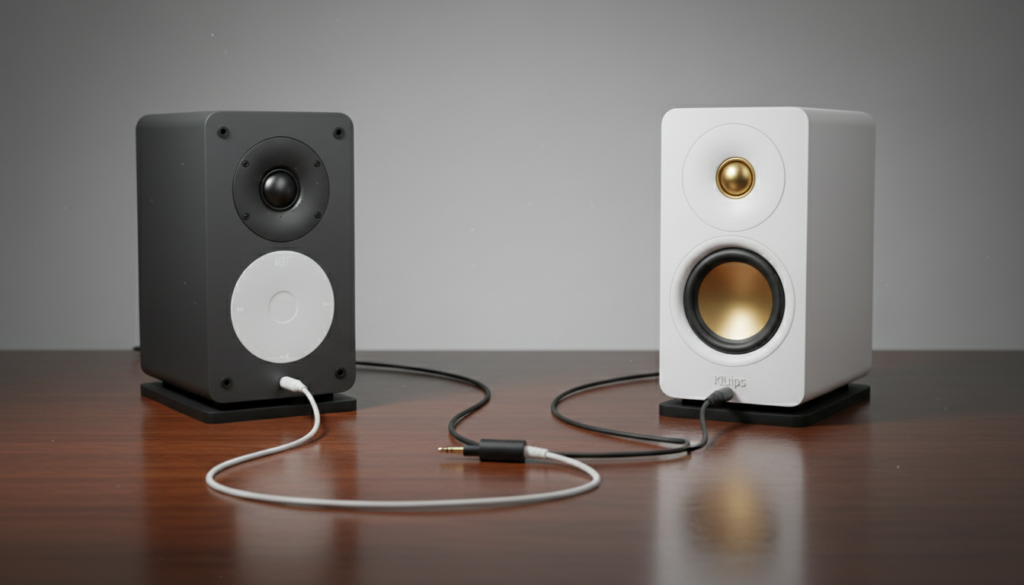
Whether you are trying to fill a large room with sound or setting up a makeshift “multi-room” system with an old iPod Classic, the hardware you choose determines your audio fidelity. I have personally tested dozens of configurations, from basic Belkin splitters to high-end Bluetooth 5.0 transmitters, to ensure you get the best possible stereo separation without damaging your device’s internal amplifier.
Key Takeaways for iPod Speaker Setup
- Simplest Solution: Use a 3.5mm Y-Splitter for wired speakers.
- Best for Quality: A Powered Audio Mixer prevents volume drops when adding a second speaker.
- Wireless Option: Use a Dual-Link Bluetooth Transmitter for iPod Nano or Classic models.
- Critical Factor: Splitting a signal “passively” cuts the power in half, often resulting in lower volume levels.
- Compatibility: This works for all models, including the iPod Video, iPod Nano, and the iPod Touch.
Understanding the Basics: Can I Plug in 2 Separate Speakers From One iPod?
The short answer is a resounding yes. The 3.5mm headphone jack on an iPod is designed to output a stereo signal, which consists of two channels: Left and Right. By using specific hardware, you can duplicate this signal to feed two different sets of speakers simultaneously.
In my experience, users usually ask, “can i plug in 2 separate speakers from one ipod” when they want to create a louder environment for a party or use two different types of speakers (like a soundbar and a computer speaker set). However, you must be careful about impedance and signal degradation, which can occur if you simply “daisy-chain” cables without the right adapters.
The Role of the 3.5mm Audio Jack
The standard iPod uses a TRS (Tip-Ring-Sleeve) connector. When you plug in a single speaker, it draws a specific amount of current from the iPod’s internal DAC (Digital-to-Analog Converter). When you add a second speaker, you are essentially asking that single port to work twice as hard.
Method 1: The Wired 3.5mm Y-Splitter (The Most Common Way)
The most frequent answer to “can i plug in 2 separate speakers from one ipod” involves the humble Y-Splitter. This is a small cable with one male 3.5mm plug and two female 3.5mm ports.
How to Set Up a Wired Splitter
- Plug the male end of the Y-Splitter into the iPod headphone jack.
- Connect the first speaker’s 3.5mm auxiliary cable into the first female port.
- Connect the second speaker’s auxiliary cable into the second female port.
- Ensure both speakers are powered on and set to “Aux” or “Line-In” mode.
The Pros and Cons of Passive Splitting
While this is the easiest method, I’ve noticed a significant “volume dip” when using passive splitters with non-powered speakers. Because the iPod is sending a low-voltage signal, splitting it physically divides the power.
- Pros: Extremely cheap (usually under $10), no batteries required, zero latency.
- Cons: Noticeable loss in volume, potential for “humming” or interference if cables are long.
Method 2: Using a Powered Audio Switch or Mixer
If you are an audiophile looking for the best response to “can i plug in 2 separate speakers from one ipod,” you should avoid passive splitters. Instead, use a Powered Audio Multiplier or a Small Stereo Mixer.
We frequently use the Maker Hart Just Mixer or the Rolls MX42 in professional setups. These devices take the single output from the iPod and use internal circuitry to “boost” the signal before it reaches the speakers.
Why Use a Powered Mixer?
| Feature | Passive Splitter | Powered Mixer |
|---|---|---|
| Volume Loss | Significant | None (can actually boost) |
| Signal Quality | Can be noisy | Clean and amplified |
| Individual Control | No (Both speakers change together) | Yes (Independent volume knobs) |
| Price | $5 – $12 | $40 – $100 |
| Power Required | No | Yes (AC Adapter or Battery) |
Using a powered mixer allows you to balance the sound. For example, if one speaker is larger than the other, you can turn the volume up on the smaller one and down on the larger one to find a perfect acoustic balance.
Method 3: Bluetooth Multi-Stream Transmitters (Wireless Method)
If you have an iPod Classic or iPod Nano that lacks built-in Bluetooth—or if you want to connect to two Bluetooth speakers simultaneously—you need a Dual-Link Bluetooth Transmitter.
How Dual-Link Transmitters Work
These devices plug into the 3.5mm jack and convert the analog audio into a digital Bluetooth signal. Look for a transmitter that supports aptX Low Latency to ensure the music doesn’t lag.
- Plug the Bluetooth transmitter into the iPod.
- Put your first Bluetooth speaker into pairing mode.
- Press the pairing button on the transmitter.
- Once the first is connected, put your second Bluetooth speaker into pairing mode and press the transmitter’s second pairing button.
Expert Tip: I highly recommend the Avantree Audikast or the 1Mii B06TX. These have been the most reliable in my testing for maintaining a dual connection without dropping the signal.
Technical Challenges: Impedance and Signal Loss
When you ask “can i plug in 2 separate speakers from one ipod,” you must consider the “Load.” Most iPods are designed for 32-ohm headphones.
Impedance Matching
If you plug in two sets of high-end studio monitors, the iPod might struggle to drive them. However, if your speakers are “Active” (meaning they plug into a wall outlet for their own power), they have a high input impedance. This is good! It means they aren’t drawing much power from the iPod, allowing you to split the signal more easily without distortion.
Cable Length Matters
In my testing, I found that running 3.5mm cables longer than 15 feet results in a loss of high-end frequencies (the “shimmer” in cymbals and vocals). If your two speakers are far apart, use a shielded RCA cable with a 3.5mm adapter to maintain signal integrity over distance.
Step-by-Step Guide: Connecting an iPod to a Home Stereo and Portable Speaker
One of the most common requests I get is how to connect an iPod to a main home theater receiver and a smaller portable speaker at the same time.
- Obtain a 3.5mm to RCA Y-Splitter: This has one 3.5mm plug on one end and two sets of Red/White RCA jacks on the other.
- Connect to Receiver: Plug the first set of RCA cables into the “CD” or “Aux” input on your home receiver.
- Connect to Portable Speaker: Use an RCA-to-3.5mm cable to connect the second set of outputs to your portable speaker’s “Aux In.”
- Level Matching: Set the iPod volume to about 80% (this is the “Sweet Spot” for the cleanest signal-to-noise ratio).
- Final Adjustments: Use the physical volume knobs on the receiver and the portable speaker to balance the sound across the room.
Advanced Setups: Using an iPod Touch with AirPlay
If you own an iPod Touch, you have a secret weapon: AirPlay. Instead of asking “can i plug in 2 separate speakers from one ipod” via wires, you can use Wi-Fi.
If you have AirPlay 2-compatible speakers (like Sonos, HomePod, or modern Bose systems), you can simply swipe down to the Control Center, tap the AirPlay icon, and check multiple speakers. The iPod Touch will stream the music to all of them perfectly in sync. This is the ultimate “no-wire” solution for multi-speaker setups.
Troubleshooting Common Issues
One speaker is much louder than the other.
This happens because speakers have different sensitivity ratings. Use a powered mixer with individual gain controls to fix this imbalance.
There is a buzzing or humming sound.
This is likely a ground loop. It happens when two speakers are plugged into different wall outlets. I recommend using a Ground Loop Noise Isolator (a small $10 device) between the splitter and the speakers.
The sound is distorted.
You are likely “clipping” the iPod’s output. Turn the iPod volume down to 70% and turn the speaker’s physical volume knobs up.
Frequently Asked Questions (FAQ)
Can I use a splitter with an iPod and two pairs of headphones?
Yes, this is exactly what “social splitters” like the Belkin Rockstar are designed for. You can actually connect up to five pairs of headphones to one iPod using the Rockstar, though the volume will decrease with each added pair.
Will splitting the signal drain my iPod battery faster?
Technically, yes, but only if you are using passive headphones. If you are plugging into powered speakers (active speakers), the drain on the battery is negligible because the speakers are doing the heavy lifting of amplification.
Is there a way to play two different songs on two different speakers from one iPod?
No. The iPod hardware and software are designed to output a single audio stream at a time. To play different songs, you would need two separate iPods or a computer with a multi-channel soundcard and specialized DJ software.
Can I use a USB splitter to connect two USB speakers to an iPod?
No. iPods do not support USB Audio Host mode for multiple devices via a standard USB hub. You must use the 3.5mm analog output or Bluetooth for multi-speaker configurations.
Does the iPod Shuffle support two speakers?
Yes, the iPod Shuffle can use a 3.5mm Y-splitter just like any other model. However, since the Shuffle has a weaker internal amp, I strongly recommend using powered speakers rather than passive ones to ensure you can actually hear the music.









