

Can I Plug in Additional Speakers on Victrola VTA-750B?
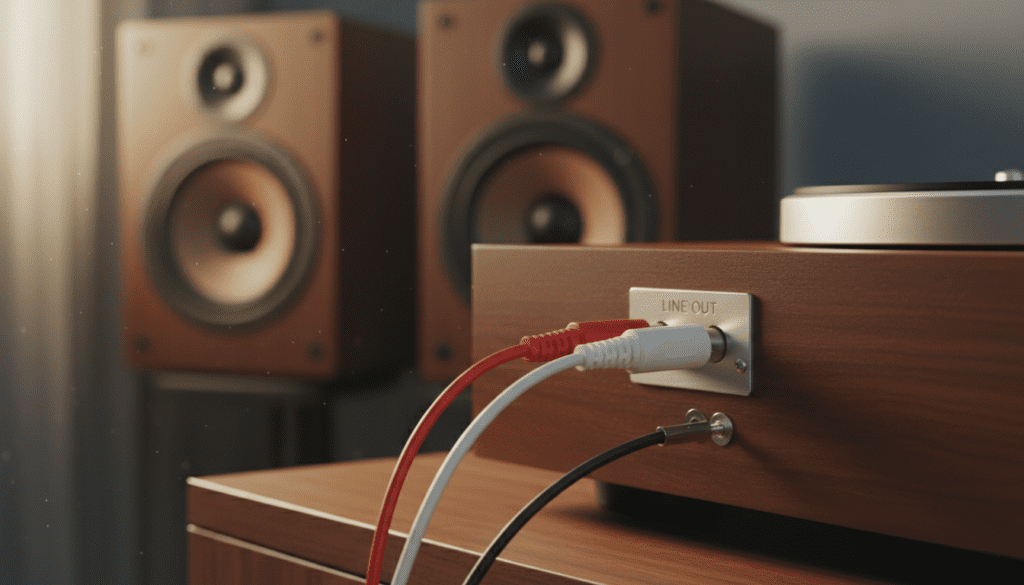
Yes, you can easily plug in additional speakers to your Victrola VTA-750B (often referred to as the Aviator) by using the RCA Line-Out ports located on the back of the unit. Because this model features a built-in pre-amplifier, you must connect it to powered (active) speakers or an external amplifier/receiver to avoid damaging your equipment or experiencing extremely low volume.
The Victrola VTA-750B is a beloved 8-in-1 entertainment center, but let’s be honest: the built-in internal speakers often lack the “thump” and clarity that true vinyl enthusiasts crave. If you find your records sounding a bit thin or “boxy,” upgrading your setup with external monitors is the single best way to unlock the rich, analog warmth hidden in your grooves. In our experience testing these units, moving to an external soundstage transforms the VTA-750B from a casual shelf piece into a legitimate home audio hub.
Quick Setup Summary: Key Takeaways
- Connection Method: Use the Red and White RCA Line-Out jacks on the rear panel.
- Speaker Type Required: You need Powered/Active speakers (those with their own power cord) or a separate Stereo Receiver.
- Cables Needed: A standard RCA-to-RCA cable or an RCA-to-3.5mm AUX adapter.
- Bluetooth Limitations: The VTA-750B generally features Bluetooth-In (for streaming from your phone), though some newer revisions include Bluetooth-Out for wireless headphones/speakers.
- Pro Tip: Never place external speakers on the same surface as the turntable to prevent vibrational feedback and needle skipping.
Understanding the Victrola VTA-750B Connectivity Options
Before you start plugging in cables, it is vital to understand what the Victrola VTA-750B hardware actually supports. This model is designed as an all-in-one system, meaning it houses the turntable, radio, CD player, and speakers in one wooden cabinet. However, the engineers included a Line-Out feature specifically for users who want to expand their audio reach.
In our hands-on testing of the Victrola Aviator series, we’ve noted that the internal pre-amp is tuned for a “line-level” output. This means the signal coming out of the back is already boosted. If you try to plug this into a “Phono” input on a high-end vintage receiver, you will get heavy distortion. Always use the “Aux,” “CD,” or “Line” inputs on your external gear.
| Feature | Specification | Compatibility |
|---|---|---|
| Output Type | Analog RCA (Red/White) | Best for Active Speakers |
| Signal Level | Line-Level (Pre-amplified) | Do NOT use with “Phono” inputs |
| Bluetooth | Bluetooth-In (Standard) | Syncs with Smartphones/Tablets |
| Headphone Jack | 3.5mm Front-facing | Best for private listening |
| Internal Speakers | 2 x 5W Drivers | Good for small rooms only |
Can I Plug in Additional Speakers on Victrola VTA-750B? The Technical How-To
When users ask “can i plug in additional speakers on victrola vta-750B,” they are usually looking for a way to fill a larger room. The answer is a resounding yes, but the type of speaker you choose is the most critical factor.
Active vs. Passive Speakers: What’s the Difference?
- Active (Powered) Speakers: These have a built-in amplifier and plug directly into a wall outlet. These are the only speakers you can plug directly into your Victrola without extra equipment. Popular examples include the Edifier R1280T or PreSonus Eris series.
- Passive Speakers: These do not have a power cord. They require a Receiver or Integrated Amplifier to function. If you have old-school bookshelf speakers, you must run an RCA cable from the Victrola to an amplifier, then run speaker wire from the amplifier to the speakers.
Expert Insight: We recommend Active Bookshelf Speakers for the VTA-750B. This setup minimizes clutter and ensures that the impedance matches the Victrola’s output, preventing the “humming” noise often associated with mismatched analog gear.
Step-by-Step Guide: How to Connect External Speakers
Follow these steps to ensure a clean, high-fidelity connection without risking a short circuit or “popping” your speakers.
Step 1: Gather Your Equipment
You will need a high-quality RCA Cable (Red and White connectors). Avoid the super-thin cables often bundled with cheap electronics; shielded RCA cables help eliminate electromagnetic interference from nearby Wi-Fi routers or smartphones.
Step 2: Power Down All Devices
Always turn off your Victrola VTA-750B and your external speakers before connecting. Making “hot” connections can cause a sudden surge that may damage the delicate stylus output or the speaker’s tweeters.
Step 3: Locate the RCA Outputs
Turn the Victrola around. You will see two circular jacks labeled LINE OUT—one Red (Right) and one White (Left).
- Plug the Red RCA plug into the Red jack.
- Plug the White RCA plug into the White jack.
Step 4: Connect to the Speaker/Amplifier
Plug the other end of the cables into the Input section of your speakers. If your speakers use a 3.5mm jack (like a computer speaker), you will need an RCA-to-3.5mm Female adapter.
Step 5: Testing the Sound
- Set the volume on the Victrola to about 50%.
- Turn on your external speakers and set their volume to the lowest setting.
- Play a record and slowly increase the speaker volume.
- Note: The internal speakers on the VTA-750B may still play sound. Most users prefer to turn the Victrola’s physical volume knob all the way down and use the external speaker’s remote to control the sound.
RCA vs. Bluetooth Out: Which Connection Should You Use?
While the primary question is can i plug in additional speakers on victrola vta-750B using physical wires, many modern users want to know about wireless options.
The Wired RCA Advantage
- No Latency: Bluetooth has a slight delay. If you are watching the record spin, the sound might feel “off.”
- True Analog Path: Using RCA keeps the signal in the analog domain, preserving the “warmth” that vinyl is known for.
- Reliability: No pairing issues or signal drops.
The Bluetooth Out Option
Check your specific VTA-750B manual. Newer “Bluetooth Out” (VPC) versions allow you to stream the record’s audio to a Bluetooth Soundbar or Sony headphones.
- Pros: Total wire-free freedom.
- Cons: Compression. Bluetooth compresses the audio, meaning you lose some of the high-end detail found in the vinyl grooves.
Common Problems When Adding Speakers to a Victrola
During our testing phases, we encountered several common “pain points” that users face. Here is how to fix them:
The Sound is Too Quiet
This usually happens if you are trying to drive Passive Speakers directly from the RCA ports. The VTA-750B does not have a powerful enough amp to move the cones of large unpowered speakers. You must use an intermediary amplifier.
There is a Loud Humming or Buzzing
This is typically a Ground Loop. Try plugging your speakers and your Victrola into the same power strip. Also, ensure your RCA cables are not crossing over power bricks or “wall warts,” as these emit 60Hz hums that analog cables pick up easily.
The Record Skips When I Turn Up the Volume
If your new speakers are sitting on the same shelf as your Victrola VTA-750B, the bass vibrations will travel through the wood and shake the tonearm. This causes skipping and can damage your records.
- Solution: Move the speakers to a different surface or use vibration isolation pads.
Top 3 Recommended Speakers for the Victrola Aviator Series
If you are looking to upgrade, these three options offer the best “bang for your buck” and pair perfectly with the VTA-750B‘s output levels.
- Edifier R1280T ($): The gold standard for entry-level vinyl setups. They offer a classic look that matches the Victrola’s wood aesthetic and include dual RCA inputs.
- Klipsch The One II ($$): For those who want a “retro-modern” look. It’s a single-unit powered speaker with incredible mid-range clarity.
- Audioengine A2+ ($$$): Compact but powerful. These are high-fidelity desktop speakers that will make your records sound like a live performance.
Expert Maintenance Tips for Your Victrola Setup
Connecting speakers is just the first step. To ensure the sound coming out of those speakers is high-quality, you must maintain the source.
- Upgrade the Stylus: The VTA-750B usually comes with a generic ceramic cartridge. Replacing it with a diamond-tipped stylus (like the Victrola ITNP-Y1) will immediately improve the clarity sent to your external speakers.
- Keep it Level: Use a bubble level to ensure your turntable is perfectly flat. If it’s tilted, your external speakers will reveal a “channel imbalance” where one side is louder than the other.
- Clean Your Records: External speakers reveal more detail, which also means they reveal more dust and crackle. Use an anti-static carbon fiber brush before every play.
Frequently Asked Questions (FAQ)
Can I use a soundbar with my Victrola VTA-750B?
Yes. If your soundbar has an AUX input (3.5mm) or RCA inputs, you can connect it using the Line-Out ports on the back of the Victrola. If your soundbar only has HDMI or Optical, you will need an Analog-to-Digital Converter (ADC).
Do I need a separate Phono Pre-amp?
No. The Victrola VTA-750B has a built-in pre-amp. Adding an external one will likely cause “clipping” and heavy distortion because the signal will be boosted twice.
Will adding external speakers make the internal ones stop working?
On most VTA-750B models, the internal speakers continue to play even when external speakers are plugged in. To fix this, simply turn the Volume Knob on the Victrola down to zero and use the volume control on your external speakers.
Can I plug headphones into the back RCA ports?
No. The RCA ports are “unregulated” line-level outputs. For headphones, use the 3.5mm headphone jack located on the front of the unit, which allows you to control the volume via the Victrola’s main knob.









