The Reality of Upgrading Drivers: Can I Upgrade My Speakers on Headphones for Bigger Speakers?
You can upgrade the internal drivers (speakers) in your headphones, but you generally cannot fit bigger speakers into your existing headphone shells without significant physical modifications. Most headphone enthusiasts ask, “can i upgrade my speakers on headphones for biger speakers” hoping for more bass or a wider soundstage, but the earcup’s internal diameter strictly limits the driver size. Instead of “bigger,” the more effective path is upgrading to higher-quality drivers of the same size, such as moving from standard PET diaphragms to Beryllium-coated or Titanium-plated units.
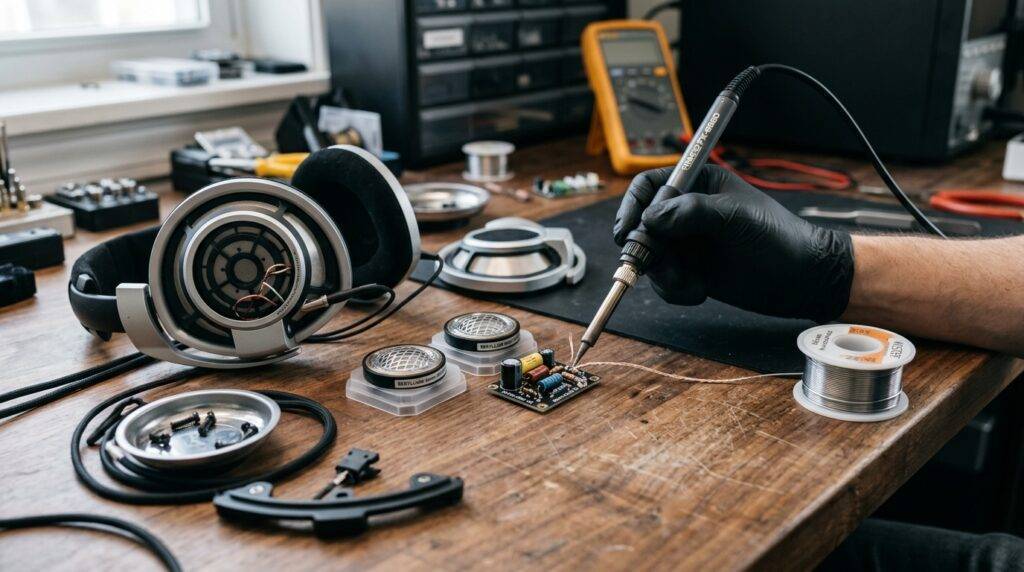
In my years of modding gear—from vintage Koss units to modern Sennheiser shells—I’ve found that the quality of the driver and the acoustic seal matters far more than a 5mm increase in diameter. If you attempt to force a larger driver into a smaller housing, you will likely destroy the acoustic tuning and sacrifice comfort.
TL;DR: Quick Headphone Upgrade Guide
Feasibility: Upgrading to the same size driver is easy; upgrading to bigger* drivers requires dremeling and structural changes.
- Sound Quality: A high-quality 40mm driver will almost always outperform a cheap 50mm driver.
- Tools Needed: Soldering iron, 60/40 Rosin Core Solder, tweezers, and basic pry tools.
- Critical Specs: Always match the Impedance (Ohms) to your source (phone vs. dedicated amp).
- Alternative: If you want “bigger” sound, focus on earpad swaps and back-venting rather than larger speakers.
Why Driver Size Isn’t the Only Factor in Sound Quality
When users ask “can i upgrade my speakers on headphones for biger speakers,” they are usually looking for the “subwoofer effect.” In the world of speakers, larger usually means more air displacement and deeper bass. However, headphones operate in a “near-field” or “pressure chamber” environment.
The Physics of Headphone Drivers
In a closed or open-back headphone, the acoustic volume of the earcup is calculated specifically for a certain driver size. If you manage to cram a 50mm driver into a shell designed for 40mm, the “back volume” (the air behind the driver) will be insufficient. This often results in “muddy” bass and a “shouty” midrange.
Common Driver Sizes and Their Roles
| Driver Size | Typical Use Case | Sound Characteristics |
|---|---|---|
| 40mm | Standard Over-Ear/Studio | Balanced, fast transient response, easy to drive. |
| 50mm | Audiophile/Bass-heavy | More potential for sub-bass, wider soundstage. |
| 70mm | Flagship (e.g., Sony MDR-Z7) | Massive scale, requires specialized enclosures. |
| 30mm | On-Ear/Portable | Lightweight, lacks deep low-end extension. |
Technical Challenges of Installing Bigger Speakers
If you are determined to find out “can i upgrade my speakers on headphones for biger speakers,” you must prepare for the technical hurdles. I have attempted several “shell-mismatch” mods, and the following three issues are the most prominent.
Physical Clearance and Baffle Modifications
The baffle is the plastic plate that holds the driver in place. Most baffles are molded specifically for one size. To fit a larger speaker, you would need to use a Dremel tool to widen the opening. This often weakens the structural integrity of the headphone, leading to vibrations and “rattle” at high volumes.
Impedance and Sensitivity Matching
Most “bigger” drivers, especially high-end ones, may have different power requirements. If your original headphones were 32 Ohms and you install a 300 Ohm driver, your phone or laptop will no longer be able to drive them to a functional volume. You would then need to invest in a Portable DAC/AMP like a FiiO BTR7 or a Schiit Magni.
Airflow and Damping
Headphones use acoustic fleece or paper filters to control the movement of the driver. A larger driver moves more air. If the original venting holes are too small, the driver will face “air resistance,” which creates a muffled sound.
Step-by-Step Guide: How to Properly Upgrade Your Headphone Drivers
While you might not be able to easily fit bigger speakers, you can definitely install better speakers. Here is the process I use when performing a high-end driver swap.
Step 1: Selecting the Replacement Driver
Don’t just buy any speaker. Look for reputable DIY suppliers or “donor” headphones.
- Peerless by Tymphany drivers are a gold standard for DIYers.
- Ensure the diameter matches your current driver (e.g., 40mm for 40mm).
- Check the Sensitivity rating (dB); look for at least 100dB/mW for easy listening.
Step 2: Disassembling the Earcups
Use a plastic pry tool to remove the earpads. Most pads are held on by a lip or a plastic ring.
- Locate the screws hidden behind the acoustic foam.
- Keep your screws in a magnetic tray; they are incredibly easy to lose.
- Pro Tip: Take a photo of the original wiring. You need to know which wire is Positive (+) and which is Negative (-).
Step 3: Desoldering the Old Drivers
Heat your soldering iron to approximately 350°C (660°F).
- Quickly touch the iron to the solder pads on the driver.
- Pull the wires away gently once the solder liquefies.
- Warning: Do not hold the iron on the pad for more than 2-3 seconds, or you will melt the plastic driver housing.
Step 4: Prepping and Soldering the New Driver
“Tin” your wires by applying a small amount of fresh solder to the tips.
- Place the new driver into the baffle.
- Solder the wires to the new pads.
- Red wire usually goes to the pad marked with a plus (+) sign or a red dot.
Step 5: Testing and Reassembly
Before snapping everything back together, plug the headphones into a source at low volume.
- Check for “channel balance.” Does the left side sound as loud as the right?
- If everything sounds clear, re-seat the driver and screw the housing back together.
Better Alternatives to Increasing Driver Size
If the answer to “can i upgrade my speakers on headphones for biger speakers” seems too complicated, there are other ways to achieve that “big” sound without the risk of breaking your gear.
Upgrading Your Earpads (The 5-Minute Mod)
Earpads change the distance between the driver and your ear.
- Brainwavz XL Pads: These increase the “chamber size,” mimicking the sound of a larger driver.
- Sheepskin Pads: These seal in the bass, providing the “oomph” people usually want from bigger speakers.
- Suede Pads: These tend to smooth out sharp treble and make the sound more “organic.”
Applying “Mass Loading” and Damping
I often use Butyl Rubber (like Dynamat) inside the headphone cups. This stops the plastic from vibrating.
- It makes the bass feel much “tighter” and more “authoritative.”
- It creates a blacker background, allowing you to hear more detail from your existing speakers.
Using an External DAC/AMP
Sometimes your speakers aren’t the problem; it’s the power source.
- A dedicated Digital-to-Analog Converter (DAC) ensures you are getting the full frequency range.
- An Amplifier provides the current needed for the drivers to move at their full potential.
Expert Insights: When is a Driver Swap Worth It?
In my experience, a driver swap is most effective on “budget” shells with good ergonomics but poor sound. For example, the Koss Porta Pro is a legendary platform for modding. People often take the drivers out and put them into Grado-style wooden shells.
However, if you are asking “can i upgrade my speakers on headphones for biger speakers” for a high-end pair like the Sennheiser HD600, my advice is: Don’t. Those drivers and enclosures are tuned to a precision of within 1dB. Any change you make will likely be a downgrade in terms of technical performance.
Modding Checklist
- Objective: Do you want more bass, or more clarity?
- Budget: High-end replacement drivers cost $40–$100 per pair.
- Skill Level: Can you solder small joints without shaking?
- Risk: Are you okay with the possibility of the headphones never working again?
Frequently Asked Questions (FAQ)
Can I put 50mm drivers in 40mm headphones?
Technically, only if you carve out the plastic baffle with a rotary tool. However, the lack of air volume in the cup usually results in poor sound quality and potential driver “flexing” (a crinkling sound).
Does a bigger speaker always mean more bass?
Not necessarily. Bass response is a combination of driver excursion, enclosure seal, and tuning ports. A high-quality 40mm driver with a proper seal will produce much deeper, cleaner bass than a cheap, poorly sealed 50mm driver.
Where can I buy replacement headphone speakers?
The most popular sources for DIY enthusiasts are AliExpress (search for “DIY Headphone Driver”), DigiKey, or Mouser for industrial-grade components. For high-end mods, look for Peerless by Tymphany HPD series drivers.
Will upgrading my drivers void my warranty?
Yes, 100%. Opening the earcups and soldering new components will immediately void any manufacturer warranty. Always perform these upgrades on out-of-warranty gear or affordable models.
What is the easiest upgrade if I can’t solder?
Changing your earpads is the most significant non-permanent upgrade you can make. It can completely transform the frequency response and comfort of the headphone without any risk of damage.