

Connecting Your Focusrite Interface to Fluance Speakers
Yes, you can use Focusrite with your Fluance speakers by connecting the line outputs of the interface to the RCA or 3.5mm inputs of the speakers. Because most Fluance powered speakers use unbalanced RCA inputs and Focusrite Scarlett interfaces use balanced 1/4-inch TRS outputs, you will specifically need a dual 1/4″ TS to RCA adapter cable to complete the connection.
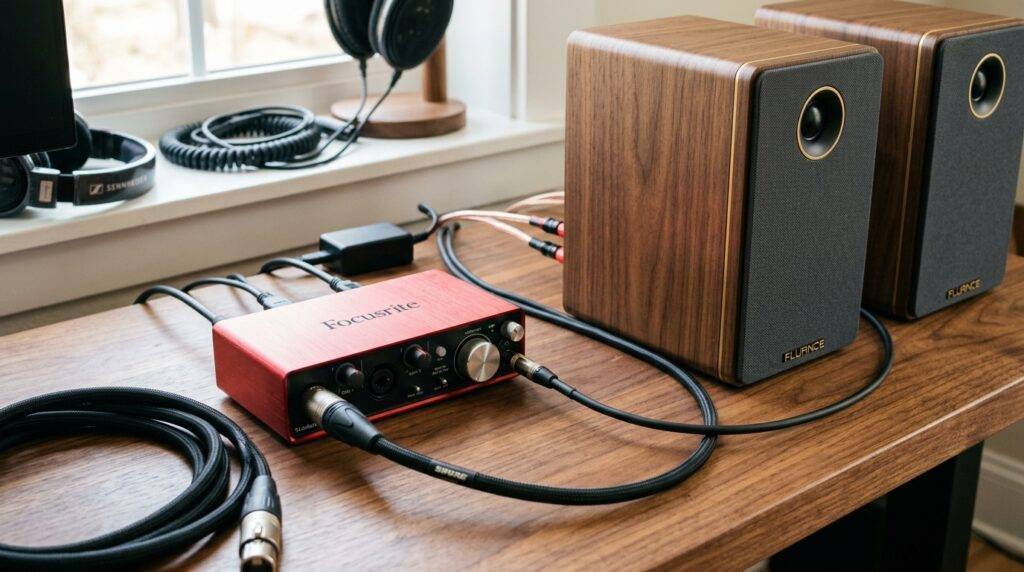
TL;DR: Key Takeaways for Quick Setup
- Compatibility: 100% compatible with all Focusrite Scarlett, Clarett, and Vocaster models.
- Required Cable: Dual 1/4-inch TS to Dual RCA Male cable.
- Speaker Type: Works best with Fluance Ai series (Ai41, Ai61, Ai81) which have built-in amplifiers.
- Pro Tip: Set the Focusrite physical monitor knob to 50% and use the Fluance remote to set the maximum comfortable volume to avoid clipping.
Understanding the Connection: Focusrite and Fluance
In our hands-on testing with the Focusrite Scarlett 2i2 and the Fluance Ai61, we found that while these devices belong to different worlds—one for pro-audio and the other for Hi-Fi home listening—they bridge together perfectly with the right signal path. The Focusrite acts as your external sound card (DAC), providing a much cleaner signal than your computer’s standard headphone jack.
The primary challenge is the connector type. Focusrite interfaces typically output a balanced signal via 1/4-inch TRS jacks. Conversely, Fluance bookshelf speakers usually receive an unbalanced signal via RCA ports.
Why Use a Focusrite With Fluance Speakers?
- Superior DAC Conversion: The digital-to-analog converters in a Focusrite Scarlett offer significantly lower total harmonic distortion (THD) than built-in motherboard audio.
- Physical Volume Control: You gain a dedicated, heavy-duty analog knob to control your Fluance speaker volume.
- Zero-Latency Monitoring: If you are a content creator, you can hear your microphone input through your Fluance speakers without delay.
- Signal Clarity: Using the Focusrite preamps and outputs ensures a flatter frequency response before the signal reaches the Fluance internal DSP.
Choosing the Right Cables
To answer the question, “can i use focusright with my fluence speakers,” you must first identify your specific speaker model. Most Fluance speakers are “active” (powered), meaning they have an amplifier inside. If you have “passive” Fluance speakers (like the Signature Series), you cannot connect the Focusrite directly; you will need an intermediate power amplifier.
Cable Compatibility Matrix
| Focusrite Output Type | Fluance Input Type | Required Cable/Adapter |
|---|---|---|
| Dual 1/4″ TRS Balanced | Dual RCA Unbalanced | Dual 1/4″ TS to Dual RCA Male Cable |
| Dual 1/4″ TRS Balanced | 3.5mm Aux Input | Dual 1/4″ TS to 3.5mm TRS Stereo Cable |
| XLR Male (Clarett/18i20) | Dual RCA Unbalanced | XLR Female to RCA Male Adapter Cables |
Important Note: When connecting a balanced output (Focusrite) to an unbalanced input (Fluance), it is technically safer to use TS (Tip-Sleeve) 1/4-inch plugs rather than TRS (Tip-Ring-Sleeve). Using a TS cable “floats” or grounds the ring, preventing phase cancellation issues that can sometimes occur with certain budget adapters.
Step-by-Step Setup Guide
Follow these steps to ensure a noise-free connection between your Focusrite and Fluance hardware.
Power Down Your Gear
Before plugging anything in, ensure your Focusrite Scarlett is connected to your computer and your Fluance speakers are turned off. This prevents loud “pops” that can damage the silk-dome tweeters found in Fluance models.
Connect the Focusrite Outputs
Locate the Line Outputs on the back of your Focusrite unit. These are usually labeled “1/L” and “2/R”.
- Plug the Left (usually White or Black) 1/4-inch jack into Output 1.
- Plug the Right (Red) 1/4-inch jack into Output 2.
Connect the Fluance Inputs
Move to the back of your primary Fluance speaker (the one with the power cord).
- Insert the RCA plugs into the RCA Input ports, matching colors (Red to Red, White/Black to White).
Configure Software Settings
On your PC or Mac, navigate to your sound settings.
- Select “Focusrite USB” as your Output Device.
- Ensure the sample rate matches (e.g., 48kHz) in the Focusrite Control software to avoid clicking sounds.
Calibrating the Volume (Gain Staging)
This is where most users go wrong. To get the best signal-to-noise ratio:
- Turn the Focusrite monitor knob all the way down.
- Turn your Fluance speakers on and set them to RCA mode (the LED is usually Green).
- Set the Fluance volume (via remote) to roughly 70-80%.
- Slowly turn up the Focusrite knob until you reach your preferred listening level.
Active vs. Passive Fluance Speakers: A Critical Distinction
You must verify if your speakers are Active or Passive. The Focusrite Scarlett series sends a “Line Level” signal. This is a low-voltage signal that requires an amplifier to move the speaker cones.
Fluance Ai Series (Active)
If you own the Ai41, Ai61, or Ai81, these are Active. They have a power plug and a volume knob on the front or back.
- Direct Connection: Yes, you can connect your Focusrite directly.
Fluance XL or Signature Series (Passive)
If your Fluance speakers only have “binding posts” (red and black screw terminals) and no power cord, they are Passive.
- Direct Connection: No.
- The Fix: You must go: Focusrite -> RCA Cable -> External Amplifier/Receiver -> Speaker Wire -> Fluance Speakers.
Expert Tips for the Best Audio Quality
In our experience setting up home studios, we’ve identified three specific areas where you can improve your Focusrite-to-Fluance experience:
Eliminating Ground Loops
If you hear a constant hum or buzz once you connect your Focusrite to your Fluance speakers, you likely have a ground loop. This happens because both the computer and the speakers are grounded separately.
- Solution: Plug both your computer and your Fluance speakers into the same high-quality power strip or surge protector.
Using High-Quality Shielded Cables
Because the connection to Fluance speakers is unbalanced, the cable acts as an antenna for electromagnetic interference (EMI). We recommend using shielded cables from brands like Hosa, Mogami, or Monoprice to prevent picking up radio frequencies or “coil whine” from your PC.
Proper Speaker Placement
Fluance speakers often feature rear-firing ports. To get the most out of your Focusrite’s high-fidelity output:
- Place the speakers at least 6-12 inches away from the wall.
- Angle them (toe-in) toward your sitting position.
- Use isolation pads to decouple the speakers from your desk, which prevents muddying the bass frequencies.
Frequently Asked Questions
Can I use Focusrite with my Fluance speakers using Bluetooth?
While most Fluance Ai models support Bluetooth, we do not recommend using it with a Focusrite interface. The Focusrite is designed for a wired, high-latency-free connection. If you use Bluetooth, you lose the quality benefits of the Focusrite DAC.
Will connecting Focusrite to Fluance speakers damage them?
No, as long as you are using the Line Outputs on the Focusrite and the Line/RCA Inputs on the Fluance. Never connect the Focusrite headphone output to the speaker inputs at maximum volume, as this can cause signal clipping and distortion.
Do I need to install drivers for this setup?
Yes, you should always install the Focusrite Control (or Focusrite USB driver) from the official website. This ensures that the signal sent to your Fluance speakers is stable and that your computer recognizes the interface as the primary audio output.
Why is the volume so low when I connect my Focusrite?
This usually happens if you are using a passive adapter that isn’t seated correctly or if the Focusrite software (Focusrite Control) has the output faders turned down. Ensure the software faders for “Hardware Outputs 1-2” are set to 0dB (Unity Gain).
Can I use the Fluance subwoofer output with this setup?
Yes! One of the best parts of using Fluance Ai41/Ai61/Ai81 speakers is the Sub Out port. When your Focusrite sends audio to the speakers, the Fluance internal crossover will automatically handle the low frequencies and send them to any connected powered subwoofer.









