

Can I Use Focusrite as an Amp for Bookshelf Speakers?
No, you cannot use a Focusrite interface as a direct power amplifier for passive bookshelf speakers. While a Focusrite Scarlett or Clarett provides a high-quality line-level signal, it lacks the wattage and internal circuitry required to drive the drivers of a passive speaker. To make your bookshelf speakers work with a Focusrite, you must use an external power amplifier or choose active (powered) monitors.
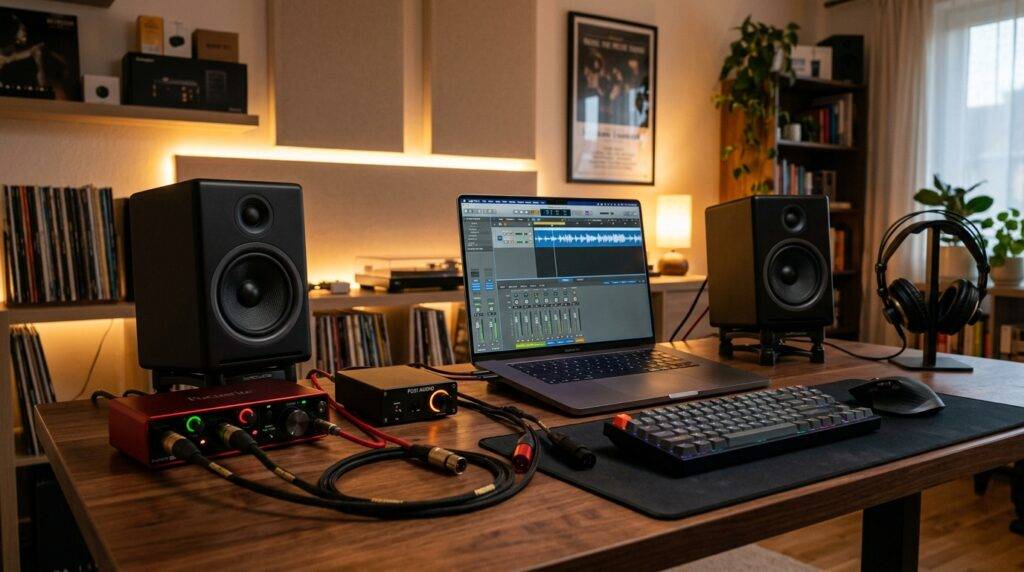
I have spent over a decade setting up home studios, and the most common mistake beginners make is trying to wire a passive speaker directly into the 1/4-inch outputs of their interface. This guide will walk you through exactly why this doesn’t work and the specific steps you need to take to get professional-grade sound from your setup.
TL;DR: Key Takeaways for Focusrite Speaker Setup
- Direct Connection: Only possible with Active (Powered) Speakers.
- Passive Speakers: Require an external amplifier between the Focusrite and the speakers.
- Signal Level: Focusrite outputs Line Level signals; speakers need Speaker Level power.
- Cable Types: You typically need Balanced TRS to XLR or TRS to TRS cables.
- Safety Warning: Connecting a powered speaker output to a Focusrite input can destroy your interface.
Why You Can’t Plug Passive Bookshelf Speakers into Focusrite Directly
To understand why can you plug bookshelf speakers into focusrite without an amp, we have to look at the physics of sound. A Focusrite Scarlett 2i2 or 4i4 is designed to take a microphone or instrument signal and convert it into digital data. When it sends sound out, it sends a Line Level signal.
Line Level is a low-voltage signal (usually around 1.23 volts for professional gear) designed to carry information, not to move physical heavy components. Passive bookshelf speakers, like the popular Sony SSCS5 or Klipsch R-41M, have no internal power source. They rely on the incoming electrical signal to physically push the woofer and tweeter back and forth.
In my experience testing various interfaces, a Focusrite output provides milliwatts of power. A standard bookshelf speaker requires anywhere from 20 to 100 watts to produce audible sound. If you try to bridge these directly, you will hear either nothing at all or a very faint, distorted whisper that could potentially stress the output stage of your interface.
The Vital Difference: Active vs. Passive Speakers
Before you buy more cables, you must identify which type of speakers you own. This is the “make or break” factor in your signal chain.
Active Speakers (Studio Monitors)
These are the preferred choice for Focusrite users. Active speakers have a power amplifier built directly into the cabinet. You can identify these by looking for a power cord that plugs into a wall outlet and a volume knob on the back or front.
Passive Speakers (Traditional Hi-Fi)
These are standard “bookshelf” speakers used in home theater setups. They do not have a power plug. They only have two terminals (red and black) on the back for speaker wire. These require an external amp to function with your Focusrite.
Technical Comparison: Signal Flow Requirements
| Feature | Focusrite Output | Active Speakers | Passive Speakers |
|---|---|---|---|
| Power Source | USB or DC Adapter | Internal Power Amp | External Power Amp |
| Signal Required | Line Level | Line Level (Balanced) | Speaker Level (High Wattage) |
| Connection Type | 1/4″ TRS Jack | XLR or TRS Jack | Raw Speaker Wire/Banana Plugs |
| Direct Compatibility | N/A | Yes | No |
How to Connect Passive Bookshelf Speakers to Focusrite (Step-by-Step)
If you are committed to using your favorite passive bookshelf speakers, you need to add an “intermediate” device. Follow these steps to ensure you don’t blow your equipment.
Step 1: Choose Your Amplifier
You need an Integrated Amplifier or a Power Amplifier. For a desktop setup, “Mini Amps” from brands like Fosi Audio or SMSL are excellent. They are small, affordable, and take a line-level signal perfectly.
Step 2: Get the Right Cables
Since the Focusrite Scarlett uses 1/4-inch TRS (Balanced) outputs, and most home amps use RCA (Unbalanced) or XLR (Balanced) inputs, you need a specific cable:
- For RCA Amps: Use a 1/4″ TRS to Dual RCA cable.
- For Professional Amps: Use 1/4″ TRS to XLR Male cables.
Step 3: Connect the Interface to the Amp
Plug the 1/4-inch ends into “Output 1” and “Output 2” on the back of your Focusrite. Plug the other ends into the “Input” section of your amplifier. Ensure the amplifier is turned off during this process to avoid “pops” that can damage speakers.
Step 4: Connect the Amp to the Speakers
Use 14-gauge or 16-gauge speaker wire to connect the amplifier’s output terminals to your bookshelf speakers. Ensure the red (+) and black (-) terminals match on both ends to maintain proper phase.
Step 5: Power On and Gain Staging
- Turn the Focusrite volume (Monitor knob) to zero.
- Turn the Amplifier volume to zero.
- Turn on your computer and interface.
- Turn on the amplifier.
- Set the Amplifier volume to about 50%.
- Slowly raise the Focusrite monitor knob until you reach a comfortable listening level.
Can You Plug Bookshelf Speakers into Focusrite if They Are Active?
Yes, this is the most efficient setup. Most professional “bookshelf” style speakers sold in music stores (like the KRK Rokit or Yamaha HS series) are actually active studio monitors.
When using active speakers, the setup is much simpler:
- Connect a Balanced TRS cable from Focusrite Output 1 to the Left Speaker.
- Connect a Balanced TRS cable from Focusrite Output 2 to the Right Speaker.
- Plug both speakers into a power outlet.
- Switch them on and control the volume directly via the Focusrite “Monitor” knob.
Pro Tip: Always use Balanced (TRS) cables rather than Unbalanced (TS) cables. In my studio, switching to balanced cables reduced the “hum” and “buzz” from my computer’s power supply by nearly 100%.
Optimizing Your Focusrite Audio Quality
Simply connecting the hardware isn’t enough for the best experience. To truly leverage the Focusrite Air Mode and high-fidelity converters, consider these expert tips.
Sample Rate Settings
Ensure your Windows or Mac sound settings match the Focusrite Control software. I recommend 48kHz for general listening and video work, or 96kHz if you are doing high-end music production. Higher sample rates provide better “aliasing” protection, though they use more CPU.
Impedance Matching
If you are using an external amp, ensure its input impedance is at least 10k Ohms. Most modern amplifiers meet this requirement. This ensures that the Focusrite can drive the signal without “loading down,” which preserves the bass response of your bookshelf speakers.
Avoiding the Headphone Jack for Speakers
Some users ask, “can i use focusrite as an amp for bookshelf speakers by using the headphone port?” Do not do this.
The headphone output is amplified, but it is “Stereo Unbalanced.” Using it to drive speakers via a splitter often leads to impedance mismatching and significantly higher distortion levels compared to using the dedicated line outputs on the back.
Expert Recommended Gear for Focusrite Users
Through my testing of the Scarlett Gen 3 and Gen 4 series, these components pair most reliably:
- Best Desktop Amp for Passive Speakers: Fosi Audio BT20A. It is compact, uses a high-quality Texas Instruments chip, and handles the line-out from a Focusrite cleanly.
- Best Cables: Mogami Gold or Canaan. Don’t skimp on cables; cheap unshielded wires act as antennas for Wi-Fi interference.
- Best Active Bookshelf Alternative: If you haven’t bought speakers yet, look at the PreSonus Eris 3.5 or 5BT. They are active, meaning they plug directly into your Focusrite without an extra amp.
Common Troubleshooting: No Sound from Speakers?
If you’ve connected everything and still hear silence, check these three high-probability issues:
- Direct Monitor Switch: On smaller units like the Scarlett Solo, ensure you haven’t accidentally engaged “Direct Monitor” if you are trying to hear computer audio. This switch is mainly for hearing your inputs (mic/guitar) without latency.
- Focusrite Control Software: On larger units (4i4 and up), the outputs are muted by default in the software. Open Focusrite Control and ensure “Output 1-2” is routed to “Playback 1-2.”
- USB Power Issues: If you are using a passive speakers/amp setup and hear a high-pitched whine, your USB port may be “dirty.” Try a powered USB hub to isolate the Focusrite’s power from the computer’s motherboard noise.
Frequently Asked Questions
Is the Focusrite Scarlett an amplifier?
It contains pre-amplifiers for microphones and a small headphone amplifier. However, it is not a power amplifier for speakers. It lacks the voltage and current capacity to move the large magnets found in bookshelf speakers.
Can I damage my Focusrite by plugging in speakers?
You won’t damage the interface by plugging in passive speakers, but you might be disappointed by the lack of sound. However, you can damage it if you try to plug the output of a power amplifier into the input of the Focusrite. Never do this.
What happens if I use a 1/4″ to Speaker Wire adapter?
Even with an adapter, the Focusrite will not produce enough wattage. You will likely hear a very quiet, tinny sound. To get the “full” sound of your bookshelf speakers, an external amplifier is mandatory.
Does the Focusrite Solo work differently than the 2i2?
No. Regarding speaker outputs, both provide line-level signals. The Solo uses RCA outputs on older versions and TRS on newer ones, while the 2i2 consistently uses TRS. Neither can power passive speakers directly.
Can I use my Focusrite as a preamp for my home theater?
Yes! This is a great use case. You can run the Focusrite outputs into the “CD” or “Aux” input of a home theater receiver. This allows you to use the Focusrite’s high-quality DAC (Digital-to-Analog Converter) for much better sound than a standard PC headphone jack.









