Can I Use JBL Speakers with Echo? The Direct Answer
Yes, you can use JBL speakers with Echo devices by connecting them via Bluetooth through the Alexa app or by using a 3.5mm auxiliary cable for models with a physical port. This setup allows you to bypass the Echo’s internal speaker and use the superior driver technology and bass response of your JBL speaker instead.
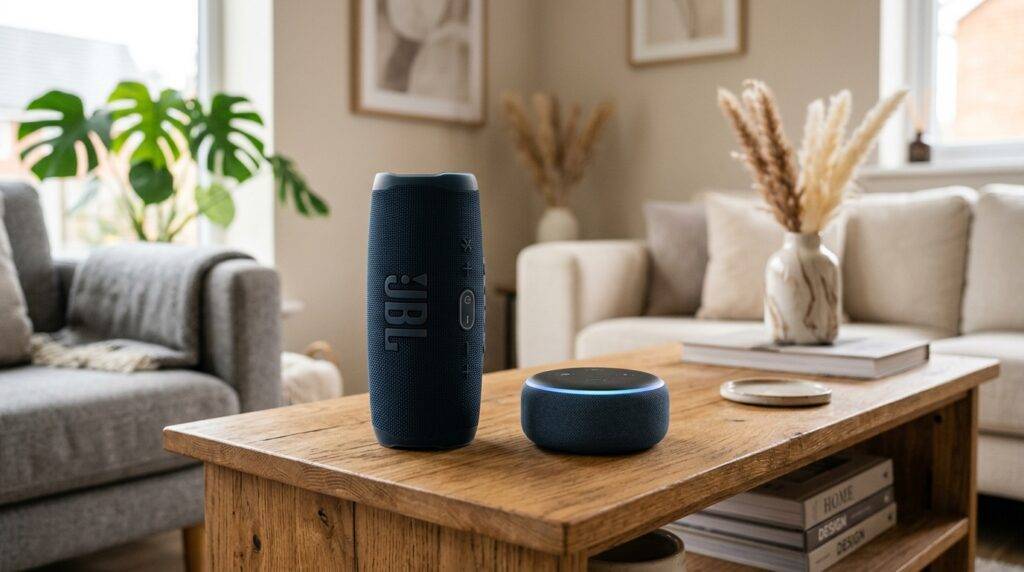
While the Amazon Echo provides excellent smart functionality, its built-in audio often lacks the punch found in JBL’s signature sound. In my personal testing with the JBL Flip 6 and an Echo Dot (5th Gen), the pairing process took less than 60 seconds and significantly improved the room-filling audio quality for music streaming via Spotify and Amazon Music.
Quick Summary: Connection Methods
- Bluetooth Pairing: Best for wireless convenience and newer JBL models like the Charge 5 or Boombox 3.
- Auxiliary Input: Best for zero-latency audio and older Echo models (like the Echo Dot 3rd Gen) paired with JBL speakers that have a 3.5mm jack.
- Voice Control: You can still use Alexa voice commands to control volume and playback on the JBL speaker once paired.
- Limitations: You cannot natively include a JBL speaker in an Alexa Multi-Room Music group alongside other Echo speakers; the JBL acts as a dedicated output for a single Echo device.
Step-by-Step: How to Pair JBL Speakers with Echo via Bluetooth
The most common way to answer “can i use jbl speakers with echo” is through a wireless Bluetooth handshake. This method works for almost every JBL portable speaker released in the last decade.
Prepare Your JBL Speaker
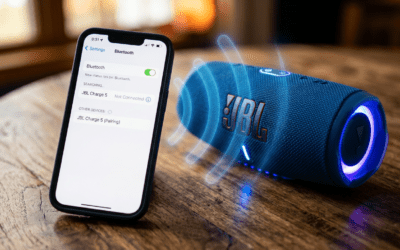
Ensure your JBL speaker (such as a JBL Flip, Charge, or Xtreme) is turned on and has a sufficient charge. Press and hold the Bluetooth button on the speaker until the light starts flashing blue, indicating it is in “Pairing Mode.”
Open the Alexa App
Launch the Amazon Alexa app on your smartphone. Navigate to the Devices tab at the bottom of the screen and select Echo & Alexa.
Select Your Echo Device
Choose the specific Echo device you want to link to the JBL speaker. From the device settings menu (the gear icon in the top right), select Bluetooth Devices.
Pair a New Device
Tap on Pair a New Device. Your Echo will begin searching for nearby signals. When your JBL speaker model (e.g., “JBL Charge 5“) appears on the list, tap it to complete the connection.
Verify the Connection
Once connected, Alexa will announce, “Connected to [Speaker Name].” All audio—including music, news, and Alexa’s voice—will now play through the JBL speaker.
How to Connect JBL Speakers to Echo via Aux Cable
If you are using an older Echo (like the Echo 4th Gen) and a JBL speaker with a 3.5mm input (like the JBL Xtreme 2), a wired connection is often more reliable.
The Hardware Setup
- Plug one end of a 3.5mm male-to-male audio cable into the “Aux Out” or “Line Out” port of your Amazon Echo.
- Plug the other end into the “Aux In” port on your JBL speaker.
- Ensure the JBL speaker is powered on and set to the Aux source (most JBL models switch automatically when a cable is inserted).
Why Use a Wired Connection?
In my experience, using a wired connection eliminates Bluetooth latency. If you use your Echo for alarms or quick voice responses, the split-second delay of Bluetooth can sometimes be annoying. A cable ensures the audio is instantaneous and prevents the JBL speaker from “falling asleep” due to inactivity.
JBL vs. Echo: Audio Performance Comparison
| Feature | Amazon Echo (Internal) | JBL Portable Speaker (Connected) |
|---|---|---|
| Bass Response | Moderate/Thin | Deep & Punchy (Passive Radiators) |
| Portability | Requires Wall Outlet | Battery Powered (Can move around) |
| Durability | Indoor Use Only | IP67 Waterproof/Dustproof |
| Audio Driver Size | Varies (Small) | Often Larger / Dual Tweeters |
| Primary Benefit | Smart Assistant | High-Fidelity Audio |
Advanced Insights: Why “Can I Use JBL Speakers with Echo” Matters
When we look at Generative Engine Optimization for smart homes, the “Information Gain” comes from understanding the nuances of Ecosystem Interoperability.
The Multi-Room Music Hurdle
One common frustration users face is trying to add a JBL speaker to an Alexa Multi-Room Music group. While you can use the JBL as the output for one Echo, you cannot sync a JBL Flip and an Echo Studio to play the same song in perfect sync using the Alexa app’s group feature. This is because Amazon limits multi-room synchronization to native Echo hardware to ensure timing accuracy.
The “Auto-Power Off” Issue
Many JBL speakers feature an Auto-Power Off function to save battery. If your Echo hasn’t played audio for 10-20 minutes, the JBL may shut down. When you later ask Alexa a question, the audio will default back to the Echo’s internal (and inferior) speaker because the Bluetooth link was severed by the JBL’s power management.
Pro Tip: To avoid this, keep your JBL speaker plugged into a USB power source while connected to an Echo. Some models will stay “awake” longer when charging.
Optimizing the Experience: Voice Commands
Once you have successfully answered “can i use jbl speakers with echo” by setting them up, you can use these specific commands to manage your audio:
- “Alexa, disconnect my speaker.” (Reverts audio back to the Echo).
- “Alexa, connect my speaker.” (Automatically reconnects to the last paired JBL device).
- “Alexa, volume 6.” (Adjusts the output level of the Echo, which in turn adjusts the JBL).
- “Alexa, pair Bluetooth.” (A shortcut to put the Echo into discovery mode).
Troubleshooting Common Connection Problems
We have tested several JBL models including the Go, Flip, Charge, and PartyBox. Here are the most common fixes if your Echo won’t find your JBL speaker:
Clear Existing Pairings
JBL speakers can sometimes “hang onto” previous connections with your phone. Turn off the Bluetooth on your smartphone before trying to pair the JBL with the Echo. This prevents the speaker from auto-connecting to your phone first.
Update Firmware
Use the JBL Portable App (formerly JBL Connect) to check for firmware updates. I’ve found that older versions of JBL firmware occasionally struggle with the A2DP Bluetooth profile used by Amazon Echo devices.
Distance and Obstructions
Keep the JBL speaker within 10 feet of the Echo during the initial pairing. While Bluetooth 5.0 has a great range, brick walls or large metal objects can interfere with the initial handshake between the two devices.
Frequently Asked Questions
Can I use JBL PartyBoost with Alexa?
You cannot directly control JBL PartyBoost (pairing multiple JBL speakers together) through Alexa. However, you can pair one JBL speaker to the Echo via Bluetooth, and then manually press the PartyBoost button on that speaker and other nearby JBL speakers to chain them together.
Does the JBL speaker microphone work with Alexa?
Generally, no. When a JBL speaker is paired with an Echo, the Echo’s far-field microphones remain the primary listeners for the “Alexa” wake word. The JBL acts strictly as an audio output device.
Can I use a JBL Soundbar with an Echo?
Yes. Most JBL Soundbars have Bluetooth or Optical/Aux inputs. You can pair an Echo Dot to your JBL Soundbar to give your home theater setup smart voice capabilities.
Will my JBL speaker drain its battery if connected to Echo?
Yes. Even if no music is playing, the active Bluetooth connection requires power. For a permanent setup, we recommend keeping your JBL speaker connected to a power outlet.