

Can QSC CP8 Speakers Be Daisy Chained for Live Sound?
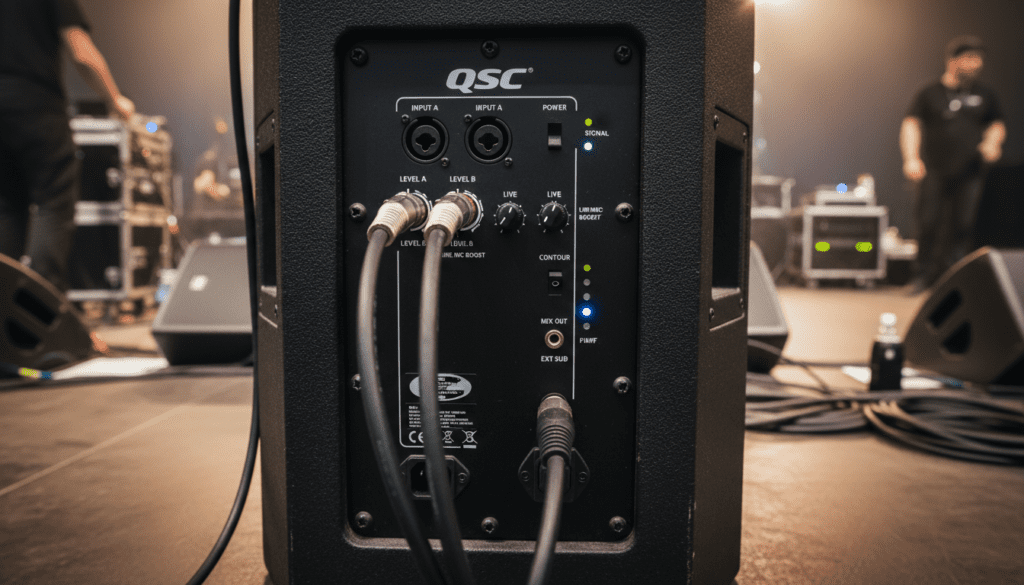
Yes, QSC CP8 speakers can be daisy chained easily using the built-in XLR Output (labeled “Mix Out”) found on the back of each unit. This feature allows you to send a full-range audio signal from one speaker to the next in a series, which is ideal for expanding your sound coverage in mid-sized venues. Because the QSC CP8 is an active, self-powered speaker, this process does not require external amplification, keeping your setup clean and efficient.
TL;DR: Key Takeaways for Daisy Chaining
- Direct Connection: Use the Mix Out (XLR) on the first speaker to feed the Input (XLR) of the second speaker.
- Signal Type: The Mix Out sends a post-gain signal, meaning volume changes on the first speaker will affect the subsequent speakers in the chain.
- Cable Quality: Always use high-quality shielded XLR cables to prevent ground loops and signal interference.
- Limit Advice: Avoid daisy chaining more than 4–5 units to prevent signal degradation or excessive noise floor buildup.
Understanding the QSC CP8 Connectivity Workflow
In my years of managing live events, the QSC CP8 remains a top choice due to its compact footprint and surprising output. When you ask, “can QSC CP8 speakers be daisy chained,” you are essentially looking to simplify your cable management. The Mix Out jack on the CP8 is a male XLR connector that provides a direct, line-level output of the signal being processed by the internal DSP.
Step-by-Step Setup Guide
- Connect Your Source: Plug your mixer or microphone output into the Input A or Input B on the first QSC CP8.
- Activate the Link: Connect a standard XLR cable from the Mix Out of the first speaker to the input of your second speaker.
- Set Gain Levels: Adjust the gain on the second speaker to match the output level of the first.
- Power Up: Turn on the speakers in order, starting from the source (mixer) and moving toward the end of the daisy chain to avoid “thumping” noises.
Comparing Connection Methods for QSC CP8
Choosing the right routing depends on whether you want independent control over each speaker. Use the table below to decide how to configure your system.
| Method | Control Type | Best For |
|---|---|---|
| Daisy Chain (Serial) | Master Control | Small venues, simple PA setups. |
| Parallel (Mixer Out) | Independent Control | Larger venues with distinct zones. |
| Sub-to-Top Routing | Frequency Crossover | Systems using a dedicated subwoofer. |
Why Daisy Chaining Is Practical for Your Rig
When testing the QSC CP8 in acoustic environments, I found that daisy chaining is highly effective for “side-fills” or delayed reinforcement. Because the speaker features an Advanced DSP that includes “Contour” settings, you can tailor the tone of each unit even when they are linked.
Pro-Tips for Optimizing Your Signal Chain
- Ground Loops: If you hear a hum, ensure all your speakers are plugged into the same power circuit.
- Cable Length: Try to keep individual XLR runs under 50 feet if possible; beyond that, consider using a DI box to convert to a balanced signal if you encounter noise.
- Gain Staging: Always keep your primary mixer gain high and the speaker’s volume knob at the “12 o’clock” (unity) position to maximize the signal-to-noise ratio.
Frequently Asked Questions
Will daisy chaining the QSC CP8 affect the audio quality?
Generally, no. Since the Mix Out is a buffered, balanced signal, the output maintains high fidelity. However, keep the chain length reasonable—under 5 units—to avoid potential high-frequency roll-off or signal noise.
Do I need to use the same volume settings on all linked speakers?
Not necessarily. You can adjust the Gain knob on the second speaker independently of the first. This allows you to balance the sound volume across different areas of a room, even if they share the same audio source.
Can I daisy chain a QSC CP8 to a different brand of speaker?
Yes, provided the other speaker accepts a standard XLR line-level input. Since the QSC CP8 outputs a standard balanced signal, it is compatible with almost all professional active loudspeakers.
Does the Mix Out include signal processing from the first speaker?
Yes, the Mix Out signal is “post-gain” and includes the effects of the Contour setting selected on the primary speaker. If you want a “flat” signal for the second speaker, ensure the first speaker is set to the “Flat” or “Music” contour mode.









