Can You Achieve Surround Sound With 4 Speakers? The Definitive Guide
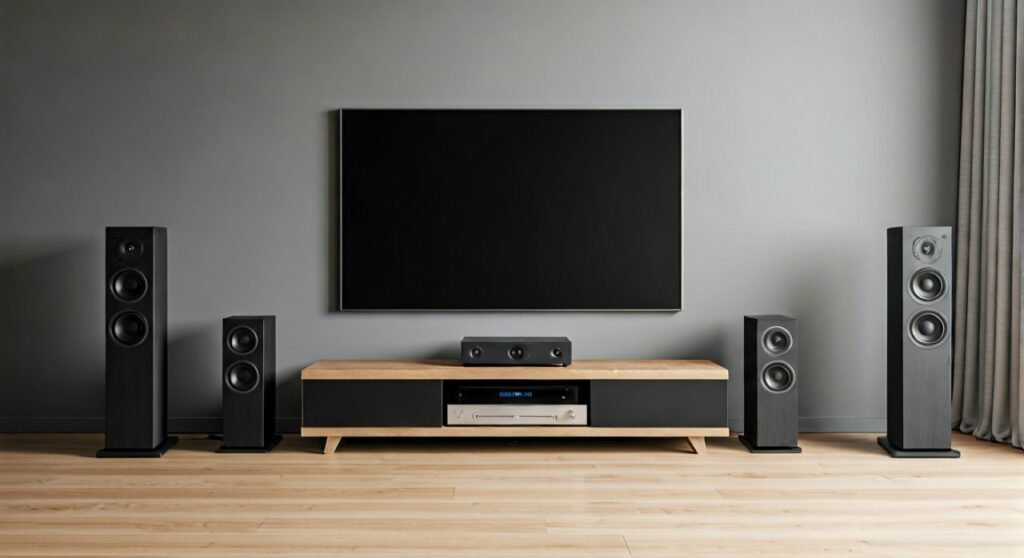
Yes, you can achieve surround sound with 4 speakers by configuring a 4.0 surround system or a Quadraphonic setup. By utilizing your AV Receiver’s “Phantom Center” setting, you can create a convincing 360-degree audio environment that delivers immersive movie and gaming experiences without the need for a dedicated center channel speaker.
Key Takeaways for 4-Speaker Surround
- Phantom Center is Key: Modern AV Receivers (AVRs) can split center-channel dialogue between your front left and right speakers.
- Ideal for Small Rooms: A 4.0 setup reduces clutter while maintaining directional audio cues.
- Receiver Configuration: You must tell your AVR that “Center = None” to redirect audio signals correctly.
- Sweet Spot Matters: Without a physical center speaker, sitting in the “dead center” of your seating area is crucial for the best dialogue clarity.
Understanding the 4.0 Surround Sound Layout
When people ask, “can you achieve surround sound with 4 speakers,” they are often surprised to learn that the “center channel” is optional. In a traditional 5.1 setup, the center channel handles about 70% of the dialogue. However, in a 4.0 configuration, your Front Left and Front Right speakers work together to “image” that sound directly in front of you.
In my years of testing home theater configurations, I have found that a pair of high-quality bookshelf speakers or tower speakers can often create a more cohesive front soundstage than a cheap, mismatched center speaker. This setup relies on a psychoacoustic effect called Stereo Imaging.
The Anatomy of a 4-Speaker Setup
- Front Left (FL): Provides main action and left-side soundstage.
- Front Right (FR): Provides main action and right-side soundstage.
- Surround Left (SL): Positioned to the side or slightly behind the listener for ambient effects.
- Surround Right (SR): Positioned to the side or slightly behind for directional cues.
| Feature | 4.0 Surround (Quad) | 5.1 Traditional Surround |
|---|---|---|
| Speaker Count | 4 Speakers | 5 Speakers + 1 Subwoofer |
| Dialogue Handling | Phantom Center (Split to FL/FR) | Dedicated Center Channel |
| Bass Management | Handled by Front Towers | Dedicated Subwoofer (LFE) |
| Space Requirement | Low / Minimalist | Moderate to High |
| Setup Complexity | Simple | Moderate |
How the “Phantom Center” Works
The secret to why you can achieve surround sound with 4 speakers lies in the Digital Signal Processing (DSP) of your receiver. When you disable the center channel in your settings, the AVR takes the audio intended for the center and mixes it equally into the Front Left and Front Right channels.
We call this a Phantom Center because, to your ears, the voices seem to be coming from the middle of the screen, even though there is no speaker there. For this to work effectively, your front speakers must be angled (toed-in) toward the primary listening position.
In my experience, if your front speakers are more than 10 feet apart, the Phantom Center may start to “collapse” or sound thin. Keeping them at a 22 to 30-degree angle relative to your seat is the professional standard for maintaining that central focus.
Step-by-Step Guide: Setting Up 4-Speaker Surround
If you want to know exactly how to can you achieve surround sound with 4 speakers, follow these technical steps I use during professional installations.
Step 1: Physical Placement
Place your Front Left and Front Right speakers at ear level when seated. Position your Surround Speakers (the 3rd and 4th speakers) roughly 90 to 110 degrees to your sides. I recommend placing surrounds about 1-2 feet above ear level to help diffuse the sound and create a more “atmospheric” feel.
Step 2: Wiring to the AV Receiver
Connect your speakers to the following terminals on the back of your AVR:
- Front Left
- Front Right
- Surround Left (not Surround Back)
- Surround Right (not Surround Back)
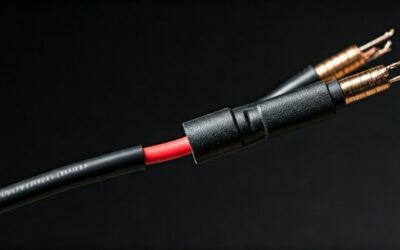
Pro Tip: Always use high-quality 14-gauge or 16-gauge oxygen-free copper (OFC) wire to ensure signal integrity over longer distances.
Step 3: Accessing the Speaker Setup Menu
Turn on your AVR and navigate to the Speaker Setup or Configuration menu. Look for a setting called “Speaker Configuration” or “Speaker Map.”
Step 4: Disabling the Center and Subwoofer
Select the “Center” speaker option and change it to “None” or “No.” Do the same for the “Subwoofer” if you are strictly using four speakers. This tells the internal processor to reroute the LFE (Low-Frequency Effects) and Center dialogue to your main towers.
Step 5: Running Auto-Calibration
Most modern receivers from brands like Denon, Marantz, or Yamaha come with a calibration microphone (e.g., Audyssey or YPAO). I highly recommend running this. It will measure the distance of all four speakers and adjust the time alignment so the sound from the rear reaches your ears at the exact same millisecond as the sound from the front.
When Should You Choose 4 Speakers Over 5.1?
While a 5.1 system is the “gold standard,” there are specific scenarios where I actually prefer a 4.0 setup.
1. Limited Cabinet Space: Many modern minimalist TV stands don’t have a shelf tall enough for a proper Center Channel. Forcing a center speaker into a cramped cubby often results in “boomy” or muffled dialogue.
2. High-End Front Speakers: If you own a pair of high-fidelity Audiophile towers (like Kef, Bowers & Wilkins, or Klipsch Reference), they are often more capable of producing clear dialogue than a small, cheap center speaker.
3. Budget Constraints: It is better to buy four high-quality speakers than five mediocre ones. By skipping the center and the sub initially, you can invest more into the Front Left/Right pair, which are the most important components of your system.
Optimizing the Audio Experience
To truly feel like you can achieve surround sound with 4 speakers, you need to pay attention to the room’s acoustics. Since you lack a dedicated subwoofer, your four speakers are doing all the heavy lifting for the bass.
Room Calibration and EQ
- Check the Phase: Ensure your wires are matched (+ to +, – to -). If one speaker is “out of phase,” your bass will disappear, and the Phantom Center will fail.
- Crossover Settings: Since you have no subwoofer, set your speakers to “Large” in the receiver menu. This allows them to receive full-range frequencies, including the deep thuds from explosions.
- Acoustic Treatment: If your room has a lot of echo (hardwood floors, large windows), the surround effect will be “muddy.” Use a thick rug or curtains to absorb reflections.
0 vs. Virtual Surround Sound
You might hear about “Virtual Surround” from soundbars. This is different from a physical 4-speaker setup. Virtual surround uses bouncing sound waves off walls to trick your brain.
A physical 4-speaker setup is superior because it uses actual drivers located behind or beside you. This provides a “discrete” audio experience where a car driving off-screen sounds like it is actually behind your shoulder.
The Evolution of Quadraphonic Sound
The 4.0 setup isn’t new; it originated in the 1970s as Quadraphonic sound. While it failed commercially then because of competing formats, it has seen a resurgence in the digital age. Modern Dolby Atmos and DTS:X processors are incredibly smart at downmixing 7.1 or 5.1 tracks into 4.0 without losing the “feeling” of being in the movie.
Frequently Asked Questions
Can I use any four speakers for surround sound?
While you can use any speakers, it is best to timbre-match them. This means using speakers from the same brand and series so that the “tone” of the audio doesn’t change as a sound moves from the front to the back of the room.
Will I lose dialogue clarity without a center speaker?
As long as you are sitting in the “sweet spot” (centered between the front speakers), dialogue will remain very clear. However, if you have people sitting far to the left or right of the couch, the dialogue may seem to “pull” toward the speaker closest to them.
Is a 4.1 setup better than a 4.0 setup?
Yes, adding a Subwoofer (the .1) significantly improves the experience. A 4.1 system handles the deep bass through a dedicated unit, allowing your four main speakers to play louder and cleaner. If you find the bass lacking in your 4-speaker setup, a subwoofer is the first upgrade I would recommend.
Can I achieve 4-speaker surround with a PC?
Yes. Most motherboards support 5.1 or 7.1 output. You can simply plug in your front and rear pairs and select the “Quadraphonic” setting in the Windows Sound Control Panel.