

Can You Convert Headphone Drivers Into Speakers?
Yes, you can convert headphone drivers into speakers, but the output volume will be limited due to the driver’s small size and high impedance. While a headphone driver won’t fill a large room with sound, it can function effectively as a near-field micro-speaker or a “pillow speaker” when paired with the right enclosure and a low-power amplifier.
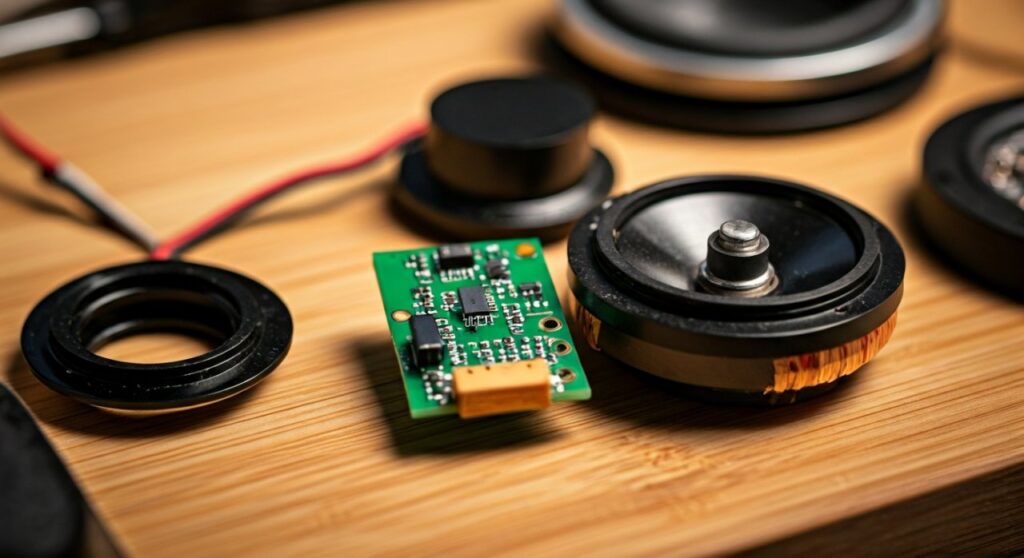
During my years of modding audio gear, I have successfully repurposed drivers from broken Sennheiser and Beyerdynamic units into desktop “monitors.” The process requires a basic understanding of impedance matching, soldering, and acoustic resonance to ensure you don’t blow the delicate voice coils.
TL;DR: Key Takeaways for Headphone-to-Speaker Conversion
- Feasibility: High. It is a straightforward DIY project for hobbyists.
- Audio Quality: Decent for mid-high frequencies; extremely poor for bass.
- Power Needs: Requires a small Class D amplifier (e.g., PAM8403) rather than a standard headphone jack.
- Best Use Case: Desktop “micro” speakers, retro-radio restorations, or private listening stations.
- Risk Level: Moderate. Pushing too much voltage will permanently melt the voice coil.
Understanding the Science: Can You Convert Headphone Drivers Into Speakers Safely?
To understand if you can convert headphone drivers into speakers, we must look at the physical differences between the two. A standard speaker driver is designed to move a large volume of air to create sound pressure that travels across a room.
A headphone driver, usually ranging from 30mm to 50mm, is designed for “pressure coupling” directly against your ear canal. When you remove that driver from the ear cup and place it in open air, you lose “bass impact” because the front and back sound waves cancel each other out—a phenomenon known as acoustic short-circuiting.
Impedance and Power Handling
Most consumer headphones have an impedance of 32 Ohms, while most home speakers are 4 Ohms or 8 Ohms.
- Lower Efficiency: Because the impedance is higher, a standard speaker amplifier might not deliver much power to the headphone driver.
- Delicate Diaphragms: Headphone diaphragms are incredibly thin (measured in microns).
- Heat Dissipation: Unlike large speakers, headphone drivers have no way to shed heat. If you crank the volume on a 20-watt amp, the driver will fail within seconds.
Comparing Driver Types for Speaker Conversion
Not all headphone drivers are created equal. In my testing, the driver technology significantly impacts how “loud” or “clear” your DIY speaker will be.
| Driver Type | Best Use Case | Sound Profile | Difficulty Level |
|---|---|---|---|
| Dynamic Drivers | General desktop audio | Balanced, easiest to power | Easy |
| Planar Magnetic | High-fidelity micro-speakers | Exceptional clarity, very quiet | Hard (Heavy magnets) |
| Electrostatic | Specialized tweeters | Ultra-high frequency detail | Expert (Requires high voltage) |
| Balanced Armature | Not Recommended | Tinny, no low-end | Not feasible |
Essential Tools and Materials Needed
Before starting your conversion, gather these specific components. Based on my experience, using a dedicated amplifier board is much better than trying to “overdrive” a standard phone or laptop jack.
- Donor Headphones: Large over-ear models (like Bose QuietComfort or Audio-Technica M50x) provide the best drivers.
- Mini Amplifier Board: A PAM8403 5V Auxiliary Module is perfect. It provides 3W per channel, which is plenty for headphone drivers.
- Enclosures: You can use 3D-printed boxes, small wooden crates, or even PVC pipe caps.
- Soldering Iron: A fine-tip iron with 60/40 Rosin Core Solder.
- Speaker Wire: 22-gauge wire is sufficient for these low-power applications.
- Power Source: A 5V USB power bank or wall adapter.
Step-by-Step Guide: How to Convert Headphone Drivers Into Speakers
Step 1: Extracting the Drivers
Carefully disassemble your donor headphones. Most high-end brands use clips or small Phillips screws hidden under the ear pads.
- Expert Tip: Use a plastic spudger to avoid puncturing the driver’s PET diaphragm.
- Desolder the existing wires from the driver terminals. Note the Positive (+) and Negative (-) markings; if they aren’t marked, look for a small red dot indicating the positive terminal.
Step 2: Building the Acoustic Enclosure
You cannot leave the driver “naked” or it will sound thin and tinny. To answer the question of how can you convert headphone drivers into speakers effectively, the answer lies in the enclosure.
- Seal the Back: Create a small airtight chamber behind the driver. This prevents the back-wave from cancelling out the front-wave.
- Add Damping: Line the inside of your box with a small amount of poly-fill or cotton. This reduces internal echoes and “boxiness.”
- Mounting: Use a bead of hot glue or silicone sealant to mount the driver flush against the front baffle.
Step 3: Wiring the Amplifier
Since headphone drivers require very little power, a Class D Micro-Amp is your best friend.
- Connect the L+ and L- outputs from the amp to your first driver.
- Connect the R+ and R- outputs to the second driver.
- Solder a 3.5mm Aux Cable to the input pins of the amplifier board.
- Connect the power leads to a USB power source.
Step 4: Testing and Calibration
When you first power on your DIY speakers, start with the volume at zero. Slowly increase it until you reach a comfortable listening level.
- Warning: If you hear “crackling” or “popping,” the driver is hitting its mechanical limit (Xmax). Lower the volume immediately to prevent permanent damage.
The Expert Perspective: Performance Expectations
I often get asked, “Will these sound as good as my Logitech or Creative speakers?” The honest answer is no.
Headphone drivers lack the “throw” (the distance the cone moves) to produce deep bass. In my workshop, I found that drivers from Beyerdynamic DT 770s (which have a 250-ohm impedance) produced a very “airy” and detailed sound when placed in a 0.5-liter wooden enclosure, but they completely lacked any “thump” below 200Hz.
Pro Advice: If you want better sound, use these drivers as Tweeters in a multi-way speaker system, rather than full-range drivers.
Common Challenges and Troubleshooting
Why is the sound so quiet?
If you are using a standard 3.5mm jack from a phone to power the “speakers,” the power is insufficient. Headphone jacks are designed to drive milliwatts. You must use an external amplifier board to get “speaker-level” volume.
Why is there no bass?
Physics is against you here. A 40mm driver simply cannot move enough air to produce sub-bass. To improve this, try a Bass Reflex design by adding a small “port” (a hollow tube) to your enclosure. This can tune the resonant frequency slightly lower.
The drivers are getting hot.
This is a sign of DC Offset or too much wattage. Check your solder joints for bridges and ensure your amplifier isn’t outputting more than 3-5 watts.
Creative Projects for Repurposed Drivers
If you have realized you can convert headphone drivers into speakers, here are three creative ways to use them:
- The “Vintage Radio” Mod: Take an old 1950s transistor radio, gut the electronics, and install high-quality headphone drivers and a Bluetooth amp module.
- Monitor Stand Speakers: Mount the drivers directly into the underside of your monitor stand for a “stealth” audio setup.
- Gaming Pillow: Sew the drivers into a travel pillow for a private, immersive gaming experience that doesn’t require wearing a headset.
Safety Considerations
- Hearing Safety: Even though they are now “speakers,” these drivers can still produce high-frequency peaks that are harsh. Do not listen to them at maximum volume if they are close to your face.
- Fire Hazard: Cheap lithium-ion batteries in DIY projects are a risk. Always use a fused power supply or a reputable power bank.
- Driver Fragility: The “voice coil” wire is thinner than a human hair. Handle it with extreme care during soldering.
Frequently Asked Questions (FAQ)
Can I use Bluetooth with my converted headphone speakers?
Yes! Instead of a standard PAM8403 amp, purchase a Bluetooth 5.0 Amplifier Board (like the XY-WRBT). This allows you to stream music wirelessly to your DIY speakers.
Will converting them ruin the drivers for future headphone use?
Generally, yes. To mount the drivers in a speaker enclosure, you usually need to use adhesives or modify the housing. It is very difficult to “re-install” them into headphones once they have been converted.
What is the best enclosure material for headphone drivers?
In my experience, Medium Density Fiberboard (MDF) or thick Acrylic provides the best acoustic properties. They are dense enough to prevent the enclosure from vibrating, which keeps the sound clear.
Can I connect two headphone drivers to one channel?
You can, but you must be careful with impedance. Wiring two 32-ohm drivers in parallel creates a 16-ohm load. Wiring them in series creates a 64-ohm load. Most small amps handle 16-ohm loads better than 64-ohm loads.
Final Thought: While converting headphone drivers into speakers won’t replace a high-end home theater system, it is a rewarding way to recycle “dead” tech and learn the fundamentals of audio engineering and electronics.









