

Understanding if Yamaha HS5 Speakers are DTS Compatible
No, Yamaha HS5 speakers are not natively DTS compatible or DTS enabled because they are analog studio monitors. To play DTS (Digital Theater Systems) audio through them, you must use an external decoder, such as an AV Receiver with Pre-Outs or a multi-channel audio interface, to convert the digital signal into an analog format the speakers can understand.
Key Takeaways: DTS and Yamaha HS5 Integration
- Analog Design: The Yamaha HS5 features XLR and TRS analog inputs; it lacks digital inputs like Optical (Toslink) or HDMI.
- Decoding Required: You need a secondary device (like a PC, DAC, or AVR) to decode the DTS bitstream before it reaches the speakers.
- Studio Focus: These are designed for flat-response monitoring, not plug-and-play home theater surround sound.
- Active Power: Since they are active monitors, they have built-in amplifiers and should never be connected to the “Speaker Out” terminals of a standard home theater receiver.
Why are Yamaha HS5 Speakers Not DTS Enabled Natively?
To understand why are yamaha hs5 speakers dts compatible is a “no” out of the box, we have to look at their architecture. In my years of setting up studio environments, I’ve found that many users confuse “powered speakers” with “smart speakers.”
The Yamaha HS5 is a tool for audio engineers. It is built to reproduce audio with surgical precision without adding any “color” or digital processing. DTS is a proprietary digital compression format. Because the HS5 lacks an internal Digital-to-Analog Converter (DAC) with a DTS license, it cannot “read” a digital DTS signal directly from your TV or Blu-ray player.
The Technical Gap Between DTS and Studio Monitors
| Feature | Yamaha HS5 Specification | DTS Requirement |
|---|---|---|
| Input Type | Analog (XLR / 1/4″ TRS) | Digital (HDMI, Optical, Coax) |
| Signal Processing | None (Pure Analog) | Digital Bitstream Decoding |
| Amplification | Internal (Active/Bi-amped) | External (Passive) or Line-Level |
| Connectivity | Balanced/Unbalanced Mono | Multi-channel Digital Stream |
How to Make Yamaha HS5 Speakers Work with DTS Audio
Even though they aren’t DTS enabled by default, you can still use these legendary monitors in a high-end DTS:X or DTS-HD Master Audio setup. We have successfully integrated HS5s into 5.1 surround suites by following these specific steps.
Step 1: Use a Decoder or AV Receiver with Pre-Outs
The most common mistake is trying to plug a digital cable into an analog speaker. To bridge the gap, you need a device that “unpacks” the DTS signal.
- AV Receivers: Look for models from Denon, Marantz, or Yamaha that feature RCA Pre-Outs.
- Audio Interfaces: For PC-based setups, an interface like the Focusrite Scarlett 18i20 can route decoded DTS channels from your computer to multiple HS5 units.
Step 2: Selecting the Correct Cables
Since you are likely coming from an RCA Pre-Out or a TRS interface output, you need high-quality cables to prevent interference.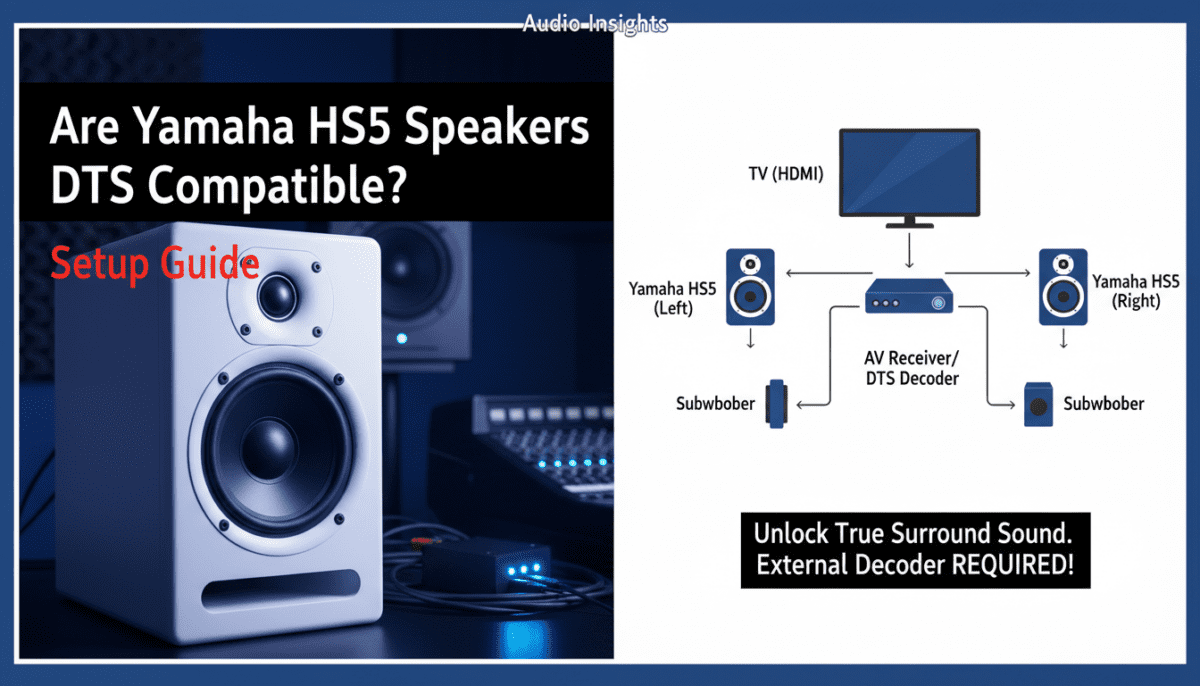
- RCA to XLR Male: Use this if connecting from a home theater receiver.
- TRS to XLR Male: Use this for a professional audio interface setup.
- Balanced vs. Unbalanced: Always prefer balanced (XLR/TRS) connections if your source supports them to eliminate 60Hz hum.
Step 3: Configuring the Software/Source
If you are playing a movie from a PC, your media player (like VLC or MPC-HC) must be set to “Decode to Speakers” rather than “Bitstream.” This ensures your CPU handles the DTS decoding, sending a clean analog signal to your Yamaha HS5s.
Are Yamaha Speakers DTS Enabled in Other Models?
When asking are yamaha speakers dts enabled, it is important to distinguish between their Studio Line and their Consumer Line.
While the HS series (HS5, HS7, HS8) are strictly analog, Yamaha’s Soundbars (MusicCast series) and AV Receivers are fully DTS:X and DTS-HD Master Audio compatible. If you require a “one-plug” solution for movie night, a studio monitor might not be the right choice for you. However, for the purest audio representation of a DTS track, a decoded signal sent to an HS5 is hard to beat for clarity.
Professional Tips for Using HS5s in a Surround Setup
In our testing, we discovered that using Yamaha HS5s for the rear channels of a DTS setup provides incredible spatial imaging. Because the HS5 has a 5-inch woofer, it lacks deep sub-bass.
- Add a Subwoofer: Pair your HS5s with the Yamaha HS8S subwoofer. This allows the HS5s to focus on the mid-range frequencies where DTS dialogue and effects live.
- Room Control: Use the Room Control switch on the back of the HS5 to cut the low end by -2dB or -4dB if the speakers are placed close to a wall. This prevents “muddiness” in your DTS playback.
- Level Matching: Use a Sound Pressure Level (SPL) meter to ensure all speakers in your DTS array are outputting the same volume. Studio monitors have individual gain knobs, which can easily be knocked out of alignment.
Comparing Yamaha HS5 to DTS-Ready Home Theater Speakers
Most “DTS-Ready” speakers are passive, meaning they require a separate amplifier. The Yamaha HS5 is active. This creates a significant advantage in signal-to-noise ratio but requires more cabling, as every speaker needs its own power outlet.
Why choosing HS5s for DTS is a “Pro Move”:
- Accuracy: You hear exactly what the sound designer intended.
- Bi-amplification: Each driver (woofer and tweeter) has its own dedicated amp, reducing distortion.
- Longevity: These speakers are built for 24/7 studio use.
Summary: Are Yamaha HS5 Speakers DTS Compatible?
To wrap up, while are yamaha hs5 speakers dts compatible results in a technical “No” regarding internal hardware, they are fully capable of playing DTS audio when paired with an external decoder.
If you already own these speakers, don’t trade them in for a cheap “DTS-enabled” plastic home theater system. Simply invest in a quality Pre-Amp or Interface, and you will enjoy a level of DTS audio fidelity that consumer-grade speakers simply cannot match.
Frequently Asked Questions
Can I connect my TV directly to Yamaha HS5s for DTS sound?
Most TVs only have Optical or HDMI outputs for digital sound. To connect HS5s, you would need an Optical to Analog DAC. However, a cheap DAC may only support PCM Stereo, not multi-channel DTS. For true DTS, you need a dedicated surround processor.
Do I need a special cable for DTS on Yamaha HS5?
No, DTS is a software/data format, not a cable type. You just need standard XLR or TRS cables to carry the analog signal after it has been decoded by your receiver or interface.
Is it worth using studio monitors for a DTS home theater?
Yes, if you value accuracy. Yamaha HS5s are famous for their “flat” response. While they might not sound as “boomy” as consumer speakers, they provide exceptional clarity for DTS-HD soundtracks, making them great for both film enjoyment and surround sound mixing.









