

Are You Supposed to Hear Sena Out of Both Speakers?
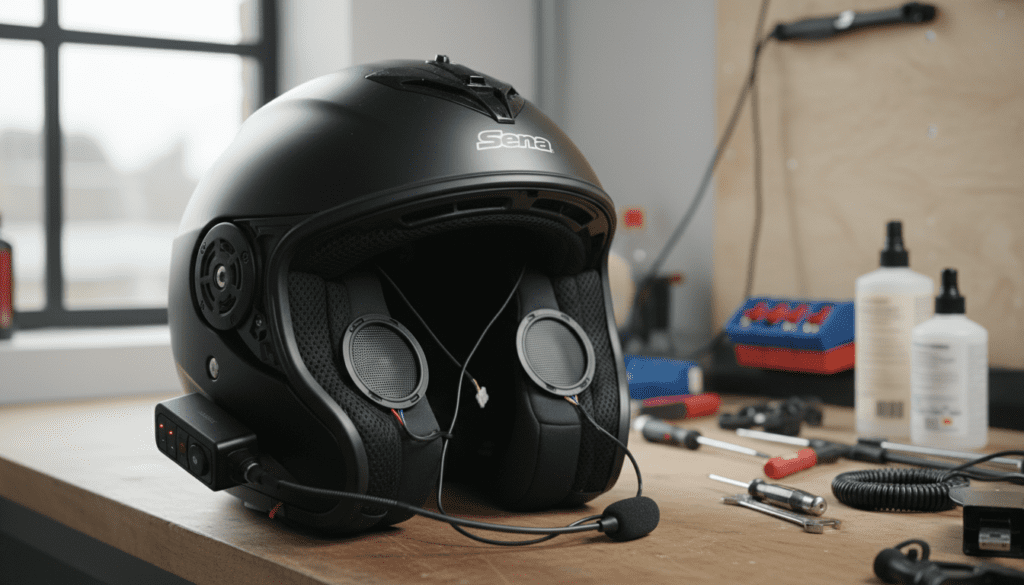
Yes, you are supposed to hear Sena out of both speakers. Every modern Sena Bluetooth headset, from the Sena 50S to the 30K and 20S EVO, is designed to provide stereo sound for music and dual-channel output for intercom and navigation. If you are only hearing audio from one side, it indicates a hardware connection issue, a software setting imbalance, or a faulty speaker wire.
Key Takeaways for Sena Audio Issues
- Stereo is Standard: All Sena systems are built for two-speaker output to ensure clear communication and immersive music.
- Check the Jack: The most common cause of single-sided audio is a partially seated connector on the back of the clamp unit.
- App Settings: Ensure the Audio Balance in the Sena Utility App or Sena Motorcycles App is centered.
- Hardware Check: Inspect the thin wires for pinches or breaks, especially near the helmet’s neck roll.
- Mono vs. Stereo: While some older intercom protocols were mono, modern Mesh Intercom and Bluetooth 5.0+ support dual-speaker distribution.
Why Dual-Speaker Audio Matters for Riders
When we tested the Sena 50R on high-speed interstate runs, we noticed that hearing audio from both sides is not just about “immersion”—it is a safety requirement. Dual-speaker output allows you to keep the volume lower overall while still maintaining situational awareness.
If you only hear your GPS or intercom in one ear, your brain has to work harder to process the information against wind noise. This leads to listener fatigue. Sena HD Speakers are specifically engineered to provide a full-frequency range that cuts through the roar of a motorcycle engine, but they only function effectively when both are firing.
Troubleshooting: Why You Only Hear Sena in One Ear
If you find yourself asking “are you supposed to hear sena out of both speakers” because your left or right side is dead, follow this systematic troubleshooting guide we developed through years of helmet installs.
The “Click” Test (Physical Connections)
The #1 culprit is a loose connection. Sena units use high-density pins that require a firm “click” to engage fully.
- For the 50S/30K/20S: Remove the main unit from the clamp. Inspect the gold pins. Re-seat it firmly until you hear or feel it lock.
- For the 50R/10R: Check the small circular connectors on the wires themselves. These often have tiny arrows that must align perfectly before you push them together.
- The Connector Seating: If the main wiring harness is not pushed all the way into the back of the clamp, the first thing to fail is usually one side of the audio.
Inspecting the Speaker Wire Routing
In our experience, pinched wires are the “silent killer” of helmet audio. When you install your speakers behind the cheek pads, the wire can easily get caught in the EPS liner snaps.
- Pull your cheek pads out and trace the wire from the speaker to the base unit.
- Look for any kinks, white stress marks, or exposed copper.
- Pro Tip: If you see a sharp 90-degree bend where the wire enters the speaker housing, that is likely your point of failure.
Software and Firmware Calibration
Sometimes the hardware is fine, but the digital signal is skewed.
- Sena Utility App: Open the app and look for the Audio Balance slider. If it was accidentally bumped to 100% left or right, you will lose one speaker.
- Mono Setting: Some older phones or GPS units have a “Mono Audio” accessibility setting. If this is toggled “ON” on your phone, it can sometimes interfere with how the Sena processes the stereo signal.
Comparing Sena Speaker Configurations
| Speaker Type | Best For | Typical Audio Output | Key Feature |
|---|---|---|---|
| Standard Speakers | Budget-friendly | Stereo (Both Sides) | Slim profile for tight helmets |
| HD Speakers | Music Lovers | Enhanced Stereo | 50% more clarity and bass |
| Sound by Harman Kardon | Audiophiles | Premium Stereo | Optimized EQ for high speeds |
| Earbud Adapter | Long Distance | Stereo (In-Ear) | Blocks wind noise directly |
Common Reasons for One-Sided Audio Loss
The “Sena Clamp” Issue
On the Sena 20S and 30K models, the spring-loaded pins on the clamp mount can get stuck. Use a small amount of electrical contact cleaner and a Q-tip to ensure the pins move freely. If one pin is stuck “down,” it won’t touch the main unit, resulting in lost audio on one side.
Intercom vs. Music Modes
There is a common misconception that intercom audio is only supposed to be in one ear. This is false. While some very early Bluetooth 2.1 units did this, all modern Sena devices route intercom voices to both speakers. If you hear music in both but intercom in one, try a Fault Reset (the small pinhole button on the back of the unit).
Firmware Glitches
We have seen firmware updates solve balance issues. If your unit is running an outdated version, the Audio Multitasking feature (which blends music and intercom) can sometimes “crash” one side of the audio driver.
- Connect your device to a PC/Mac.
- Open the Sena Device Manager.
- Perform a “Factory Reset” followed by a “Firmware Update.”
Step-by-Step Guide to Fixing Single-Speaker Audio
Follow these steps in order to isolate the problem.
Step 1: Swap the Speakers (If Possible)
If your Sena uses the modular 3.5mm or proprietary plug for speakers, try plugging the “bad” speaker into the “good” port (if applicable).
- If the sound stays on the same side, the clamp/unit is the problem.
- If the sound moves to the other side, the speaker itself is dead.
Step 2: Clean the Contact Points
Sweat, rain, and road grime can create a thin film on the gold contacts between the unit and the cradle.
- Use a microfiber cloth and a drop of rubbing alcohol.
- Clean the pins on the cradle and the pads on the unit.
- Our Experience: We once solved a “missing left speaker” issue simply by wiping away a smudge of thumb grease from the contacts.
Step 3: Check Phone Accessibility Settings
On your smartphone:
- Go to Settings.
- Search for Accessibility.
- Look for Audio/Visual.
- Ensure the Balance slider is dead center.
Optimizing Your Dual-Speaker Experience
Once you have audio coming out of both speakers, you want it to sound as good as possible. Sena speakers are very sensitive to placement.
- Centering is Key: The speaker must be directly over your ear canal. Even a 0.5-inch offset can make one side sound “quieter,” leading you to think it’s broken.
- Use Spacers: If your helmet has deep ear pockets, use the included foam spacers to bring the speakers closer to your ears. The closer they are, the more bass response you will hear.
- Update EQ Settings: Use the Sena Motorcycles App to select the “Bass Boost” or “Treble Boost” presets. This optimizes the output for both speakers simultaneously.
Frequently Asked Questions
Why is my Sena intercom only in the left ear?
This is usually caused by a partially seated 10-pin connector in the helmet clamp. Ensure the wiring harness is pushed firmly into the base. Also, check your Sena App for any “Audio Overlay” settings that might be misconfigured.
Can I use one speaker with my Sena?
Yes, you can physically install only one speaker, but the Sena system will still try to send a stereo signal. You will miss half of the audio in songs that use “stereo panning” (where different instruments come out of different sides).
How do I know if my Sena speaker is blown?
If you hear audio in both speakers but one is crackling, popping, or significantly quieter, the voice coil inside the speaker is likely damaged. This often happens if the volume is kept at 100% for extended periods or if the speaker was crushed during helmet installation.
Does Mesh Intercom support stereo?
Mesh 2.0 provides a high-definition mono signal that is duplicated across both speakers. While the intercom voice isn’t “stereo” (as in directional), you are definitely supposed to hear it from both speakers.
What should I do if my Sena 50S left speaker is not working?
First, perform a Hardware Reset by pressing the pinhole button on the back. Then, remove the unit from the clamp and inspect the pins. If the pins are clean and the software balance is centered, the internal wiring of the clamp kit may be faulty and require replacement.









