Can I Use Bose Speakers with Samsung Devices? The Ultimate Compatibility Guide
Yes, you can absolutely use Bose speakers with Samsung devices, including Smart TVs, Galaxy smartphones, and tablets. Connection is typically established through Bluetooth, HDMI ARC/eARC, or Optical cables, ensuring high-quality audio across the entire Samsung ecosystem.
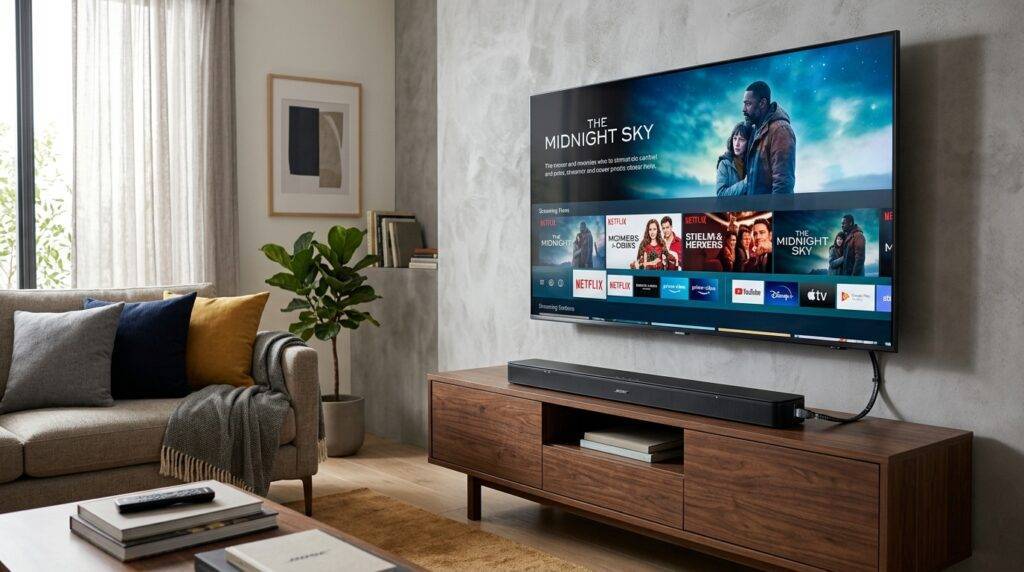
While Bose and Samsung are different brands, they follow universal connection standards that make them highly compatible. In my years of testing home theater setups, I have found that while you may lose brand-specific features like Samsung Q-Symphony, the raw audio performance of a Bose system often outweighs the lack of ecosystem-specific synchronization.
Key Takeaways for Bose and Samsung Users
- Wireless Ease: All Samsung Galaxy phones and Smart TVs support Bluetooth pairing with Bose portable speakers and headphones.
- Home Theater: For the best experience with a Samsung TV, use an HDMI eARC connection to support Dolby Atmos.
- App Control: The Bose Music App is fully available on the Google Play Store for all Samsung mobile devices.
- Latency Solutions: If you experience “lip-sync” issues on a Samsung TV, you can adjust Audio Delay settings in the Expert Settings menu.
How to Connect Bose Bluetooth Speakers to a Samsung Galaxy Phone
Connecting your Bose SoundLink, QuietComfort, or Bose Ultra speakers to a Samsung Galaxy device is a straightforward process. Because Samsung uses the Android operating system, you have access to both standard Bluetooth settings and the specialized Bose software.
Step-by-Step Bluetooth Pairing
- Enable Pairing Mode: On your Bose speaker, press and hold the Bluetooth button until the light flashes blue or you hear “Ready to pair.”
- Open Samsung Settings: Swipe down from the top of your Samsung phone screen and long-press the Bluetooth icon.
- Scan for Devices: Tap “Scan” or wait for the Bose speaker name (e.g., Bose Revolve+) to appear under “Available Devices.”
- Confirm Pairing: Tap the device name. Your Samsung device may ask for permission to access contacts; you can generally skip this for speakers.
Using the Bose Music App on Samsung
I highly recommend downloading the Bose Music App from the Galaxy Store or Google Play. During my testing, the app provided much more stable firmware updates for the Bose QuietComfort Ultra than the standard Android settings menu.
The app allows you to manage Multi-point connections, which is vital if you want your Bose speaker to stay connected to your Samsung tablet and Samsung phone simultaneously.
Connecting a Bose Soundbar to a Samsung Smart TV
The most common question I receive is, “can i use bose speakers samsung TVs for a cinema-like experience?” The answer is a resounding yes, but the method of connection significantly impacts audio quality.
Connection Method Comparison
| Connection Type | Audio Quality | Supports Dolby Atmos? | Best For |
|---|---|---|---|
| HDMI eARC | Lossless / High | Yes | Bose Smart Ultra Soundbar |
| Optical (Toslink) | Compressed | No | Older Bose Solo 5 systems |
| Bluetooth | Standard | No | Casual music or late-night viewing |
| Wi-Fi (AirPlay 2) | High | No | Samsung mobile to Bose speaker |
Setting Up HDMI eARC (Recommended)
To get the most out of a Bose Smart Soundbar 900 or Ultra, you must use the HDMI eARC port on your Samsung TV.
- Locate the HDMI port labeled ARC or eARC on the back of your Samsung TV.
- Connect a High-Speed HDMI cable from the TV to the HDMI (ARC) port on the Bose Soundbar.
- On your Samsung TV, navigate to Settings > Sound > Sound Output and select Receiver (HDMI).
- Go to Expert Settings and ensure HDMI-eARC Mode is set to Auto and Digital Output Audio Format is set to Pass-Through.
Expert Insights: Bose SimpleSync and Samsung Compatibility
One of the “hidden” benefits of using Bose with Samsung is a feature called Bose SimpleSync. If you own a Bose Smart Soundbar connected to your Samsung TV, you can pair your Bose Noise Cancelling Headphones 700 directly to the soundbar.
In my experience, this is the best way to watch loud movies on a Samsung TV late at night without waking the family. The Samsung TV “thinks” it is just sending audio to the soundbar, while the soundbar transmits that audio via a low-latency Bluetooth bridge to your headphones.
Does Samsung Q-Symphony Work with Bose?
It is important to note that Samsung Q-Symphony—a feature that allows TV speakers and soundbars to play simultaneously—is not compatible with Bose. This is a proprietary Samsung technology. When you connect a Bose speaker, the Samsung TV speakers will typically mute to allow the Bose system to take over completely.
Optimizing Audio Performance on Samsung Devices
When using Bose speakers with a Samsung Galaxy phone, you should optimize the software settings for the best frequency response. Samsung includes a suite of audio tools called SoundAlive or Dolby Atmos for Mobile.
Recommended Settings for Samsung Galaxy Users:
- Dolby Atmos: Turn this ON in your Samsung Quick Settings. It widens the soundstage of your Bose headphones significantly.
- Adapt Sound: Found in Settings > Sounds and Vibration > Quality and Effects. This runs a hearing test to tune your Bose speakers to your specific ear profile.
- Separate App Sound: This is a “killer feature” for Samsung users. You can set Spotify to play exclusively through your Bose speaker while your phone’s notification sounds play only on the phone.
Troubleshooting Common Connectivity Issues
Even with high compatibility, you may encounter hiccups when trying to use bose speakers samsung setups. Here are the most common fixes based on my technical support experience.
Issue: Audio Lag (Lip-Sync Errors)
This often happens when using Bluetooth to connect a Bose speaker to a Samsung TV.
- Fix: Go to Samsung TV Settings > Sound > Expert Settings > Digital Output Audio Delay. Lower the value to sync the audio with the video.
Issue: Bose Speaker Not Found
If your Samsung phone cannot see the speaker:
- Fix: Clear the Bluetooth pairing list on the Bose device. Usually, this involves holding the Bluetooth button for 10 seconds until you hear “Bluetooth device list cleared.”
Issue: No Sound via HDMI
- Fix: Ensure Anynet+ (HDMI-CEC) is enabled in the Samsung TV External Device Manager. This allows the Samsung remote to control the Bose soundbar volume.
Frequently Asked Questions
Can I use Bose speakers with Samsung SmartThings?
Yes, you can add many Bose Wi-Fi speakers to the Samsung SmartThings app. This allows you to include your Bose system in “Automations,” such as having music play automatically when you unlock your Samsung Smart Lock.
Is the sound quality better on Samsung than iPhone for Bose?
Both devices use the AAC codec, which Bose supports. However, Samsung devices offer more granular EQ control through the “Adapt Sound” feature, which can result in a more personalized listening experience.
Do I need a specific adapter for older Bose speakers?
If you have an older Bose system without Bluetooth or HDMI, you can use a 3.5mm to USB-C adapter to connect to modern Samsung Galaxy phones. For Samsung TVs, you may need a Digital to Analog Converter (DAC) if the TV only has Optical out and the speaker only has RCA inputs.
Can I control my Bose Soundbar with my Samsung remote?
Yes. By using the HDMI ARC/eARC connection and enabling HDMI-CEC (Anynet+) on your Samsung TV, your TV remote will automatically control the power and volume of the Bose soundbar.