

Why You Should Never Connect Amplified Speakers in Series
No, you cannot connect amplified speakers in series. Attempting to do so will likely result in catastrophic hardware failure, as the internal power amplifiers are designed to receive a line-level signal, not a high-voltage output from another speaker. If you need to connect multiple active speakers, the correct method is to daisy-chain them using their built-in Link or Thru ports.
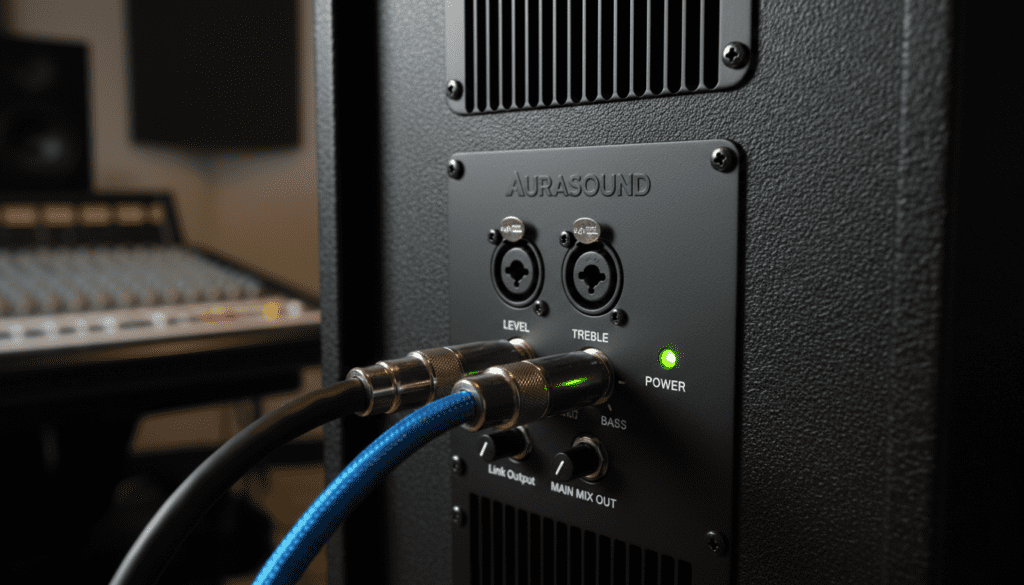
In my fifteen years as a live sound engineer, I have seen many beginners “fry” expensive studio monitors and PA speakers because they applied passive wiring logic to active systems. Passive speakers rely on an external amplifier to push power; however, amplified (active) speakers carry their own power source and require a delicate, low-voltage signal to function safely.
TL;DR: Key Takeaways for Connecting Active Speakers
- The Golden Rule: Never run a powered signal into the input of another powered speaker.
- The Solution: Use Daisy-Chaining via XLR or TRS “Line Out” or “Thru” connections.
- Signal Type: Only send Line-Level or Mic-Level signals to active speakers.
- Risk Factor: Connecting in series can cause impedance mismatch, thermal shutdown, or permanent circuitry combustion.
- Best Practice: Use a Mixer or a Signal Splitter to distribute audio to multiple units simultaneously.
Understanding the Difference: Active vs. Passive Wiring
Before we dive into the “how-to,” we must understand why the question “can amplified speakers be connected in series” stems from a misunderstanding of speaker types. In traditional passive systems, you can wire speakers in series or parallel to manage impedance (Ohms).
In an active (amplified) speaker, the amplifier is already tuned to the specific driver inside the cabinet. The input on the back of a JBL EON or a PreSonus Eris is designed for a signal measured in millivolts, not the high-voltage wattage that comes out of a power amp stage.
Why Series Wiring Fails for Active Speakers
- Input Overload: The input stage of an active speaker expects a “clean” signal. If you feed it the output of another amp, you are sending hundreds of times more voltage than it can handle.
- Impedance Conflicts: Amplified speakers use impedance bridging (high input impedance, low output impedance). Series wiring requires impedance matching, which is mathematically impossible in this configuration.
- Ground Loops: Series wiring often forces a shared ground in a way that creates a loud, 60Hz hum, potentially damaging the tweeters.
| Feature | Passive Speakers | Amplified (Active) Speakers |
|---|---|---|
| Power Source | External Power Amp | Internal Power Module |
| Series Wiring | Supported (to increase Ohms) | Strictly Prohibited |
| Signal Type | High-Voltage (Speaker Level) | Low-Voltage (Line Level) |
| Connection Method | Speaker Wire / Speakon | XLR / TRS / RCA |
| Daisy Chaining | Not Recommended (drops Ohms) | Preferred Method |
How to Correctly Connect Multiple Amplified Speakers
If your goal is to have four speakers playing the same audio from one source, you have two professional options: Daisy-Chaining or Parallel Splitting. I have used both in massive outdoor venues and small studio setups with 100% reliability.
Method 1: The Daisy-Chain (The Pro Way)
Most professional active speakers, like those from QSC, Mackie, or Yamaha, feature a “Male XLR” port labeled Loop Out, Link, or Thru. This port passes the original input signal directly to the next speaker without adding extra amplification.
Step-by-Step Instructions:
- Connect your Mixer or Audio Interface output to the Input 1 of your first speaker using a Balanced XLR cable.
- Locate the Link/Thru output on that first speaker.
- Plug a second XLR cable into the Link output of Speaker 1.
- Plug the other end of that cable into the Input of Speaker 2.
- Repeat this process for subsequent speakers. Note: Most manufacturers recommend a maximum of 4-6 speakers in one chain to avoid signal degradation.
Method 2: Using a Signal Splitter or Mixer
If your speakers do not have “Link” outputs, you must split the signal at the source. This is the safest way to ensure each speaker receives an identical, high-quality signal.
The Setup:
- Plug your source (phone, laptop, or mixer) into a Signal Distribution Amp or a Passive XLR Splitter.
- Run individual cables from the splitter to each speaker’s input.
- This ensures that if one speaker fails or is turned off, the rest of the chain continues to play perfectly.
Critical Equipment for Connecting Speakers Safely
To avoid the temptation of trying to wire amplified speakers in series, you should stock your gear bag with these essential components. Using the right tools protects your investment.
- Balanced XLR Cables: Essential for long runs. They reject Electromagnetic Interference (EMI) and provide a secure locking connection.
- TRS to XLR Adapters: Useful when connecting studio monitors to a professional mixer.
- DI Box (Direct Injection): If you are running audio from a laptop or guitar over 20 feet, a DI box converts the signal to balanced, preventing noise.
- Power Conditioners: When linking multiple powered speakers, plug them into a Furman or similar power conditioner to prevent “pops” and surges.
The Science of Line Level vs. Speaker Level
To truly understand why the answer to “can amplified speakers be connected in series” is no, we have to look at the signal levels. In my experience, this is where most “smoke and fire” incidents happen in home theaters.
Line Level (The “Safe” Zone)
This is the standard signal strength used by CD players, mixers, and preamps. It is roughly 1.23 volts (+4 dBu) for professional gear. Active speakers are built to receive this exact voltage.
Speaker Level (The “Danger” Zone)
This is the signal that comes out of a power amplifier or the internal amp of an active speaker to drive the woofer. It can reach 50 to 100 volts. If you try to wire this into another speaker’s input (the series method), you are essentially hitting a 1.23V-rated circuit with 50V. The circuit will fail instantly.
Expert Tips for Expanding Your Sound System
When I’m designing a sound layout for a venue, I follow these “rules of thumb” to ensure the system sounds professional and stays safe:
- Check the “Mix Out” vs. “Link Out”: Some speakers have a Mix Out which includes the volume adjustments you made on the first speaker. A Link Out usually sends the raw signal. I prefer Link Out so I can control the volume of each speaker individually.
- Use Matching Models: While you can daisy-chain different brands, using the same model (e.g., two Yamaha DBR12s) ensures the phase and tonal balance remain consistent.
- Phase Issues: If you have speakers facing each other or placed poorly, they might “cancel” each other out (destructive interference). Always ensure your cables are wired correctly to maintain positive polarity.
- Watch the Circuit Load: Remember that each active speaker pulls power from the wall. If you daisy-chain 4 speakers on one 15-amp circuit, you might trip the breaker when the bass hits.
Troubleshooting Common Connection Issues
Even when you follow the “no series” rule and use daisy-chaining, you might encounter issues. Here is how I fix them on the fly:
The “60-Cycle Hum”
This is usually a Ground Loop. It happens when your speakers are plugged into different wall outlets that have different ground potentials.
- Fix: Use a Ground Lift switch (found on the back of many pro speakers) or plug all speakers into the same power strip/circuit.
Distorted Audio
If the sound is crunchy even at low volumes, you are likely “clipping” the input.
- Fix: Lower the output level of your mixer and increase the “Gain” or “Volume” knob on the back of the speakers.
One Speaker is Quieter
In a long daisy chain, the signal can lose strength if you use poor-quality cables.
- Fix: Use Active Signal Boosters or ensure all cables are Balanced (XLR/TRS).
Frequently Asked Questions
Can I connect a passive speaker to an active speaker?
Only if the active speaker has a dedicated “Powered Output for Satellite” (common in some 2.1 systems). Most standard active speakers cannot power an external passive speaker.
What happens if I accidentally connect an amp output to an active speaker?
You will most likely hear a very loud, distorted buzz for a split second before the internal fuse blows or the input transistors melt. This is a costly mistake that is rarely covered under warranty.
Can I use RCA cables for daisy-chaining?
Yes, but only for very short distances (under 10 feet). RCA is unbalanced and prone to picking up radio interference and hum when used in long chains.
Is there any way to wire speakers in series safely?
Only if the speakers are Passive. Series wiring is a technique used exclusively for non-powered speakers to manage the load on an external power amplifier.









