

How to Connect Canton Plus L Speakers to Your Computer
Canton Plus L speakers can be plugged into a computer, but they require an external amplifier or receiver to function because they are passive speakers. Since your computer’s sound card does not provide enough power to drive the voice coils in these high-fidelity German monitors, a dedicated power source is necessary.
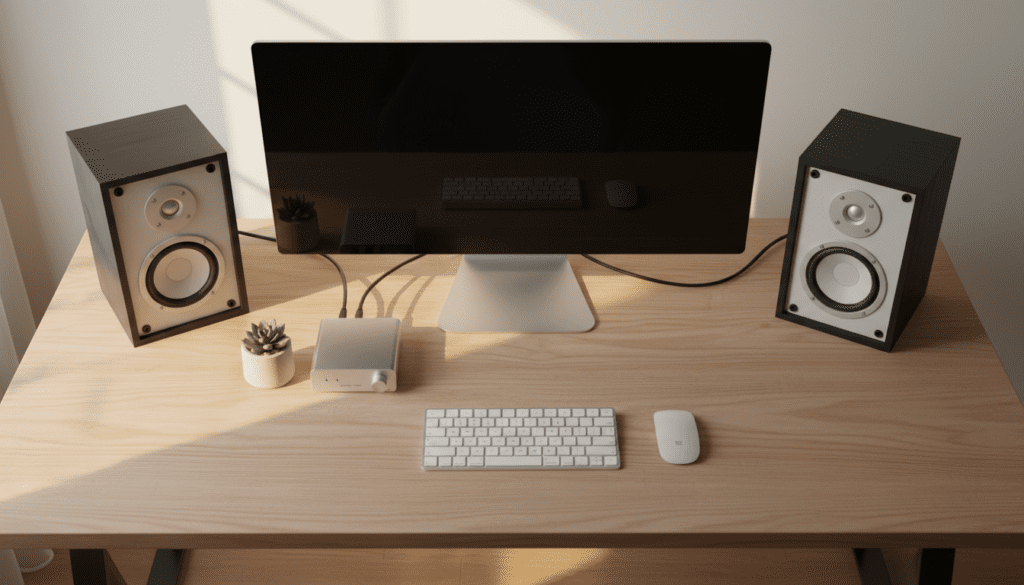
I have spent over a decade integrating vintage hifi gear into modern digital workspaces. The Canton Plus L is a legendary piece of audio engineering, known for its aluminum-manganese tweeters and robust 4-8 ohm impedance. However, connecting them to a PC requires a specific signal path to avoid damaging your hardware or suffering from “thin” audio quality.
Key Takeaways for Your Desktop Setup
- Passive Requirement: You cannot use a simple 3.5mm-to-wire adapter; you must use an amplifier.
- Power Matching: The Canton Plus L handles 50W to 80W, so look for a Class D desktop amp for the best desk-space efficiency.
- Cable Quality: Use at least 16-gauge oxygen-free copper (OFC) speaker wire to maintain signal integrity.
- Digital-to-Analog Converter (DAC): For the best sound, use an external USB DAC instead of your computer’s motherboard audio jack.
Why You Need an Amplifier for Canton Plus L Speakers
The Canton Plus L is a passive speaker, meaning it does not have a built-in power cord or internal volume control. In a traditional setup, these were used as satellite speakers in a home theater or high-end bookshelf units.
Your computer’s 3.5mm “Line Out” or “Headphone Jack” sends a “Line Level” signal. This signal is high in information but extremely low in electrical current. If you were to wire the Canton Plus L directly to this jack, the sound would be either non-existent or so quiet and distorted that it would be unlistenable.
The Signal Path
To answer “can Canton Plus L speakers be plugged into a computer,” you must follow this specific chain:
- Source: Computer (USB or 3.5mm Output).
- Conversion: DAC (Optional but recommended for high-fidelity).
- Gain: Integrated Amplifier or Power Amplifier.
- Output: Canton Plus L Speakers.
Essential Gear for the Connection
Before you start the physical setup, ensure you have the following components. In my experience, choosing the right amplifier is the difference between these speakers sounding “boxy” or sounding “ethereal.”
| Component | Recommended Specification | Purpose |
|---|---|---|
| Amplifier | 40W – 100W per channel (4-8 Ohm compatible) | Powers the passive drivers. |
| Audio Cable | 3.5mm to RCA (Stereo Breakout) | Connects PC to the Amplifier. |
| Speaker Wire | 14 or 16 AWG Oxygen-Free Copper | Connects Amp to Canton Plus L. |
| Banana Plugs | Closed-screw type (optional) | Ensures a secure, oxidation-free connection. |
| Desktop DAC | 24-bit / 192kHz resolution | Bypasses noisy internal PC components. |
Step-by-Step Guide: Connecting Your Canton Plus L to a PC
Follow these steps to ensure a safe and high-performance installation.
Prepare Your Speaker Wire
The Canton Plus L features high-quality spring clips or screw terminals on the rear.
- Strip about 1/2 inch of insulation from both ends of your speaker wire.
- Twist the copper strands tightly to prevent “fraying,” which can cause a short circuit if a stray strand touches the neighboring terminal.
- Pro Tip: If your amplifier supports them, use banana plugs. They make the desktop setup much cleaner and easier to move.
Connect the Amplifier to the Speakers
Maintaining polarity is the most critical part of this step.
- Connect the Red (+) terminal on the back of the Canton Plus L to the Red (+) terminal on your amplifier.
- Connect the Black (-) terminal to the Black (-) terminal.
- Warning: If you swap these (out of phase), your bass response will virtually disappear, and the stereo image will feel “hollow.”
Connect the Computer to the Amplifier
You have two primary ways to do this:
- Option A (Budget): Use a 3.5mm to RCA cable. Plug the 3.5mm end into your PC’s green “Line Out” jack and the RCA ends into the “Input” of your amp.
- Option B (High Performance): Connect a USB DAC to your computer. Then, run RCA cables from the DAC to the amplifier. This is how I personally run my Canton setup to eliminate the “hiss” often found in motherboard audio.
Power On and Initial Testing
- Set your computer’s system volume to about 70%.
- Turn the physical volume knob on your amplifier to the lowest setting.
- Power on the amp and slowly turn the knob up until you hear audio.
- Technical Note: The Canton Plus L has an impedance of 4…8 ohms. Ensure your amplifier is rated to handle 4-ohm loads, as some cheaper receivers are only rated for 8 ohms and may overheat.
Optimizing the Canton Plus L for Near-Field Desktop Use
Since these speakers were originally designed for room-filling sound, using them as desktop monitors requires some adjustment.
Speaker Placement
The Canton Plus L uses a high-quality 25mm dome tweeter. For the best “imaging” (the ability to hear exactly where instruments are located), the tweeters should be at ear level.
- Desktop Stands: Use slanted foam pads or “ISO-stands” to angle the speakers upward toward your ears.
- The Golden Triangle: Position the speakers as far apart from each other as they are from your head.
Managing the Bass
The Plus L is a sealed or small-ported cabinet depending on the specific revision. They are punchy but don’t produce deep sub-bass.
- Wall Distance: Placing them 4-6 inches from a back wall can naturally “boost” the lower frequencies through boundary reinforcement.
- Subwoofer Integration: If your amplifier has a “Sub Out,” I highly recommend adding a small active subwoofer to complement the Canton‘s crisp highs.
Choosing the Right Amplifier for Canton Plus L
Because the Canton Plus L is rated for 50 Watts (Nominal) and 80 Watts (Music), you don’t need a massive floor-standing receiver.
- Compact Class D Amps (Best for Desks): Brands like Fosi Audio, SMSL, or Loxjie make tiny amplifiers that fit under a monitor and provide 50W-100W of clean power.
- Vintage Receivers: If you have the desk space, a vintage Marantz or Yamaha receiver pairs beautifully with the “warm” yet detailed sound profile of the Canton brand.
- Integrated Desktop Amps: Units like the PS Audio Sprout100 are the gold standard for this setup, providing a DAC, Phono preamp, and high-quality power in one box.
Technical Specifications Table: Canton Plus L
Understanding these numbers will help you avoid “clipping” your amplifier or blowing the drivers.
| Feature | Specification | Impact on PC Setup |
|---|---|---|
| Impedance | 4…8 Ohms | Requires an amp that is “4-ohm stable.” |
| Power Handling | 50 / 80 Watts | Amp should output between 40W and 100W. |
| Frequency Response | 45 – 30,000 Hz | Crisp highs; may need a sub for deep bass. |
| Crossover Frequency | 2,500 Hz | Smooth transition between woofer and tweeter. |
| Driver Material | Aluminum/Manganese | Extremely durable and fast transient response. |
FAQ: Can Canton Plus L Speakers Be Plugged Into a Computer?
Will I damage my computer if I try to plug them in directly?
While you won’t likely damage your computer’s hardware, you will get zero sound or extremely distorted sound. Using an improper adapter (like a 3.5mm to bare wire) could theoretically cause a short circuit if the wires touch, which could damage your motherboard’s audio chip. Always use an amplifier.
Do I need a sound card for Canton Plus L speakers?
A dedicated internal sound card is not necessary if you use an External USB DAC. External DACs are generally preferred for these speakers because they sit outside the computer case, away from the electrical interference (EMI) caused by your GPU and CPU.
What is the best wire gauge for a desktop setup?
For a standard desk where the wire run is less than 6 feet, 16-gauge (16 AWG) wire is perfect. If you are running wires across a large room to the computer, consider 14-gauge to prevent signal loss.
Can I use these for gaming and video editing?
Absolutely. The Canton Plus L offers a very neutral and detailed “monitor-like” sound. This makes them excellent for spatial awareness in gaming and accurate frequency monitoring during video or audio editing.









