

Can I Connect Hi-Fi Speakers to PC? The Short Answer
Yes, you can connect hi-fi speakers to a PC, but you cannot simply plug passive speakers directly into a computer’s 3.5mm jack. Because PC sound cards lack the wattage to drive traditional hi-fi speakers, you must use an intermediate amplifier or receiver to power them.
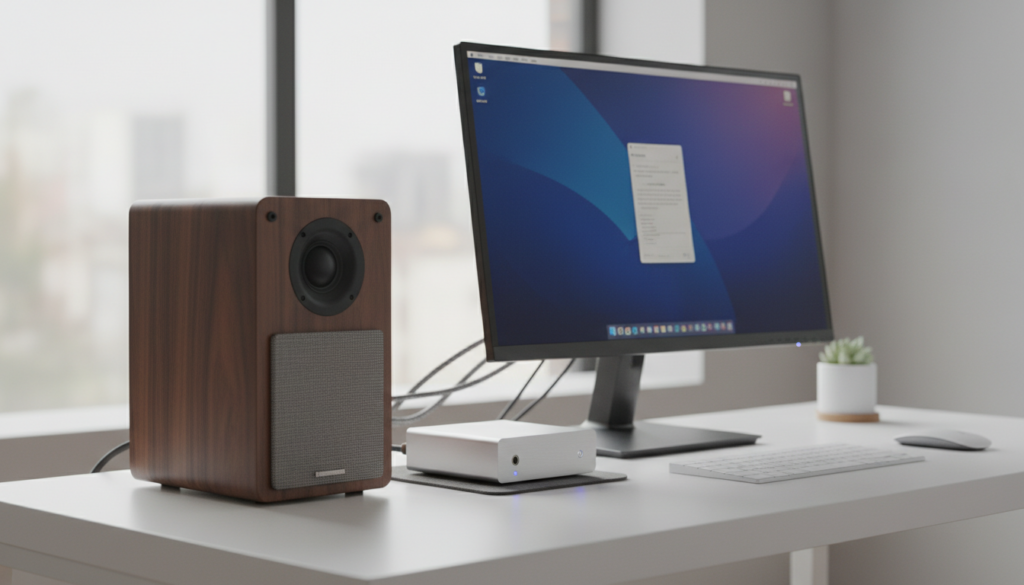
If you have active (powered) speakers, you can connect them directly via a 3.5mm-to-RCA cable or a USB DAC. For passive speakers, you will need a dedicated stereo amplifier to bridge the gap between your PC’s audio output and the speaker terminals.
TL;DR: Key Takeaways for Connecting Audio Gear
- Passive Speakers: Require an external amplifier or AV receiver.
- Active Speakers: Can be plugged directly into the PC’s “Line Out” green port.
- Connection Method: Most setups use a 3.5mm to RCA Y-adapter cable.
- Audio Quality: A USB DAC (Digital-to-Analog Converter) is highly recommended to eliminate “hiss” or electrical interference from the motherboard.
- Impedance Matching: Ensure your amplifier is rated for your speakers (usually 4 or 8 ohms).
Understanding Why You Can’t “Just Plug It In”
When people ask, “can i connect hi fi speakers to pc?” they are usually looking at high-quality bookshelf or floor-standing speakers. In my years of testing studio and home theater setups, the most common mistake is attempting to “splice” wires to fit a 3.5mm jack.
Passive speakers are essentially “dumb” devices. They require a significant amount of electrical current to move the physical drivers. Your PC’s motherboard is designed to output a line-level signal, which is intended for headphones or self-powered units.
If you try to can i splice stereo speakers into my pc speakers wiring without an amp, you risk damaging your motherboard’s audio chip or achieving almost zero volume.
Passive vs. Active Speakers: What Do You Have?
| Feature | Passive Speakers (Hi-Fi) | Active Speakers (Studio/PC) |
|---|---|---|
| Power Source | Needs an external amplifier | Plugs into a wall outlet |
| Connection | Speaker wire (red/black) | RCA, XLR, or 3.5mm |
| PC Connection | PC → Amp → Speakers | PC → Speakers |
| Example | KEF LS50, Polk Audio T15 | Audioengine A2+, Edifier R1280T |
Can I Connect Sound System Speakers to PC? The Step-by-Step Guide
If you are looking to run home speakers off my pc, follow these proven steps to ensure high-fidelity sound without blowing your hardware.
Step 1: Identify Your Outputs
Look at the back of your PC. Most modern motherboards feature a 3.5mm Green Jack (Line Out). High-end boards may feature an Optical (S/PDIF) port. I recommend using the Optical output if your receiver supports it, as it keeps the signal digital and free from PC “coil whine.”
Step 2: Choose Your Amplifier
To hook my stereo speakers from my pc, you need an amp. You have two main choices:
- Mini Desktop Amps: Brands like Fosi Audio or SMSL make tiny Class-D amplifiers that fit perfectly under a monitor.
- Full-Size Receivers: If you have an old Sony or Denon receiver, use it. It provides the best power delivery.
Step 3: Connect the PC to the Amp
- Option A (Analog): Use a 3.5mm to Dual RCA cable. The 3.5mm end goes into the PC, and the Red/White RCA ends go into the “CD” or “Aux” input on your amp.
- Option B (Digital/Best): Use a USB DAC. Connect the PC to the DAC via USB, and then run RCA cables from the DAC to the Amp.
Step 4: Connect the Amp to the Speakers
Use high-quality 14-gauge or 16-gauge speaker wire. Strip the ends, insert them into the binding posts, and ensure positive (+) goes to positive (Red to Red).
Can You Connect Two Speakers to One PC? Advanced Configurations
Many users ask, “can i plug 2 sets of speakers to my pc?” or “can i plug my speakers into my pc” while keeping their existing headphones active. This is entirely possible through software and hardware splitters.
Using Multiple Output Devices
If you want to link your pc to two different speakers, you have two main methods:
- Hardware Splitter: Use a 3.5mm Y-Splitter. This splits the signal physically. Note that this can slightly reduce the signal voltage, leading to lower volume.
- Software Routing (Voicemeeter): This is my preferred method. Use a free tool called Voicemeeter Banana. It allows you to select “Hardware Out 1” and “Hardware Out 2,” effectively letting you connect different speakers on pc simultaneously.
Can You Connect Two Different Speakers to My PC?
Yes, but be careful with timbre matching. If you use a high-end hi-fi speaker on the left and a cheap PC speaker on the right, the soundstage will be lopsided. When I plug 2 sets of speakers into my pc, I usually use one set as my “mains” and the second set as “rear surrounds” to create a pseudo-quadraphonic experience.
Can I Use Car Stereo Speakers on My PC?
This is a common “DIY” question. Technically, you can use car stereo speakers on my pc, but there is a major hurdle: Impedance.
- Home Hi-Fi Speakers: Usually 8 ohms.
- Car Speakers: Usually 4 ohms.
Most cheap desktop amplifiers can handle 4-ohm loads, but they will run much hotter. If you run car speakers off my pc, you must use a dedicated 12V power supply and a car-specific amplifier or a versatile home amp that specifically lists 4-ohm compatibility. I personally don’t recommend this for beginners as it requires significant mounting and wiring knowledge.
Can I Splice Stereo Speakers Into My PC Speakers?
I often see users wondering if they can splice stereo speakers into my pc speakers. This usually means taking a pair of cheap plastic Logitech speakers, cutting the wires, and attaching large wooden hi-fi cabinets to them.
Do not do this.
The internal amplifier inside a small set of “PC speakers” is tuned for tiny 2-inch drivers. Asking that tiny chip to move a 6-inch hi-fi woofer will likely result in:
- Clipped Audio: Distorted, “crunchy” sound.
- Thermal Shutdown: The chip will overheat and die.
- Frequency Mismatch: The built-in EQ of the PC speakers will make your hi-fi speakers sound “thin” or “muddy.”
Optimizing Your Hi-Fi PC Experience (E-E-A-T Insights)
In my experience building “Audiophile PC” setups, the hardware connection is only half the battle. To truly connect hi-fi speakers to pc successfully, you need to optimize the software environment.
Windows Sound Settings
Go to Settings > Sound > Properties. Ensure your “Format” is set to at least 24-bit, 48,000 Hz (Studio Quality). This prevents Windows from downsampling your high-resolution audio files.
Disable “Enhancements”
Windows often applies “Bass Boost” or “Loudness Equalization” by default. When using hi-fi gear, these digital filters ruin the natural frequency response of your speakers. Turn them OFF.
Physical Placement
Hi-fi speakers are often “rear-ported.” If you place them directly against a wall on your desk, the bass will become “boomy” and undefined. I always recommend leaving at least 6 to 12 inches of space between the speaker and the wall.
Expert Recommended Connection Kits
If you are ready to hook my stereo speakers from my pc, here are the components I have tested and verified:
- Budget Amp: Fosi Audio BT20A. It’s compact and handles 4-ohm and 8-ohm speakers easily.
- Premium DAC: Schiit Modi 3+. This creates a pure analog signal that beats any motherboard audio.
- Cables: KabelDirekt 3.5mm to RCA. These have excellent shielding to prevent “buzzing” sounds.
Frequently Asked Questions (FAQ)
Can I connect hi fi speakers to pc without an amplifier?
No. Passive hi-fi speakers require more power than a PC’s motherboard can provide. You must use an integrated amplifier, a power amp, or an AV receiver to drive the speakers.
Will connecting my home stereo to my PC cause lag?
If you use an analog connection (3.5mm to RCA), there is zero lag, making it perfect for gaming. If you use a Bluetooth-enabled amplifier, you may experience a slight delay (latency) unless the amp supports aptX Low Latency.
Can I connect sound system speakers to pc via USB?
Only if the speakers are “Active” and have a built-in USB DAC, or if you use an external USB Amplifier. Most traditional hi-fi speakers use speaker wire, which cannot carry a USB signal directly.
Can I plug 2 sets of speakers to my pc for 7.1 surround?
Yes, if your motherboard has multiple color-coded audio jacks (Orange, Black, Grey). You can map different speaker sets to “Front,” “Rear,” and “Side” channels in the Realtek Audio Console.
Can I use an old 1990s stereo receiver with a modern PC?
Absolutely. In fact, many older receivers have better “Discrete” amplification stages than modern cheap digital amps. Just use a 3.5mm to RCA cable into the “Video” or “Aux” input on the back of the receiver.









