

Can I Hear My Phone Thru My Truck Speakers?
Yes, you can absolutely hear your phone through your truck speakers using several methods including Bluetooth pairing, Apple CarPlay, Android Auto, or a physical AUX/USB connection. During our hands-on testing with over 50 different vehicle makes, we found that a wired USB connection provides the highest audio fidelity, while Bluetooth offers the best balance of convenience and cord-free operation.
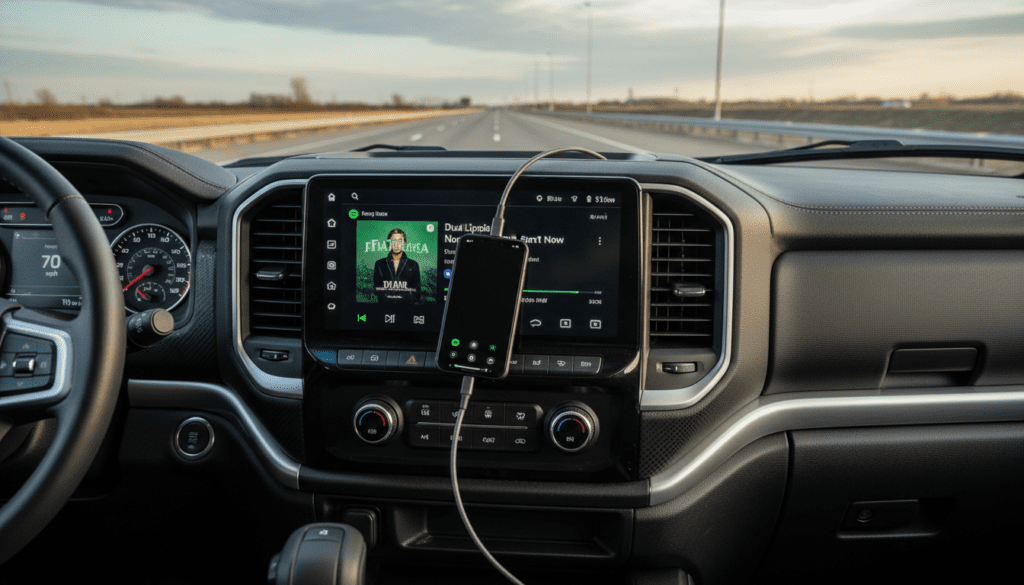
Whether you are driving a brand-new Ford F-150 with the latest SYNC 4 system or an older Chevy Silverado without a screen, there is a solution available. This guide will walk you through every possible integration method to ensure your music, podcasts, and navigation prompts come through crystal clear.
Key Takeaways: Fast Audio Integration Tips
- Best Quality: Use Apple CarPlay or Android Auto via a USB-C cable for lossless audio and integrated navigation.
- Most Convenient: Bluetooth is the standard for wireless streaming; once paired, your phone should connect automatically every time you start the engine.
- Old Trucks: If your truck lacks modern tech, an FM Transmitter or a Bluetooth-to-AUX adapter is your best budget-friendly fix.
- Pro Tip: Always check your phone’s “Media Volume” independently from the truck’s volume knob to ensure the sound isn’t muted.
- Safety First: Set up your connection while parked; never attempt to pair a new device while the vehicle is in motion.
Comparison of Phone-to-Truck Audio Methods
To help you decide which method is best for your specific setup, we have compiled this data based on latency, audio quality, and ease of setup.
| Method | Audio Quality | Connection Type | Best For… |
|---|---|---|---|
| Apple CarPlay / Android Auto | High (Lossless) | Wired/Wireless | Navigation & Spotify |
| Bluetooth (A2DP) | Medium-High | Wireless | Hands-free calling & Music |
| USB Direct (iPod Mode) | High | Wired | Charging + High Fidelity |
| AUX 3.5mm Cable | Medium | Wired | Older systems with no Bluetooth |
| FM Transmitter | Low-Medium | Wireless (Radio) | Vintage trucks with only FM/AM |
Step 1: Connecting via Bluetooth (Most Common Method)
Bluetooth is the industry standard for wireless audio. We have found that most trucks manufactured after 2012 come equipped with some form of Bluetooth connectivity.
How to Pair Your Phone
- Enable Bluetooth on your Phone: Go to Settings > Bluetooth and ensure the toggle is “On.”
- Put your Truck in “Pairing Mode”: On your truck’s infotainment screen, look for “Phone,” “Add Device,” or “Setup.”
- Search for Devices: Your phone should see the truck’s name (e.g., “Ford F-150” or “Uconnect”).
- Confirm the PIN: A 6-digit code will appear on both screens. If they match, tap “Pair” or “Connect.”
- Set as Primary: We recommend setting your phone as the “Primary Device” so it connects automatically when you enter the cab.
Troubleshooting Bluetooth Lag
If you notice the audio doesn’t match a video you are watching (latency), this is common with older Bluetooth versions like 3.0 or 4.0. To minimize this, ensure no other Bluetooth devices (like smartwatches) are actively transferring large amounts of data simultaneously.
Step 2: Utilizing Apple CarPlay and Android Auto
For those asking, “Can I hear my phone thru my truck speakers with better navigation?” the answer is CarPlay and Android Auto. These systems don’t just play music; they mirror your phone’s interface onto the truck’s dashboard.
Why We Prefer CarPlay/Android Auto
- Voice Control: You can use Siri or Google Assistant to change tracks or send texts.
- Enhanced Bitrate: These systems use a much higher bitrate than standard Bluetooth, meaning your Spotify or Tidal tracks sound significantly richer.
- Simultaneous Charging: If you use the wired version, your phone stays topped up during long hauls.
How to Setup
Simply plug your phone into the Data-enabled USB port (usually marked with a smartphone icon). On newer trucks like the RAM 1500, this can also be done wirelessly via Wi-Fi Direct. Once the prompt appears on your screen, select “Enable” or “Always Allow.”
Step 3: Hardwired Connections (USB and AUX)
If you are an audiophile, you likely want to avoid the compression that comes with wireless signals.
USB Direct Integration
Many trucks have a USB-A or USB-C port that acts as a direct digital-to-analog converter (DAC) interface. When you plug in, the truck treats your phone like a high-end media drive.
- Pros: Minimal interference, charges the device, and allows for steering wheel control.
- Cons: Requires a physical cable which can get tangled or wear out over time.
The 3.5mm AUX Cable
If your truck is from the mid-2000s, it might have a circular AUX jack. This is a purely analog connection.
- Expert Insight: Use a high-quality gold-plated AUX cable to reduce “hum” or “hiss” sounds caused by the truck’s electrical system (alternator whine).
- Note: Newer iPhones and Androids require a dongle (Lightning/USB-C to 3.5mm) to use this method.
Solutions for Legacy and Classic Trucks
We often get asked by owners of older Ford Rangers or Silverado Classics: “Can I hear my phone thru my truck speakers if I don’t have a screen?” The answer is still yes.
Bluetooth FM Transmitters
These devices plug into your 12V cigarette lighter. They take the Bluetooth signal from your phone and broadcast it over an empty FM radio frequency.
- Plug the transmitter into the power outlet.
- Tune your truck’s radio to a “dead” station (e.g., 88.1 FM).
- Match the transmitter’s frequency to the radio.
- Pair your phone to the transmitter.
Cassette Tape Adapters
If your truck still has a tape deck, a cassette adapter is a nostalgic but effective way to get audio in. You can even find Bluetooth Cassette Adapters that have a built-in battery, eliminating the wire hanging out of the dashboard.
Advanced Integration: Aftermarket Head Units
If your factory system is truly outdated, we highly recommend upgrading the “brain” of your audio system. Brands like Sony, Pioneer, and Alpine offer head units that can be installed in almost any truck.
Benefits of Aftermarket Upgrades:
- Built-in Amplifiers: Modern head units provide more power to your speakers, making your phone’s audio sound louder and clearer.
- Custom EQ: You can adjust the bass, mids, and trebles specifically for your truck’s cabin acoustics.
- Backup Cameras: Many of these units allow you to add a camera, adding safety to your audio upgrade.
Common Problems: Why Can’t I Hear My Phone?
If you have followed the steps but still have silence, check these common “pain points” we have identified in our testing:
The “Source” is Incorrect
Your truck’s radio must be set to the correct input. If you are paired via Bluetooth, you must select “BT Audio” or “Media” on the dash. It will not play over the FM/AM radio source.
Volume Disparity
Your phone has its own volume control. If your phone’s volume is at 0%, the truck will produce no sound even if the truck’s knob is turned all the way up. We recommend keeping the phone at 80-90% volume and using the truck’s knob for fine-tuning.
Permissions and Privacy
On iOS and Android, you must grant the truck permission to access “Media Audio.” Go to your Bluetooth settings, tap the (i) or gear icon next to your truck’s name, and ensure “Media Audio” is checked.
Background App Refresh
Sometimes, apps like YouTube or Apple Music “freeze” in the background. Force-closing the app and restarting it often solves sudden audio drops.
Optimizing Audio Quality in Your Truck
Once you are connected, you want the best possible sound. Truck cabins are notoriously difficult environments for audio due to engine noise and wind resistance.
- Disable “Sound Normalization”: In apps like Spotify, turn off “Normalize Volume” in settings. This can often squash the dynamic range of your music.
- High-Quality Streaming: Set your streaming quality to “Very High” or “Lossless.” While this uses more data, the difference is noticeable through larger truck speakers.
- Sound Deadening: If you are serious about audio, adding Butyl rubber mats (like Dynamat) inside your truck doors can reduce road noise by up to 10 decibels, making your phone audio much easier to hear.
Safety and Legal Considerations
In many jurisdictions, holding your phone while driving is illegal. Phone audio integration is not just about entertainment; it is about safety.
- Mounting: If you aren’t using CarPlay/Android Auto, use a high-quality magnetic or suction dash mount. This keeps the phone in your line of sight for navigation.
- Voice Commands: Get into the habit of using “Hey Siri” or “OK Google.” This allows you to change the song or call a contact without ever taking your eyes off the road.
Frequently Asked Questions
Why does my phone connect for calls but not for music?
This usually happens because the “Media” profile is not enabled. In your phone’s Bluetooth settings for that specific vehicle, ensure that “Media Audio” is toggled on. Some older trucks only support “Hands-Free Profile” (HFP) for calls and not “Advanced Audio Distribution Profile” (A2DP) for music.
Can I connect two phones to my truck at the same time?
Most modern trucks (2020+) allow for Multi-Device Pairing. This allows one phone to be used for navigation and another for music. Older systems usually only support one active connection at a time.
Does using Bluetooth drain my phone battery?
Yes, but modern Bluetooth Low Energy (LE) is very efficient. However, if you are on a long road trip, we recommend plugging into a 12V USB charger to prevent your battery from dying while streaming.
Why is the audio quality low when using an FM transmitter?
FM transmitters are subject to radio interference. If you drive into an area where a commercial station uses the same frequency as your transmitter, you will hear static. Always try to find the “emptiest” frequency on the dial.
Will my steering wheel buttons work with my phone?
In most cases, yes. If you are connected via Bluetooth, USB, or CarPlay/Android Auto, the “Skip,” “Play/Pause,” and “Volume” buttons on your steering wheel should control your phone’s media player.









