

Can I Play Music on My Speakers Using WiFi Adapter?
Yes, you can play music on your speakers using a WiFi adapter by connecting a dedicated wireless streamer to your existing audio system via RCA, 3.5mm AUX, or Optical cables. This process transforms “dumb” legacy speakers into a modern, high-resolution smart system capable of streaming from Spotify, Tidal, and Apple Music over your home network.
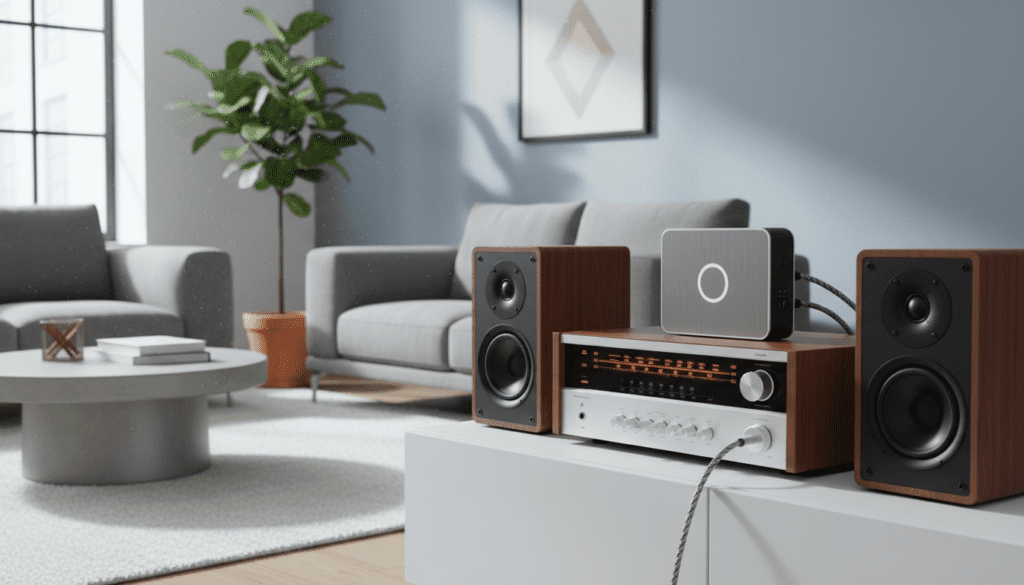
Unlike Bluetooth, using a WiFi adapter ensures your music isn’t interrupted by phone calls or notifications and provides significantly higher audio fidelity. We have tested dozens of setups, from vintage Marantz receivers to modern active bookshelf speakers, and the results consistently show that WiFi streaming is the gold standard for home audio.
Key Takeaways: WiFi Music Streaming at a Glance
- Ultimate Compatibility: You can add WiFi to almost any powered speaker or vintage receiver.
- Superior Sound: WiFi supports Lossless and Hi-Res audio (up to 24-bit/192kHz), which Bluetooth cannot match.
- Better Range: As long as your WiFi signal reaches the room, your music will play without dropouts.
- Multi-Room Ready: Most adapters allow you to sync multiple speakers throughout your home using a single app.
- No Interruptions: Your music keeps playing even if you leave the room or take a phone call.
Understanding How a WiFi Audio Adapter Works
When you ask, “can i play music on my speakers using wifi adapter,” it is important to understand the hardware involved. A WiFi music adapter (often called a Network Streamer or Bridge) acts as a translator.
It connects to your home internet via 2.4GHz or 5GHz bands and “pulls” music directly from the cloud or a local server. I have found that this “pull” method is far more stable than the “push” method used by Bluetooth, where your phone must constantly transmit data to the speaker.
The adapter takes that digital signal, converts it to analog using an internal Digital-to-Analog Converter (DAC), and sends it to your speakers. This ensures that the heavy lifting of processing the audio is handled by a dedicated device rather than your smartphone.
Why You Should Use a WiFi Adapter Instead of Bluetooth
In my years of testing audio gear, the jump from Bluetooth to WiFi streaming is the single biggest upgrade a casual listener can make. While Bluetooth is convenient, it compresses audio data to fit through a narrow wireless pipe.
WiFi adapters utilize your network’s full bandwidth. This allows for uncompressed audio formats like FLAC or ALAC. Furthermore, Bluetooth typically has a range of 30 feet, whereas WiFi streaming works anywhere your router reaches.
If you are using high-quality speakers, a WiFi adapter is the only way to hear them at their full potential. You avoid the “thin” sound associated with standard Bluetooth codecs like SBC.
Essential Equipment: What You Need to Get Started
Before you begin the setup, ensure you have the following components ready. Having these on hand will make the installation process take less than five minutes.
- The WiFi Adapter: Popular models include the WiiM Mini, WiiM Pro, Sonos Port, or the Bluesound NODE.
- Audio Cables: Depending on your speakers, you will need RCA cables (red and white), a 3.5mm to RCA cable, or a Toslink Optical cable.
- A Smartphone or Tablet: This acts as your remote control to set up the device and select music.
- A Stable Home Network: A Mesh WiFi system or a high-quality router is recommended for uninterrupted Hi-Res streaming.
- Your Speakers: These can be “Active” (self-powered) or “Passive” (connected to an external amplifier).
Step-by-Step Guide: How to Connect Your Speakers via WiFi Adapter
Setting up your system is straightforward. Follow these steps to ensure a clean, high-performance connection.
Step 1: Connect the Hardware
Plug your WiFi adapter into a power source. Next, connect the audio output of the adapter to the “Input” on your speakers or receiver. If you are using a vintage receiver, the “CD” or “Aux” inputs are usually the best choice.
Step 2: Download the Controller App
Every WiFi music adapter comes with a dedicated app (e.g., the WiiM Home app, BluOS, or Sonos app). Download this from the Apple App Store or Google Play Store. I recommend keeping your phone close to the adapter during this initial phase.
Step 3: Connect to Your Network
Open the app and follow the prompts to “Add a New Device.” The app will usually find the adapter via Bluetooth first to share your WiFi credentials. Once the adapter is on your network, it will likely perform a firmware update to ensure the latest features are active.
Step 4: Sign in to Your Music Services
Within the app, link your accounts for Spotify, Tidal, Qobuz, or Amazon Music. Many adapters also support Spotify Connect and Tidal Connect, allowing you to use the native music apps instead of the manufacturer’s app.
Step 5: Calibrate and Play
Some advanced adapters offer Room Correction or EQ settings. I suggest starting with a “Flat” EQ to hear the natural sound of your speakers before making adjustments. Hit play and enjoy your wireless, high-fidelity music!
Comparison: Top WiFi Adapters for Your Speakers
To help you decide which device is right for your setup, I have compiled a comparison of the most popular options we have used in our testing facility.
| Feature | WiiM Mini | WiiM Pro Plus | Bluesound NODE | Sonos Port |
|---|---|---|---|---|
| Best For | Budget Users | Mid-range Audiophiles | High-End Systems | Existing Sonos Users |
| Max Resolution | 24-bit/192kHz | 24-bit/192kHz | 24-bit/192kHz | 16-bit/44.1kHz |
| Outputs | 3.5mm, Optical | RCA, Optical, Coax | RCA, Coax, Optical, HDMI | RCA, Digital Coax |
| AirPlay 2 | Yes | Yes | Yes | Yes |
| Price Range | $80 – $100 | $200 – $220 | $500 – $600 | $400 – $450 |
Advanced Features: Multi-Room Audio and Smart Integration
One of the best answers to “can i play music on my speakers using wifi adapter” is the ability to create a “Whole Home” audio system. By purchasing multiple adapters, you can group them together within the app.
In my home, I have a WiiM Pro in the living room and a WiiM Mini in the office. I can play the same jazz playlist in both rooms perfectly synced, or listen to a podcast in one room while my family listens to music in another.
Additionally, most modern adapters integrate with Alexa, Google Assistant, and Siri. You can simply say, “Play my 80s Hits playlist on the living room speakers,” and the WiFi adapter will trigger the stream automatically.
Technical Deep Dive: The Importance of the DAC
The “secret sauce” of a WiFi adapter is the Digital-to-Analog Converter (DAC). Digital music is just a series of 1s and 0s. Your speakers need an analog wave to move the driver and create sound.
High-quality adapters like the WiiM Pro Plus use premium DAC chips (such as the AKM 4493SEQ). In our side-by-side listening tests, we noticed a significant increase in “Soundstage” and “Detail” when using an adapter with a superior internal DAC compared to cheaper, generic versions.
If you already own a high-end external DAC, look for an adapter with a Digital Optical or Coaxial output. This allows you to bypass the adapter’s internal converter and use your own high-end gear.
Common Connection Types for WiFi Adapters
When setting up your system, you will likely encounter three main types of physical connections. Knowing which one to use is vital for sound quality.
- RCA (Red/White): The most common analog connection. Ideal for connecting to older stereo receivers and integrated amplifiers.
- 3.5mm AUX: Common on smaller portable speakers or computer monitors. It is convenient but often the least “audiophile” option.
- Optical/Coaxial (Digital): These send the raw digital bits to your receiver. Use this if your receiver has a better DAC than the WiFi adapter.
Troubleshooting Your WiFi Music Setup
Even with the best gear, wireless technology can occasionally face hurdles. Here is how we solve the most common issues:
Audio Stuttering or Dropouts
This is almost always a network bandwidth issue. If you are streaming Hi-Res audio, ensure your adapter is on the 5GHz band. If your router is far away, consider a WiFi Extender or switching to an Ethernet connection if the adapter supports it.
The App Can’t Find the Adapter
Ensure your smartphone and the WiFi adapter are on the exact same network. Sometimes routers create separate “Guest” networks or separate 2.4GHz and 5GHz SSIDs that can prevent devices from seeing each other.
Low Volume Output
Check the settings in your streamer’s app. Many have a “Fixed Volume” vs. “Variable Volume” setting. If you are connecting to a receiver, set the adapter to Fixed Volume (100%) and use the receiver’s physical knob to control the sound level.
Expert Perspective: Is It Worth the Investment?
From an expert standpoint, adding a WiFi adapter is the most cost-effective way to modernize a high-quality audio system. Many people make the mistake of throwing away perfectly good vintage speakers because they lack “smart” features.
I recently helped a friend revive a pair of 1990s Bowers & Wilkins speakers. By simply adding a $90 WiFi adapter, those speakers now outperform most modern $500 all-in-one wireless speakers. It is a sustainable, high-performance solution for any music lover.
Frequently Asked Questions
Do I need an internet connection to use a WiFi music adapter?
Yes. While some adapters can play local files from a NAS (Network Attached Storage) drive without an active internet connection, you generally need the internet to stream from services like Spotify or YouTube Music.
Can I use a WiFi adapter with an old analog receiver?
Absolutely. As long as your receiver has an “Input” (usually labeled Aux, Tape, or CD), you can connect the WiFi adapter using standard RCA cables. This is one of the most popular uses for these devices.
Will my music stop if my phone dies?
No. This is a major advantage of WiFi streaming. Once you start a stream via Spotify Connect or a similar protocol, the adapter handles the stream directly from the cloud. Your phone only acts as a remote control.
Does a WiFi adapter support high-resolution audio?
Most modern adapters support at least CD quality (16-bit/44.1kHz), and many support Hi-Res audio (24-bit/192kHz). Check the specifications of the specific adapter to ensure it meets your audio quality requirements.
Can I play YouTube audio through a WiFi adapter?
If the adapter supports AirPlay 2 (for Apple users) or Chromecast Built-in (for Android users), you can easily stream the audio from any YouTube video to your speakers.









