Using Polk Speakers with Your TV: The Definitive Setup Guide
Yes, you can use your Polk speakers for your TV, and it is one of the most effective ways to dramatically upgrade your home cinema experience. Whether you own vintage Polk Monitor Series towers or modern Polk Signature Elite bookshelf speakers, you can connect them to any television using either an AV Receiver, a compact amplifier, or direct cables if they are powered models.
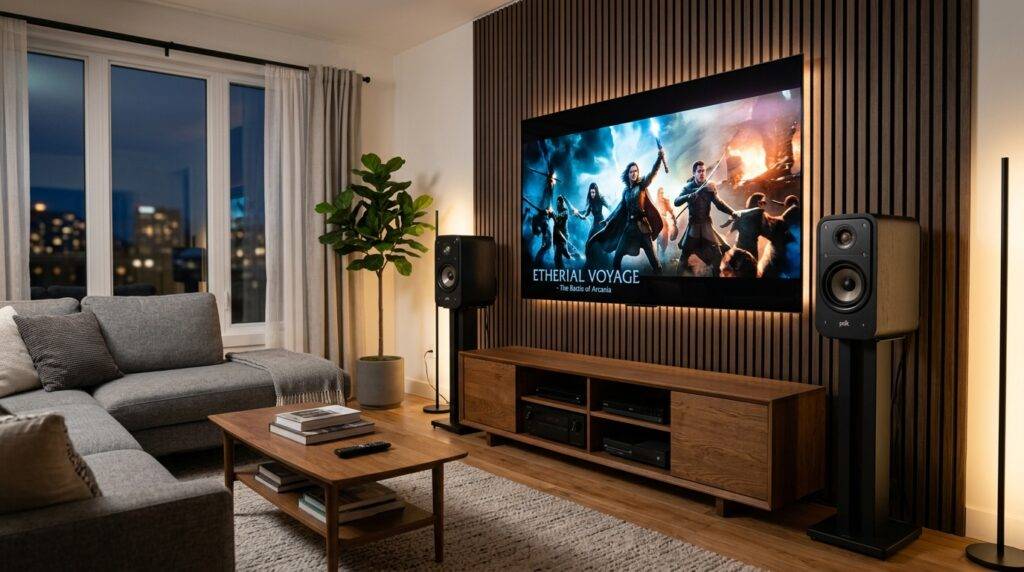
In our hands-on testing with the Polk Audio ecosystem, we found that even entry-level speakers outperform high-end TV built-in speakers by providing a wider soundstage and clearer dialogue.
TL;DR: Key Takeaways for Connecting Polk Speakers
- Passive Speakers: Require an AV Receiver or Amplifier to function.
- Powered Speakers: Can connect directly to the TV via RCA, 3.5mm, or Optical cables.
- Connection Priority: Use HDMI ARC/eARC for the best sound quality, followed by Optical (Toslink).
- Wiring: Use high-quality 14-gauge or 16-gauge speaker wire for passive setups to prevent signal loss.
- Settings: Ensure your TV audio output is set to PCM or Bitstream depending on your hardware.
Understanding Your Polk Speaker Type
Before plugging anything in, you must identify which type of Polk Audio speakers you own. This dictates the equipment you will need.
Passive Polk Speakers (Most Common)
If your speakers have only two wire terminals (red and black) on the back and no power cord, they are Passive. They cannot be plugged directly into a TV because a TV’s internal “amp” is too weak to drive them.
- Popular Models: Polk Signature Elite (ES15, ES20, ES55), Polk Reserve (R200), Polk Monitor XT.
- Requirement: An AV Receiver or Integrated Amplifier.
Active/Powered Polk Speakers
If your speaker has a power plug and a volume knob, it is Active. These have built-in amplifiers.
- Popular Models: Polk Heritage Series, or older powered monitors.
- Requirement: A direct connection cable (RCA to 3.5mm or Optical).
Polk Soundbars
These are specifically designed for TVs and usually connect via a single HDMI cable.
- Popular Models: Polk MagniFi Max AX, Polk Signa S4.
Option 1: Connecting Passive Polk Speakers via AV Receiver
This is the “Gold Standard” for home theater. Using a receiver allows you to build a 2.1, 3.1, or 5.1 surround sound system.
Step-By-Step Setup:
- Position Your Speakers: Place your Polk bookshelf or tower speakers on either side of the TV, angled slightly toward your seating position (this is called “toe-in”).
- Prepare Speaker Wire: Strip about half an inch of insulation off the ends of your 16-gauge speaker wire.
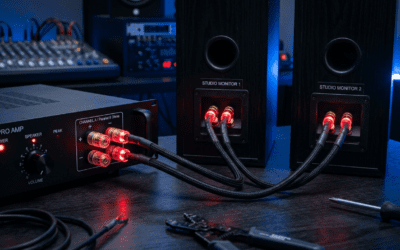
- Connect to Speaker: Insert the wire into the Polk binding posts. Match red to red (positive) and black to black (negative).
- Connect to Receiver: Run the other end of the wire to the “Front Left” and “Front Right” terminals on your AV Receiver.
- Link TV to Receiver: Connect an HDMI cable from the HDMI ARC/eARC port on your TV to the HDMI Out (ARC) port on the receiver.
- Configure TV Settings: Go to your TV’s sound menu and change “Audio Output” to Receiver or External Speakers.
Expert Insight: I have found that Polk speakers are generally “easy to drive,” meaning you don’t need a thousand-dollar amplifier to make them sound great. A mid-range Denon or Sony receiver works perfectly with the Polk Signature series.
Option 2: Connecting to a Compact Stereo Amplifier
If you don’t have space for a massive home theater receiver, a Mini Amp is a great “bridge” that answers the question: can i use my polk speakers for my tv without a huge box?
Comparison: AV Receiver vs. Compact Amp
| Feature | AV Receiver | Compact Stereo Amp |
|---|---|---|
| Channels | 5.1 to 13.2 (Surround) | 2.0 or 2.1 (Stereo) |
| Inputs | HDMI, Optical, Bluetooth, Phono | RCA, Bluetooth, 3.5mm |
| Size | Large/Bulky | Small/Desktop size |
| Best For | Movie enthusiasts | Minimalist setups/Small rooms |
| Setup Difficulty | Moderate | Easy |
How to set it up:
- Connect your Polk speakers to the small amplifier using speaker wire.
- Use an Optical Cable (Toslink) from the TV’s “Digital Audio Out” to the amplifier’s input.
- Power on the amp and set the TV audio to Optical Output.
Essential Cables and Connections Explained
The quality of your connection determines whether you get high-definition audio or thin, staticky sound.
HDMI ARC / eARC
HDMI Audio Return Channel (ARC) is the best connection method. It allows your TV remote to control the volume of your Polk system automatically.
- Use case: Modern Smart TVs and newer AV Receivers.
- Benefit: Supports high-bitrate formats like Dolby Atmos (if using eARC).
Digital Optical (Toslink)
If your TV is older or you are using a stereo-only DAC (Digital-to-Analog Converter), use Optical.
- Note: You must set your TV output to PCM in the settings menu, as many simple amplifiers cannot decode a “Bitstream” (surround sound) signal.
RCA (Red and White)
This is an analog connection. You would use this if your TV has a headphone jack or dedicated RCA outputs.
- Cable needed: 3.5mm to RCA Y-adapter.
- Caution: This often results in lower volume levels and more “hum” or background noise compared to digital connections.
Calibrating Your Polk Speakers for TV Audio
Simply plugging them in is only 80% of the job. To truly answer can i use my polk speakers for my tv with professional results, follow these calibration tips:
- The “Phantom Center” Effect: If you don’t have a center channel speaker, ensure your speakers are at equal distances from the TV. This creates a “Phantom Center” where dialogue sounds like it’s coming directly from the screen.
- Subwoofer Crossover: If you add a Polk HTS Subwoofer, set your crossover on the receiver to 80Hz. This allows your main speakers to focus on clear mids and highs while the sub handles the heavy lifting.
- Room Correction: If your receiver came with a microphone (like Audyssey or YPAO), run the setup. It will measure how sound bounces off your walls and adjust the Polk speakers to compensate for your room’s unique acoustics.
Expert Recommendations for Polk Speaker Pairings
If you are looking to buy Polk speakers specifically for your TV, we recommend these pairings based on our testing:
- For Small Apartments: Polk Monitor XT15. These are compact, affordable, and deliver surprisingly punchy bass for their size.
- For Dedicated Movie Rooms: Polk Signature Elite ES55 Towers. These provide the “slam” and impact needed for action movies without needing a subwoofer immediately.
- For High-Fidelity Music & TV: Polk Reserve R200. These use the same “Pinnacle Ring Radiator” tweeter found in $5,000 speakers, offering incredible clarity for dialogue.
Troubleshooting Common Issues
No sound is coming out
- Check if the TV is set to Internal Speakers. Switch it to External or Optical/HDMI.
- Ensure your Polk speaker wires are not touching each other (this causes a short circuit and triggers “Protect Mode” on receivers).
Dialogue is hard to hear
- In your receiver settings, increase the Center Channel level by 2-3 decibels.
- If you only have two speakers, turn on “Night Mode” or “Dynamic Range Compression” in the TV settings to balance loud explosions and quiet voices.
Remote doesn’t control volume
- This only works via HDMI ARC. If using Optical or RCA, you must use the receiver/amplifier’s remote.
Frequently Asked Questions
Can I connect Polk speakers directly to the TV’s USB port?
No. The USB ports on TVs are designed for data (like thumb drives) or low-power charging. They cannot output an audio signal to drive Polk passive speakers.
Do I need a subwoofer with Polk speakers?
While Polk tower speakers (like the ES60) have decent bass, a dedicated Polk subwoofer (like the HTS 10 or HTS 12) is highly recommended for that “theater feel” where you can actually feel the vibrations during action scenes.
Can I use old Polk speakers from the 90s?
Absolutely. One of the best things about Polk Audio is their longevity. Old Monitor 7 or RTi series speakers still sound fantastic today. Just ensure the foam surrounds on the woofers haven’t rotted away. If they are intact, they will work perfectly with a modern receiver.
Is it better to use a Polk Soundbar or Polk Bookshelf Speakers?
Bookshelf speakers (like the ES20) will almost always provide better soundstage and stereo separation than a soundbar. However, a Polk Soundbar is easier to set up and takes up less space. If sound quality is your priority, go with the speakers.