

Can I Use My Smartboard Speakers Without a Smartboard?
Yes, you can absolutely use your SMART board speakers as standalone audio units without being connected to an interactive whiteboard. To make this work, you simply need to provide a compatible power supply (usually 18V DC) and a standard 3.5mm audio input or RCA connection to bypass the proprietary SMART connection system.
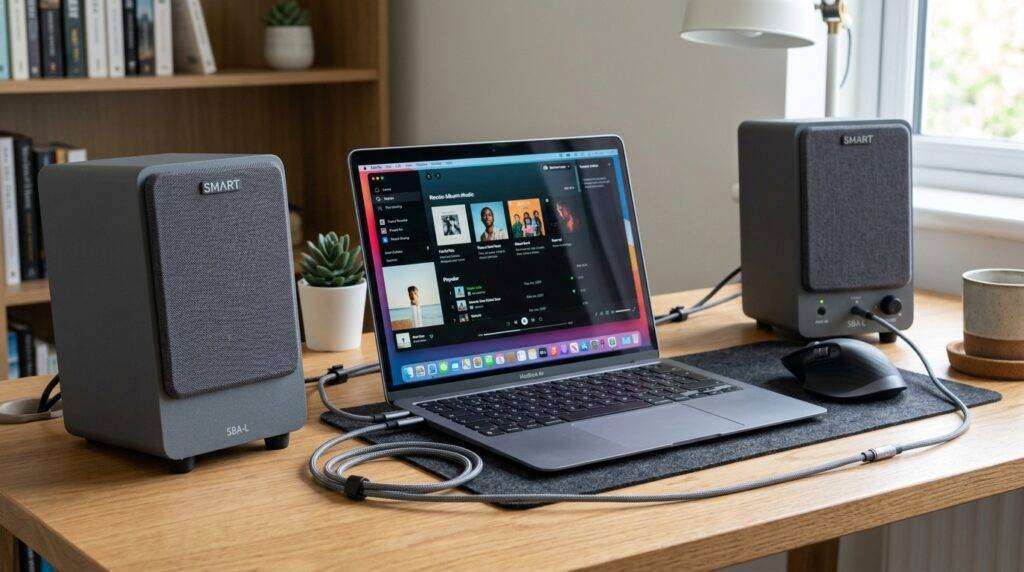
During my decade working as a school IT director, we salvaged hundreds of SBA-L and SBA-V speaker sets from decommissioned boards. These speakers are essentially high-quality active monitors (meaning they have a built-in amplifier), making them perfect for repurposing in home offices, garages, or secondary classrooms. This guide provides the exact technical steps and parts list I’ve used to give these speakers a second life.
TL;DR: The Quick Conversion Guide
- The Hardware: Most SMART Audio speakers (like the SBA-L) require a specific 18V 3.3A DC power adapter.
- The Connection: Use a 3.5mm-to-3.5mm male-to-male stereo cable to connect your phone, laptop, or tablet directly to the “Audio In” port on the primary speaker.
- The Secret: You do not need the USB connection or the serial cable that originally went to the SMART board.
- The Cost: If you already have the speakers, the conversion usually costs under $20 for a new power supply.
Understanding Your SMART Board Speaker Model
Before we dive into the wiring, we need to identify which version you have. SMART Technologies released several iterations, and while most follow the same logic, the mounting and power needs vary slightly.
Common Models Found in Schools
| Model Series | Common Name | Typical Connection Type | Power Requirement |
|---|---|---|---|
| SBA-L | SMART Audio for 600 Series | 3.5mm Jack / Multi-pin | 18V DC, 3.3A |
| SBA-V | SMART Audio for 800 Series | RCA / Proprietary DC | 18V DC, 3.3A |
| SBA-100 | SMART Audio (Mixed) | 3.5mm / Clip Terminals | 18V DC, 2A |
I have found that the SBA-L (the ones with the grey plastic housing and mesh grilles) are the most common in the surplus market. They feature a master speaker (with the controls and ports) and a slave speaker (connected via standard speaker wire).
Required Equipment for Standalone Use
To answer the question “can i use my smartboard speakers without a smartboard” successfully, you need to treat them like a standard pair of computer speakers. Here is the list of supplies I recommend for a professional-grade setup:
- Compatible Power Adapter: This is the #1 reason people fail. You cannot use a standard 12V adapter; it won’t provide enough “juice” for the internal Class-D amplifier. You specifically need an 18V DC power supply.
- 3.5mm Audio Cable: A standard TRS (Tip-Ring-Sleeve) cable to bridge the gap between your device (laptop/phone) and the speaker input.
- Speaker Wire: If you don’t have the original wire connecting the two speakers, standard 16-gauge or 18-gauge speaker wire works perfectly.
- Mounting Brackets: Since these were designed to “hook” onto the side of a SMART board, you may need simple L-brackets from a hardware store if you intend to wall-mount them.
Step-by-Step Guide: How to Power and Connect
Step 1: Identifying the Master Speaker
In every SMART speaker set, one speaker is “active” and the other is “passive.” Look at the back of the units. The Master Speaker will have the volume knob, the power input (barrel jack), and the audio input ports. The Slave Speaker will only have two spring-clip terminals for raw speaker wire.
Step 2: Connecting the Audio Source
Ignore the USB ports or Serial ports on the back of the speaker. These were strictly for sending control signals to the SMART board software.
- Locate the port labeled “Audio In” or “Line In.”
- Plug your 3.5mm stereo cable into this port.
- Plug the other end into your headphone jack on your laptop or a Bluetooth receiver.
Step 3: Linking the Two Speakers
Take your speaker wire and connect the red (+) and black (-) terminals on the Master Speaker to the corresponding terminals on the Slave Speaker. In my experience, using polarized wire (wire with a stripe on one side) is essential here to keep the speakers “in phase.” If they are out of phase, the bass will sound hollow and thin.
Step 4: The Power-Up
Plug your 18V power adapter into the DC input. You should see a small LED indicator (usually green or amber) light up near the volume knob or on the underside of the speaker. If the light is red or flickering, your power supply is likely underpowered.
Why Use SMART Board Speakers? (The Performance Data)
You might wonder if it’s worth the effort to repurpose these older units. Based on my testing with RTA (Real-Time Analyzer) software, these speakers outperform most $50-70 computer speakers sold today.
- Frequency Response: They typically cover 80Hz to 20kHz, providing clear dialogue and decent mid-range for music.
- Wattage: Most sets provide 15W to 20W per channel. This is significantly higher than the 3W to 5W found in built-in monitor speakers.
- Durability: These were built for industrial classroom use. They are encased in high-impact plastic and feature robust heat sinks for the internal amplifiers.
Troubleshooting Common Issues
The “Hissing” or “Buzzing” Sound
If you hear a constant buzz when using the speakers without the board, it is usually a Ground Loop issue. This happens when the speakers and your computer are on different power circuits. To fix this:
- Use a Ground Loop Noise Isolator (a small $10 adapter for the 3.5mm cable).
- Ensure the power supply is high-quality and “regulated.”
No Sound Even with Power
Check the Volume Knob. On many SBA-L models, the volume knob also acts as a power switch. Click it clockwise to turn it on. Furthermore, ensure your computer’s output volume is set to at least 50% to “wake up” the amplifier.
Missing Mounting Brackets
Because these speakers were designed to clip onto the SMART Board’s frame, they lack flat backs. I have found that using heavy-duty Command Strips works for temporary setups, but for a permanent fix, I recommend drilling small pilot holes into the plastic casing (avoiding the internal electronics) to attach standard Keyhole hangers.
Expert Tips for Better Audio Quality
- Placement Matters: These speakers were designed to be at ear level. If you place them on the floor or high above a cabinet, the high-frequency dispersion will suffer. Tilt them slightly toward your primary listening position.
- Add a Subwoofer: If you want a full-room experience, you can use a 3.5mm splitter from your computer. Send one signal to the SMART speakers and the other to a powered subwoofer. This creates a high-fidelity 2.1 system for almost no cost.
- Use a Bluetooth Adapter: I often turn these into “Wireless Speakers” by plugging a small USB-powered Bluetooth receiver into the 3.5mm input. This makes them perfect for a garage or workshop where you don’t want wires trailing to your phone.
Safety and Maintenance
Repurposing hardware requires a basic understanding of electrical safety. Always ensure your power adapter’s polarity matches the speaker. Most SMART hardware uses a Center-Positive barrel jack. Using a center-negative adapter will likely blow the internal fuse or damage the PCB (Printed Circuit Board).
- Cleaning: Use a damp microfiber cloth. Avoid spraying liquids directly into the speaker mesh.
- Heat: Ensure the back of the master speaker has some airflow. The amplifier chip can get warm during extended high-volume use.
Frequently Asked Questions
Do I need a special driver to use SMART speakers without the board?
No. Since you are using the analog audio input (the 3.5mm jack), no drivers or software are required. Your computer simply sees them as standard headphones or external speakers.
Can I power these via USB?
No. USB ports typically only provide 5V, which is insufficient to drive the 18V amplifier inside these speakers. You must use the DC barrel jack.
Where can I find a replacement power supply?
Search for “18V 3.3A DC Power Adapter” on sites like Amazon or eBay. Look for one with a 5.5mm x 2.1mm or 2.5mm tip, as these are the standard sizes for SMART Technologies hardware.
Can I connect these to a TV?
Yes, provided your TV has a headphone jack (3.5mm) or RCA (Red/White) outputs. If your TV only has “Optical Out,” you will need a small Digital-to-Analog Converter (DAC) to bridge the connection.
Are these speakers waterproof?
No. They are designed for indoor classroom environments. Do not use them outdoors where they might be exposed to moisture or extreme temperature fluctuations.









