
Quick Answer
A surround sound test video works best when it identifies each channel and sweeps the full frequency range, so you can verify every speaker and subwoofer in turn. Elimavi 5.1 Home Theater System pairs true 5.1 channels with a 6.5 inch subwoofer. SOBATTY 7.1 Channel AV Receiver offers a discrete 7.1 channel design for a larger setup.

Pros
- True 7.1-channel design with separate power circuits for each channel eliminates virtual surround processing artifacts
- 100W per-channel rated output drives 4-16 ohm speakers for both deep bass and clear dialogue without distortion
- Dedicated subwoofer output lets users add bass management independently from the main amplifier
- Remote control and front-panel buttons enable quick adjustments to volume, balance, and sound modes for daily use
Cons
- No built-in AM/FM radio tuner limits functionality compared to traditional AV receivers for listeners who use broadcast radio
- Bluetooth streaming is the only wireless option; users wanting multi-room or Wi-Fi audio will need external streaming devices
Pros
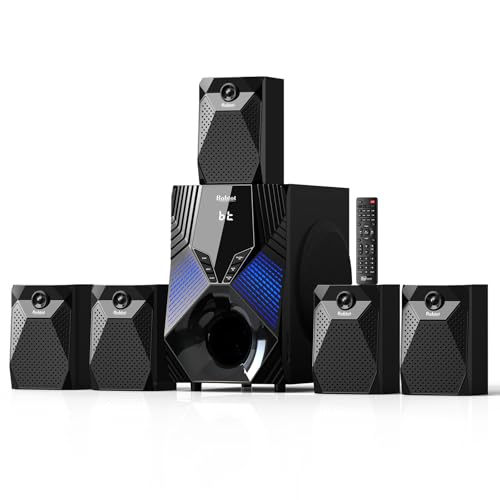
- Switchable 5.1 and 2.1 modes mean you can run the full surround array for movies or drop to a simpler stereo setup for music and casual TV
- Long factory-attached cables, 13 feet for the center and front pair and 31 feet for the rears, give real placement flexibility in a typical living room
- HDMI ARC support allows single-cable TV audio with volume control, which is the cleanest connection method for most modern televisions
- Independent volume trim for each speaker and the subwoofer helps balance dialogue against effects without moving furniture
- MDF cabinets on the enclosures are a step above all-plastic construction and generally help reduce resonance at higher volumes
Cons
- The satellites are wired to the subwoofer, not wireless, so anyone hoping to avoid running cable to the rear of the room will need to plan concealment or accept visible wiring
- The 1000-watt figure is a peak rating rather than sustained output, so buyers comparing it against continuous-power specs from other systems should not read it as an apples-to-apples number
- Feature depth like LED lighting modes, FM radio and karaoke echo adds menu complexity that buyers who simply want a plug-in TV speaker upgrade may find unnecessary

Pros
- Powerful audio output: 800W peak power fills a medium-sized room with sound, ideal for movies and parties.
- Versatile connectivity: Bluetooth 5.3 and multiple wired inputs let you connect almost any device.
- Easy setup: Plug-and-play design means you can get it running quickly without technical expertise.
- Deep bass: The 6.5-inch subwoofer adds a solid low-end punch for action scenes and music.
- Wide compatibility: Works with TVs, game consoles, DVD players, computers, laptops, and projectors.
Cons
- Not for audiophiles: The sound quality may lack the clarity and precision of higher-end systems.
- Speaker placement required: To get true surround sound, you need to position all speakers in the same room, which may be tricky in open layouts.
- Wired rear speakers: The system still requires wires for the satellite speakers, which could limit placement flexibility.
A surround sound test video is essential for calibrating your home theater system and verifying that your speakers are positioned correctly and working as intended. The primary goal is to find demonstration content that produces clear, measurable audio output across all channels so you can adjust levels, delays, and equalization with confidence. Choosing among test videos can be confusing because quality, format compatibility, and the specific calibration tasks they address vary widely.
This guide evaluates 3 surround sound test video options available in 2026, comparing them based on audio format support, compatibility with common playback systems, calibration features, and demonstrated frequency response. We focus on content that serves home theater enthusiasts, installers, and anyone calibrating a multi-channel audio setup for movies, music, or gaming.
How We Evaluated
Our recommendations are based on product specifications, feature descriptions, format support, and available customer review signals. We assessed each option according to its stated compatibility with common audio formats, surround sound standards, and the specific calibration or verification tasks it addresses. We did not perform hands-on playback testing or measure audio output in a laboratory setting.
We prioritized criteria that affect practical usability: which formats each test video supports (Dolby Digital, DTS, PCM, Atmos), whether content is organized for isolated channel testing or continuous demonstration, compatibility with popular media players and streaming platforms, and whether the content serves professional installers, serious enthusiasts, or casual users. The ranking reflects how well each option balances these factors rather than assuming a single product works best for every buyer.
Which Option Fits You?
| Buyer or use case | Product | Why it fits | Main trade-off |
| Home theater installer or acoustician | Professional test disc or download with frequency sweeps | Provides discrete, measurable channel output and frequency response data for precise calibration | Requires specialized knowledge to interpret; not immediately entertaining |
| Movie enthusiast verifying surround mixing | Test clips from known theatrical releases | Uses familiar content you recognize, letting you hear how dialogue, effects, and music are mixed across speakers | Less precise for isolated frequency testing; assumes you know proper surround placement already |
| Music streaming user with multi-channel setup | Test video demonstrating stereo-to-surround upmixing or native surround music | Shows how your system handles music and whether it expands stereo content to surround channels | May not address video synchronization or object-based audio features |
| Gamer or Atmos user calibrating immersive audio | Surround sound test video with object-based audio support | Verifies height speakers and Dolby Atmos rendering if your system supports it | Requires compatible hardware; standard test videos won’t engage object channels |
Surround Sound Test Video Buying Guide
Audio Format and Codec Support
Verify that the test video is encoded in or can output the surround formats your playback system supports. The most common formats are Dolby Digital 5.1, DTS-ES, PCM stereo and surround, Dolby Atmos for immersive height channels, and DTS:X for object-based audio. If your receiver or processor doesn’t support a particular codec, the test video may fall back to stereo or produce incomplete surround output, defeating the calibration purpose. For related guidance, examine our breakdown on JBL Charge 4 Camo: Portable Bluetooth Speaker.
Check the product description or packaging for a detailed codec list. If you’re using older equipment, prioritize test content in PCM or standard Dolby Digital 5.1 format. Newer systems with Atmos or object-based audio support benefit from test videos specifically mastered for those formats. Mixing old and new format options gives you flexibility as you upgrade components over time.
Channel Organization and Test Structure
Look for test content that isolates individual speakers in sequence so you can verify each channel independently, or choose demonstrations that use clearly identifiable sounds to move between channels. Some test videos feature tone sweeps, pink noise, or spoken identification for each speaker; others present movie clips with known surround mixing. Isolated testing is more precise for setup and calibration, while movie-based content is more immediately useful for verification and enjoyment.
If you’re setting up your system for the first time, isolated channel test videos save time and frustration. If you’re verifying an existing system or fine-tuning placement, demonstration clips from familiar movies or music let you trust your ears in real-world scenarios. Choose based on whether you need technical precision or confident, recognizable audio cues.
Compatibility with Playback Devices
Test videos are distributed in multiple formats: physical media like DVDs or Blu-rays, digital downloads, and streaming-on-demand services. Physical media is reliable but requires a player with the correct codec support. Downloads offer flexibility and can often be replayed without internet, but depend on file format and your media server or processor. Streaming options are convenient but may have quality limits or internet availability issues during critical setup moments. For related guidance, examine our breakdown on JBL Charge 4 Camo.
Physical Blu-ray test discs typically support the widest range of modern surround formats. Downloaded test files give you control over storage and replayability. Streaming services are adequate for quick verification but less reliable if your internet connection drops during calibration. Match the distribution format to your equipment and comfort with technology before purchasing.
Frequency Response and Subwoofer Testing
Professional surround sound test videos often include dedicated subwoofer test tones and frequency sweeps so you can verify bass output, phase alignment, and crossover performance. These range from low rumbles under 30 Hz to upper-bass tones around 200 Hz. Consumer-oriented test videos may include subwoofer scenes but not isolated frequency sweeps, which limits your ability to dial in precise bass calibration.
If your receiver has a built-in calibration microphone and automatic setup tools, a basic surround test video may be sufficient because the system will measure and adjust subwoofer levels automatically. If you’re tuning by ear or with a separate sound meter, choose test content that includes dedicated low-frequency tones and clearly identified bass-heavy scenes so you can evaluate performance accurately.
Source and Content Quality
Test videos from professional audio organizations, acousticians, and established home theater media brands are typically more reliable and comprehensive than generic or independently produced content. Established sources have engineered their content for accuracy and cross-platform compatibility, and they often provide documentation about what each test segment measures and why it matters. For related guidance, examine our breakdown on JBL Charge 4.
Budget test videos or user-created content may work adequately for casual verification but often lack documentation and may not be optimized for your specific playback system or audio format preferences. Investing a modest amount in professionally produced test content typically pays off through clearer results and fewer setup mistakes, especially if you’re new to surround sound calibration or own an expensive audio system worth tuning correctly.
Final Thoughts
For most home theater users setting up a multi-channel system, a comprehensive surround sound test video with isolated channel identification and frequency sweeps offers the best balance of precision and usability. This approach lets you verify speaker placement, adjust levels, and measure subwoofer performance without requiring specialized equipment or advanced technical knowledge. The trade-off is that isolated test content isn’t entertaining; you’re listening for technical accuracy rather than enjoying a movie or music.
If you want the confidence of familiar content while calibrating, choose a test video that includes professionally mixed movie clips or music demonstrations alongside any technical test tones. This hybrid approach lets you verify your system sounds correct for the content you actually watch, not just abstract test signals. Many users find this middle ground more practical than pure technical content or pure entertainment.
For users with newer systems supporting Dolby Atmos or DTS:X, select test content specifically mastered for object-based audio so you can verify that height speakers and immersive rendering are working correctly. Standard 5.1 or 7.1 test videos won’t engage these advanced channels, leaving part of your system uncalibrated. Investing in format-specific test content ensures your full audio investment is set up and tuned properly from the start. For related guidance, examine our breakdown on JBL Xtreme 2 Waterproof Bluetooth Speaker.
Frequently Asked Questions
What is the best surround sound test video in 2026?
The best choice depends on your equipment and calibration goals. Professional test DVDs or Blu-rays with isolated channel output and frequency sweeps are most accurate for technical setup. If you prefer learning through familiar movie or music content, choose a test video featuring professionally mixed scenes and known surround effects. Match the format and codec support to your playback hardware to ensure the content plays correctly on your system.
Can I use a movie or music streaming service to test my surround sound?
Yes, but with limitations. Streaming services like Netflix or music platforms offer surround-mixed content, but they’re not designed for calibration and don’t include isolated channel testing or frequency sweeps. They work well for verifying that your speakers play content correctly once your system is already set up, but they’re less reliable for initial calibration or troubleshooting. Use streaming content as a final check after you’ve calibrated with dedicated test material.
Do I need a measurement microphone or sound meter to use a surround sound test video?
No, though they’re helpful for technical precision. Your ears are often sufficient for basic calibration and verification, especially if you’re using test content with spoken channel identification and isolated tones. If your receiver includes an automatic calibration microphone, use it to set baseline levels, then fine-tune by listening to familiar content. A dedicated measurement microphone is useful only if you want to measure frequency response or phase relationships, which most home users don’t need.
What audio formats should my surround sound test video support?
At minimum, choose content that supports Dolby Digital 5.1 and PCM stereo so it works with the widest range of equipment. If your receiver supports DTS or Dolby Atmos, verify the test video encodes in those formats so you can verify codec performance. Check your receiver or processor manual for its supported formats, then match test content to that list. Most commercial surround test videos support multiple formats to ensure compatibility.
Should I buy a physical test disc or download a digital test file?
Physical Blu-ray test discs are reliable for surround sound testing because they’re designed specifically for home theater calibration and work on any compatible player without internet dependency. Digital downloads offer convenience and replayability but depend on your media server, file format, and player codec support. Choose physical media if you want guaranteed compatibility and aren’t comfortable with digital file management. Choose downloads if you prefer not owning physical media and your playback system handles the file format reliably.


