Can a Synthesizer Be Run Directly Through Powered Speakers?
Yes, can a synthesizer be run directly through powered speakers is a common question, and the answer is a definitive yes. Because most modern synthesizers output a line-level signal and powered speakers (also known as active monitors) have built-in amplification, they can be connected directly using the correct audio cables without the need for an external amplifier or mixer.
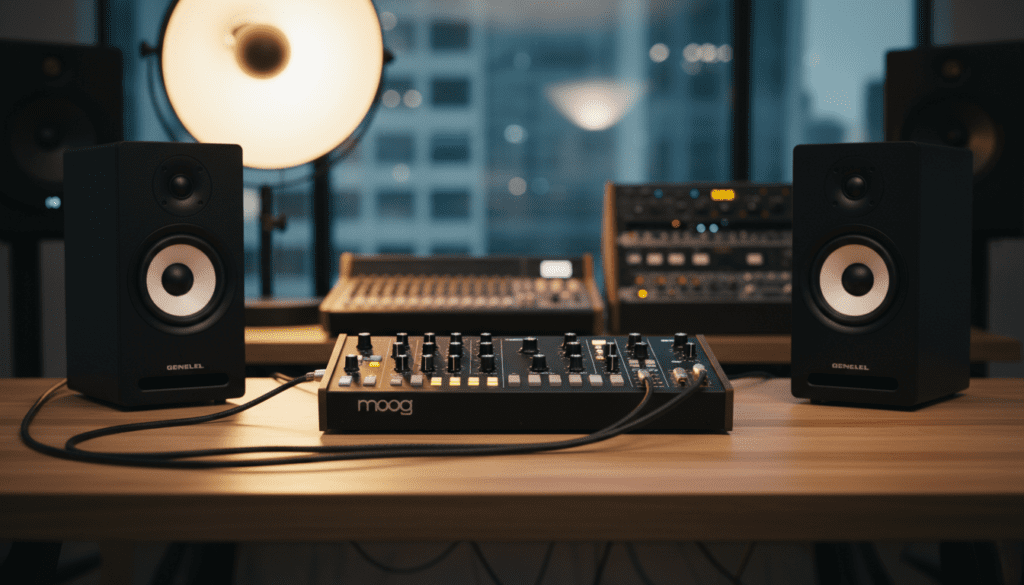
Connecting your gear this way is the fastest route to making noise, but there are technical nuances regarding impedance, cable types, and signal chain order that you must understand to protect your equipment. In my years of configuring home studios, I have found that while a direct connection is convenient, managing your gain staging is the difference between a pristine lead sound and blown speaker tweeters.
Key Takeaways for Synthesizer Setup
- Direct Connection: Synthesizers produce a Line Level signal, which is perfectly compatible with the inputs on Powered Speakers.
- Cable Choice: Use 1/4″ TS (Tip-Sleeve) cables for unbalanced signals or TRS (Tip-Ring-Sleeve) for balanced signals to minimize noise.
- Power Sequence: Always turn your synthesizer on first and your speakers on last to avoid damaging “pops.”
- Volume Control: Start with the volume at zero on both devices and slowly increase the synth output to avoid clipping.
- Stereo vs. Mono: Most synths have Left and Right outputs; ensure you connect both to a pair of speakers for the full sonic experience.
Understanding the Signal: Line Level and Amplification
To understand why can a synthesizer be run directly through powered speakers, we have to look at how audio signals work. There are four main types of signals in a studio: Mic, Instrument, Line, and Speaker level.
Synthesizers almost exclusively operate at Line Level. This is a relatively “hot” or strong signal compared to the weak signal produced by an electric guitar (Instrument Level) or a microphone (Mic Level).
Powered speakers are designed specifically to receive this Line Level signal. They contain their own internal power amplifiers, meaning they don’t need a bulky external receiver or amp to drive the drivers. This makes the synth-to-speaker connection one of the most efficient setups for minimalist producers and hobbyists.
Powered vs. Passive Speakers
| Feature | Powered (Active) Speakers | Passive Speakers |
|---|---|---|
| Internal Amp | Yes, built-in. | No, requires external amp. |
| Power Source | Needs a wall outlet for each speaker. | Powered via speaker wire from the amp. |
| Direct Synth Connection | Yes (Best for direct use). | No (Will result in no sound). |
| Best For | Home studios, synth jams, DJs. | High-end Hi-Fi, permanent installs. |
Essential Gear: What You Need for the Setup
Before you plug anything in, you need to verify your hardware. I’ve seen many beginners frustrate themselves by trying to use standard headphone splitters when they should be using dedicated instrument cables.
The Synthesizer
Most modern hardware synths like the Korg Minilogue, Arturia MicroFreak, or Roland GAIA feature dual 1/4″ outputs. Look for jacks labeled Output L/Mono and Output R.
Powered Speakers / Studio Monitors
Popular choices for this setup include the Yamaha HS5, KRK Rokit 5, or PreSonus Eris series. These speakers usually have multiple input options on the back, such as XLR, 1/4″ TRS, or RCA.
High-Quality Audio Cables
This is where most people go wrong. You generally need two 1/4″ TS to 1/4″ TS cables for a standard unbalanced connection. If your synth and speakers both support balanced connections, use 1/4″ TRS cables to significantly reduce background hum and electromagnetic interference.
Step-by-Step Guide: How to Connect Your Synth Directly
Follow this sequence exactly. In my experience, skipping the “Volume Zero” step is the number one cause of hardware repair bills in the synth community.
Step 1: Physical Placement
Place your speakers on stable stands or isolation pads. Ensure the tweeters (the small top speakers) are at ear level and pointing toward your sitting position to form an equilateral triangle.
Step 2: The Volume Reset
Turn the Volume/Gain knobs on the back of your Powered Speakers all the way down. Do the same for the Master Volume knob on your Synthesizer.
Step 3: Cable Connection
- Plug one end of your first cable into the L/Mono Output of the synth.
- Plug the other end into the Input of your Left Speaker.
- Plug your second cable into the R Output of the synth.
- Plug the other end into the Input of your Right Speaker.
Step 4: The “Safe” Power-On Sequence
Electronic components send a voltage spike when they are turned on. To protect your speakers:
- Turn on your Synthesizer first.
- Wait 5 seconds for the synth’s internal circuits to stabilize.
- Turn on your Powered Speakers.
Step 5: Gain Staging
- Set the volume on your Powered Speakers to a “Unity” or 12 o’clock position (or the manufacturer’s recommended starting point).
- While playing a note on the synth, slowly turn up the Synth Master Volume.
- Adjust until you reach a comfortable listening level without any distortion.
Choosing the Right Cables: TS vs. TRS Explained
When asking can a synthesizer be run directly through powered speakers, you must consider the cable type. Using the wrong cable won’t necessarily break your gear, but it will affect your sound quality.
- TS (Tip-Sleeve) Cables: These are “unbalanced” cables. They are fine for short runs (under 10-15 feet). However, they are prone to picking up radio signals or “60-cycle hum” from nearby power bricks.
- TRS (Tip-Ring-Sleeve) Cables: These are “balanced.” They look like stereo headphone jacks but are used for mono-balanced signals. If your speaker and synth both have balanced jacks, TRS cables will provide a much cleaner, noise-free signal.
- XLR to TRS: Some studio monitors only have XLR inputs. In this case, you will need a cable that has a 1/4″ TRS plug on one end (for the synth) and an XLR Male plug on the other (for the speaker).
When You Should Use a Mixer Instead of a Direct Connection
While you can run a synthesizer directly through powered speakers, it isn’t always the best long-term solution. As your collection grows, you will run into limitations.
Multiple Instruments
If you buy a second synth, you will have to constantly unplug and replug cables. A Mixer (like the Mackie Mix8 or Yamaha MG10) allows you to keep all your gear connected simultaneously.
Recording Capabilities
A direct connection to speakers doesn’t allow you to record into a computer. For that, you need an Audio Interface (like the Focusrite Scarlett 2i2). The interface acts as the middleman, sending audio to both your computer and your speakers.
Integrated EQ and Effects
Powered speakers usually have very basic acoustic tuning controls. A mixer gives you EQ knobs (High, Mid, Low) to shape the sound of your synth before it ever hits the speakers, allowing you to cut muddy frequencies or boost the “shimmer.”
Protecting Your Investment: Pro Tips for Synth Safety
I have seen many beautiful Moog and Dave Smith synthesizers suffer from neglected signal chains. Follow these professional tips to ensure your setup lasts for decades.
Watch the “Clipping”
If you see a red light flickering on your speakers or your synth’s output meter, you are clipping. This means the signal is too hot for the circuitry to handle, resulting in digital distortion that can physically heat up and damage speaker voice coils. Always back off the volume if you hear “crunchiness” that isn’t part of the synth patch.
Use a Power Conditioner
Don’t just use a cheap $5 power strip. Synthesizers are sensitive computers. A Power Conditioner (like those from Furman) filters out electrical noise and provides superior surge protection against lightning strikes or grid fluctuations.
Balanced Power Management
If you hear a persistent buzzing sound (ground loop), try plugging your speakers and your synth into the same power outlet or power strip. This ensures they share a common ground and can often eliminate annoying electrical hum.
Troubleshooting Common Connection Issues
Problem: There is no sound at all.
- Check the “L/Mono” Jack: Some synths require the Left jack to be plugged in first to activate the output.
- Check the VCA/Envelope: On many analog synths, you won’t hear sound unless the Sustain is up or a Gate signal is present.
- Local Control: If you are using a synth with MIDI, ensure “Local Control” is turned ON in the settings menu, otherwise the keyboard won’t trigger the internal sounds.
Problem: The sound is very quiet.
- Check Input Sensitivity: Some powered speakers have a switch for +4dBu (Professional Line Level) vs -10dBV (Consumer Level). Ensure yours is set correctly based on your synth’s manual.
- Expression Pedals: Ensure you don’t have an expression pedal plugged in that is currently set to the “zero” position.
Problem: Only one speaker is working.
- Check the cables: Swap the left and right cables at the synth output. If the problem moves to the other speaker, the cable is faulty.
- Mono Mode: If you are using a mono synth (like a Moog Grandmother), it only has one output. You will need a “Y-Splitter” cable (one 1/4″ TS to two 1/4″ TS) to hear it through both speakers.
Frequently Asked Questions
Can I use guitar amps instead of powered speakers?
You can, but it is not recommended. Guitar amps are designed to color the sound and lack the high-frequency response (tweeters) needed to reproduce the complex textures of a synthesizer. A keyboard amp or powered studio monitors will provide a much more accurate sound.
Will I damage my speakers if I turn the synth up all the way?
Possibly. If the synth output is so high that it causes the speaker’s internal amplifier to square off (clip), the resulting heat can damage the speaker’s components. Always keep your synth volume at around 75% and use the speaker’s gain for the rest of the volume.
Do I need a DI box to connect a synth to powered speakers?
Generally, no. A DI (Direct Injection) box is used to convert a Line/Instrument signal to a Mic signal for long cable runs to a mixing console. For a direct connection to powered speakers over a few feet, a DI box is unnecessary and may actually make your signal too quiet.
Can I connect my synth to my computer speakers?
If your computer speakers are powered (meaning they have a volume knob and plug into a wall), yes. However, you will likely need a Dual 1/4″ TS to 1/8″ (3.5mm) Stereo Mini-jack adapter to make the connection.
Is it better to use XLR or 1/4″ inputs on the speakers?
If your synth has balanced TRS outputs, both XLR and TRS inputs on the speakers will perform identically. Choose the one that matches the cables you currently own.
**
**
**
**