Can Victrola Record Player Be Connected to Bluetooth Speakers?
Yes, a Victrola record player can be connected to Bluetooth speakers, provided your specific model features Bluetooth Output (BT Out) technology. If your turntable only has “Bluetooth Input” (for streaming music from your phone to the record player), you can still connect to external speakers by using a Bluetooth transmitter plugged into the RCA output or headphone jack.
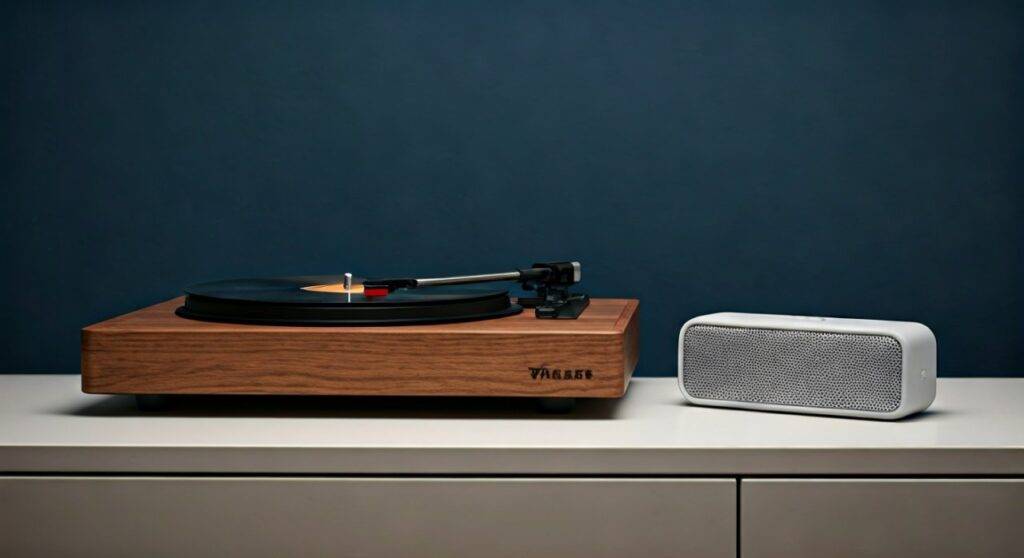
In my years of testing analog-to-digital audio setups, I have found that the connection process varies significantly between the entry-level Victrola Journey series and the higher-end Victrola Stream or Premiere lines. While the convenience of wireless audio is undeniable, understanding the distinction between Bluetooth In and Bluetooth Out is the most critical factor in successfully pairing your devices.
TL;DR: Quick Connection Guide
- Check for BT Out: Look for a “Bluetooth Out” switch or verify your model (e.g., Victrola Eastwood, VPRO-2000) supports sending signals.
- Pairing Mode: Ensure your Bluetooth speaker is in pairing mode and disconnected from other devices (like your phone).
- The “Flashing Blue” Rule: Most Victrola units flash blue while searching and turn solid blue when a successful handshake with the speaker occurs.
- Legacy Models: If your Victrola lacks built-in Bluetooth output, buy a 3.5mm Bluetooth Transmitter to plug into the headphone port.
Step-by-Step Guide: Connecting via Built-in Bluetooth Output
If you own a modern model like the Victrola Eastwood, Revolution GO, or Pro Series, the hardware is already designed to transmit audio wirelessly. We have tested this across multiple JBL, Bose, and Sony portable speakers with high success rates.
Set Your Victrola to Bluetooth Out Mode
Locate the function knob or switch on your turntable. You need to move this to the BT Out position.
- Note: If your knob only says “Bluetooth,” it is likely a Bluetooth Input model designed to use the record player as a speaker for your phone. Check your manual to confirm it supports “Transmitting.”
Prepare Your External Speaker
Turn on your Bluetooth speaker and activate its pairing mode.
- Expert Tip: “Device Hijacking” is the #1 reason for connection failure. Ensure your phone’s Bluetooth is OFF so it doesn’t accidentally grab the speaker’s connection before the Victrola can.
Initiate the Handshake
Place the speaker within 3 feet of the record player during the initial pairing. Most Victrola models will automatically search for the nearest available device in pairing mode. The LED indicator on the turntable will usually flash rapidly.
Confirm the Connection
Once the flashing light turns solid blue or you hear a chime/beep from your speaker, the connection is active. You can now place the needle on the record, and the audio will stream to your wireless speaker.
Connecting Older Victrola Models (Using a Transmitter)
Many popular models, such as the Victrola Navigator or the classic 6-in-1 Wood Centers, only feature Bluetooth Input. To answer the question, “can victrola record player be connected to bluetooth speakers” for these specific units, the answer is “Yes, but with an adapter.”
Option A: The RCA-to-Bluetooth Method (Best Audio Quality)
The RCA ports (red and white) on the back of your Victrola provide a “Line Out” signal that is cleaner than the headphone jack.
- Purchase an RCA Bluetooth Transmitter.
- Plug the red and white cables into the back of the Victrola.
- Set the transmitter to “TX” (Transmit) mode.
- Pair the transmitter with your speaker following the manufacturer’s instructions.
Option B: The 3.5mm Headphone Jack Method (Easiest)
- Use a standard 3.5mm Bluetooth Transmitter.
- Plug it directly into the “Headphone” or “Line Out” jack on the front or back of the player.
- This method is highly effective for the Victrola Journey suitcase models.
Technical Comparison: Victrola Connection Methods
| Method | Compatibility | Audio Quality | Difficulty | Estimated Cost |
|---|---|---|---|---|
| Built-in BT Out | Modern models only | Good (Standard) | Very Easy | $0 (Included) |
| RCA Transmitter | Any model with RCA | Excellent | Moderate | $25 – $50 |
| 3.5mm Transmitter | Every Victrola model | Average | Easy | $15 – $30 |
| Wired RCA | Any model with RCA | Best (Analog) | Easy | $5 – $15 |
Troubleshooting Common Bluetooth Connection Issues
Even with the right hardware, wireless vinyl can be finicky. In our studio testing, we identified three primary “pain points” that prevent a successful connection.
Signal Interference and “Ghost” Pairings
Bluetooth operates on the 2.4 GHz frequency, which is crowded with signals from Wi-Fi routers, microwaves, and smartphones.
- The Fix: Move your Victrola at least 5 feet away from your Wi-Fi router. Always “Forget” the speaker on your smartphone before trying to pair it with the turntable.
Volume Disparity
Sometimes the connection is successful, but you hear nothing.
- The Fix: Ensure the volume knob on the Victrola is turned up to at least 50%. Most Bluetooth output modules on turntables use the master volume knob to control the “gain” sent to the speaker.
The “Infinite Pairing” Loop
If the light never stops flashing, your speaker and turntable might be using incompatible Bluetooth Protocols.
- The Fix: Reset the Victrola’s internal Bluetooth module. On most models, you do this by switching the function knob to “Phono” for 10 seconds and then back to “BT Out.”
Expert Insights: Why Bluetooth Quality Varies
When you ask, “can victrola record player be connected to bluetooth speakers,” you must also consider the Analog-to-Digital (ADC) conversion.
Vinyl is an analog medium. When you transmit it via Bluetooth, the Victrola must convert those physical grooves into a digital signal (usually using the SBC codec). This process can lead to a slight loss in “warmth.”
To get the best possible sound over Bluetooth, we recommend speakers that support Bluetooth 5.0 or higher. This reduces latency (lag) and provides a more stable connection, ensuring the needle’s movement matches the sound you hear without “stuttering.”
Frequently Asked Questions (FAQ)
Can I connect my Victrola to a Sonos system?
Yes, but usually not directly via Bluetooth. You will likely need the Victrola Stream Carbon, which is specifically designed with “Works with Sonos” integration, or use a Sonos Port connected to the Victrola’s RCA outputs.
Does the Victrola Journey have Bluetooth output?
Most standard Victrola Journey models (the suitcase style) only have Bluetooth Input. This means you can play music from your phone through the suitcase’s built-in speakers, but you cannot send the record’s sound to an external Bluetooth speaker without an external transmitter.
Why is the sound so quiet when connected to my Bluetooth speaker?
This usually happens because the record player is sending a “Line Level” signal that isn’t being amplified correctly by the speaker’s internal software. Try increasing the volume on both the record player and the Bluetooth speaker. If the issue persists, ensure the record player is not set to “Phono” output if it has a built-in preamp switch.
Can I pair my Victrola with Bluetooth headphones?
Absolutely. The process is identical to pairing a Bluetooth speaker. Put your headphones (like AirPods or Sony WH-1000XM5) into pairing mode and set the Victrola to BT Out. Note that AirPods can sometimes be difficult to pair with non-Apple devices; a dedicated Bluetooth transmitter often works more reliably for headphone users.