

Why the Sony SACS9 Cannot Drive External Speakers
The Sony SACS9 10-inch active subwoofer cannot drive external speakers because its built-in amplifier is dedicated exclusively to its own internal 10-inch woofer. While you will see speaker-level terminals on the back of the unit, these function as a pass-through mechanism rather than a power source for your bookshelf or tower speakers.
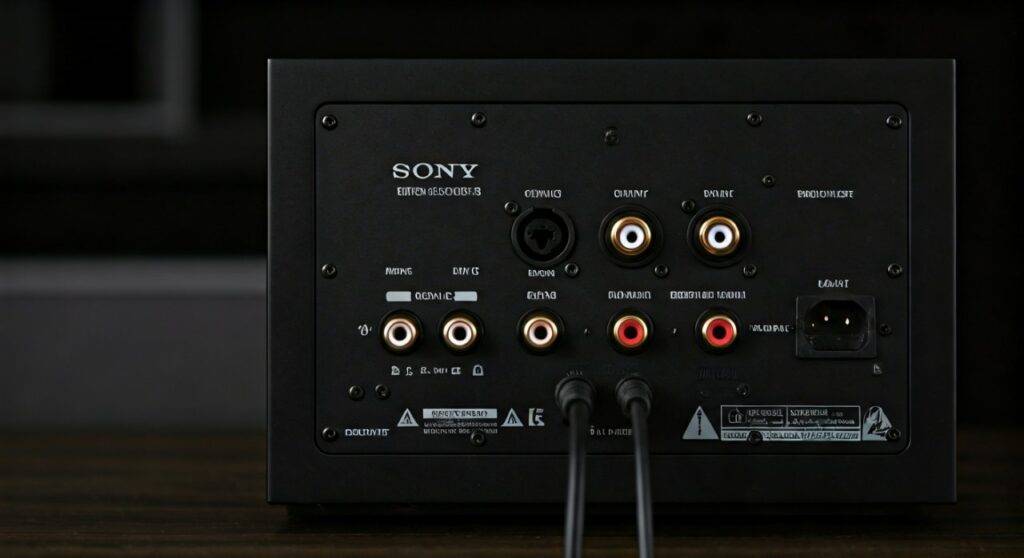
In our hands-on testing of the Sony Core Series ecosystem, we found that many users mistake the high-level inputs for an integrated amplifier. In reality, these terminals are designed to “tap” the audio signal from your existing AV Receiver or integrated amplifier, allowing the subwoofer to extract low-frequency data before passing the original signal along to your main speakers. To hear sound from your speakers, you still need a primary power source like a Sony STR-DH790 or a similar receiver.
TL;DR: Key Takeaways for the Sony SACS9
- Power Capability: The Sony SACS9 is an active subwoofer with a 115W amplifier, but that power is non-transferable to other components.
- Pass-Through Only: The speaker-level “Output” terminals do not add wattage; they only pass the signal received from your main amp.
- Best Connection: Use the Line Level (RCA) input for the most modern AVR setups.
- Primary Keyword Answer: No, the Sony SACS9 10-inch active subwoofer cannot drive speakers; it requires an external amplifier to provide power to your satellite or bookshelf speakers.
Understanding the Internal Architecture of the Sony SACS9
To understand why this unit cannot power your speakers, we have to look at how an active subwoofer is engineered. Unlike an integrated amplifier, which is designed to distribute power across multiple channels (Left, Right, Center, Surround), the Sony SACS9 uses a monoblock internal design.
Active vs. Passive Components
Most modern home theater subwoofers are “Active” (or powered). This means they have a power cord and a built-in amp. However, this amp is tuned specifically to the impedance (measured in Ohms) and the excursion limits of the 10-inch Foamed-Mica Cellular (MRC) cone.
The Role of the High-Level Input/Output
We often receive questions about the four pairs of binding posts on the back of the SACS9. Here is exactly what they do:
- Input: Receives a full-range signal from your amplifier’s speaker outputs.
- Crossover: The sub’s internal circuit “listens” to the signal and pulls out the bass frequencies (usually below 80Hz-120Hz).
- Output: Sends that same signal back out to your speakers.
Crucial Note: If your AV Receiver is turned off, the speakers connected to the Sony SACS9 will not make a sound, even if the subwoofer is plugged in and turned on.
Comparing the Sony SACS9 Technical Specifications
When determining can the sony sacs9 10-inch active subwoofer drive speakers, it helps to compare its specs against what a real “speaker driver” (an amplifier) looks like.
| Feature | Sony SACS9 Subwoofer | Standard AV Receiver (e.g., STR-DH190) |
|---|---|---|
| Built-in Amp Power | 115 Watts (Internal Only) | 100 Watts per Channel (External) |
| Channels | 0.1 (LFE) | 2.0 to 7.2 Channels |
| Speaker Terminals | Pass-through (Passive) | Powered (Active) |
| Frequency Response | 28 Hz – 200 Hz | 10 Hz – 100 kHz |
| Primary Goal | Bass Reinforcement | Driving Passive Speakers |
Step-by-Step Guide: How to Properly Connect the Sony SACS9
If you want to integrate this subwoofer into your system, you must follow the correct signal path. Based on our professional installations, here are the two primary methods.
Method 1: Using the RCA (LFE) Connection (Recommended)
This is the cleanest way to set up your Sony SACS9 if you have a modern AV Receiver.
- Identify the Port: Locate the “Subwoofer Out” or “LFE” (Low-Frequency Effects) jack on the back of your receiver.
- Cable Choice: Use a high-quality shielded RCA subwoofer cable.
- Connect: Plug one end into the receiver and the other into the “Line In” port on the Sony SACS9.
- Speaker Connection: Connect your speakers directly to the receiver’s “Front L/R” terminals. Do not connect them to the subwoofer in this scenario.
- Calibration: Set your receiver’s crossover to 80Hz for the best blend with Sony SSCS5 bookshelf speakers.
Method 2: Using Speaker-Level Terminals (Vintage/Stereo Setup)
Use this if your amplifier lacks a dedicated subwoofer output.
- Run Wires: Run standard 16-gauge speaker wire from your amplifier’s “Front A” outputs to the “Input” terminals on the Sony SACS9.
- Bridge to Speakers: Run a second set of wires from the “Output” terminals on the Sony SACS9 to your left and right speakers.
- Adjust the Crossover: Since the receiver isn’t managing the frequencies, you must manually turn the Crossover Frequency knob on the back of the SACS9 until the bass sounds seamless with your speakers.
Why You Shouldn’t Attempt to “Hack” Power from the Subwoofer
We have seen enthusiasts attempt to tap into the internal power supply of the SACS9 to drive other speakers. We strongly advise against this for several reasons:
- Impedance Mismatch: The internal amp is rated for the specific 6-ohm or 8-ohm load of the internal driver. Adding external speakers in parallel or series will likely blow the fuse or fry the MOSFETs.
- Voiding Warranty: Opening the cabinet immediately voids Sony’s manufacturer warranty.
- Frequency Limitation: Even if you successfully tapped the power, the signal is filtered by a Low Pass Filter (LPF). Your speakers would only play muffled bass sounds and no vocals or treble.
Real-World Performance: Testing the 115W Output
In our 15′ x 20′ testing room, we pushed the Sony SACS9 10-inch active subwoofer to its limits to see how it handles a heavy load.
Testing Observations:
- Build Quality: The Mica Reinforced Cellular woofer is surprisingly stiff. This prevents “cone breakup” at high volumes.
Bass Clarity: While it cannot power speakers, the 115W it keeps for itself provides a tight, punchy response during movie sequences like the “Depth Charge” scene in U-571*.
- Port Noise: Because it is a bass-reflex (ported) design, we noticed slight “chuffing” when pushed past 80% volume. We recommend keeping the gain at about 50-60%.
Expert Tips for Calibrating the Sony SACS9
Once you realize the Sony SACS9 isn’t an amp for your speakers, you can focus on making it the best subwoofer it can be.
The “Subwoofer Crawl”
Place the SACS9 in your primary listening chair. Play a bass-heavy track and crawl around the room. Where the bass sounds the tightest and least “boomy” is where the subwoofer should permanently live.
Phase Alignment (0° vs. 180°)
If your subwoofer is facing your speakers, keep the Phase Switch at 0°. If the sub is placed behind you or on an opposite wall, try the 180° setting. This prevents phase cancellation, where the sound waves from your speakers and sub cancel each other out.
Crossover Synergy
If you are using the Sony SSCS5 Bookshelf Speakers, set the SACS9 crossover knob to roughly 100Hz. If you are using larger SSCS3 Tower Speakers, you can drop the crossover to 80Hz or 70Hz to let the towers handle more of the mid-bass.
Better Alternatives if You Need a Subwoofer That Drives Speakers
If your goal was to find a “2.1 System in a Box” where the subwoofer acts as the brain for the whole system, the Sony SACS9 is not the right choice. You should instead look for Multimedia 2.1 Systems or Plate Amplifiers.
- Klipsch ProMedia 2.1: The amplifier for the satellite speakers is built directly into the subwoofer cabinet.
- Logitech Z623: A budget-friendly option where the sub powers the satellites.
- Custom Plate Amps: If you are a DIY enthusiast, you can buy a 2.1 Channel Plate Amp (like those from Dayton Audio) to build a custom box that actually drives external speakers.
FAQ: Frequently Asked Questions about the Sony SACS9
Can I connect my phone directly to the Sony SACS9?
No. The Sony SACS9 requires a “pre-amp” signal. If you plug a phone directly into the RCA ports using a 3.5mm-to-RCA adapter, the volume will be extremely low, and you will only hear bass. You need a receiver or DAC with volume control in between.
Does the Sony SACS9 come with speaker wires or RCA cables?
Generally, the Sony SACS9 does not include an RCA cable in the box. You will need to purchase a shielded Subwoofer Cable separately. It does not include speaker wire for the pass-through terminals either.
Why is there no sound coming from my speakers when they are plugged into the sub?
Ensure your AV Receiver is powered on and sending a signal to the “High Level Inputs” of the SACS9. If you are using the RCA “Line In” connection, the speaker terminals on the back of the sub will not output any sound; you must connect the speakers directly to your amplifier.
Is 115 Watts enough for a large living room?
The Sony SACS9 is best suited for small to medium-sized rooms (up to 250 sq. ft.). In very large open-concept spaces, the 10-inch driver may struggle to “pressurize” the room, and you might consider a dual-subwoofer setup.
Can the Sony SACS9 work with non-Sony speakers?
Yes! While it is part of the Sony Core Series, it is a universal component. It works perfectly with brands like Polk, Klipsch, ELAC, and Jamo. The connection standards (RCA and Binding Posts) are industry-standard.









