

Can You Change the Speakers of a Gaming Headset? The Short Answer
Yes, you can change the speakers of a gaming headset, but it requires moderate technical skill, specific tools, and an understanding of audio impedance. In most cases, replacing the internal drivers involves opening the ear cups, desoldering the wires from the old speakers, and soldering them onto new, compatible units.
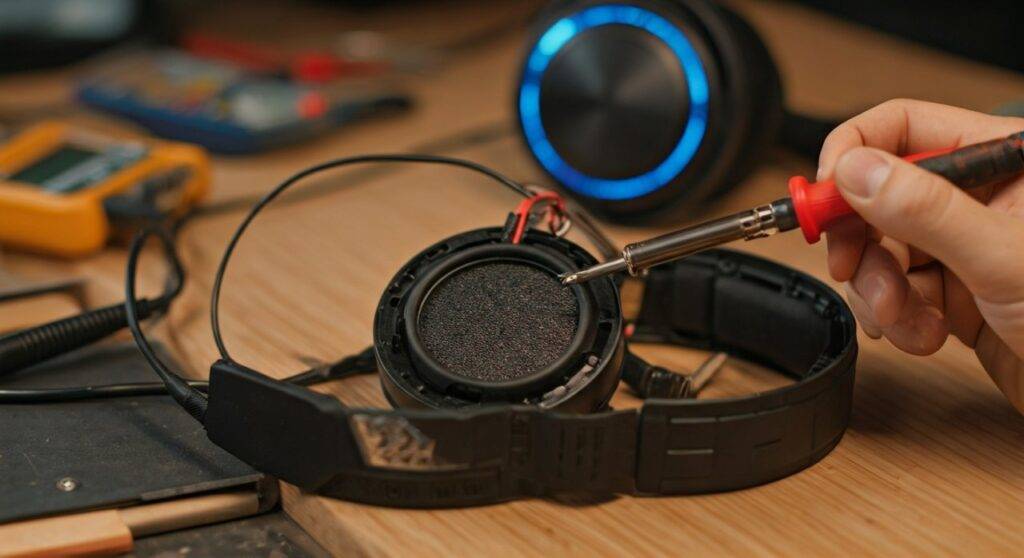
Whether you are looking to fix a blown driver or upgrade your audio fidelity, this process is entirely possible for DIY enthusiasts. However, because most gaming headsets use permanent adhesive or plastic clips to secure components, there is a risk of cosmetic damage during the teardown process.
TL;DR: Quick Guide to Headset Speaker Replacement
- Feasibility: High, provided you can use a soldering iron.
- Cost: $15–$50 for replacement drivers; significantly cheaper than a new premium headset.
- Key Requirement: The new drivers must match the diameter (mm) and impedance (Ohms) of the originals.
- Risk Level: Moderate. You may void your warranty or damage the plastic housing.
- Best For: Users with a broken HyperX, SteelSeries, or Razer headset out of warranty.
Why You Might Change Your Gaming Headset Speakers
The decision to swap out the speakers (technically called drivers) usually stems from one of two scenarios: repair or performance enhancement. Over the years, I have salvaged dozens of headsets that were headed for the landfill simply because one side stopped working.
Repairing a Blown or Rattling Driver
Gaming headsets are often subjected to high volumes and accidental drops. If you hear a metallic rattling or if one side has gone completely silent, the voice coil inside the driver may be damaged. Replacing the speaker is often more sustainable than buying a whole new unit.
Upgrading Sound Quality
Many mid-range gaming headsets use generic 40mm or 50mm drivers that prioritize “muddy” bass over clarity. By installing high-fidelity drivers (like those made of beryllium or titanium-coated PET), you can transform a $60 headset into a piece of gear that rivals audiophile-grade headphones.
Customizing the Sound Signature
If your current headset is too “bright” (sharp treble) or too “dark” (heavy bass), changing the speakers allows you to tune the audio to your preference. You can source drivers specifically designed for competitive gaming that emphasize footstep frequencies (2kHz – 5kHz).
Understanding Driver Specifications Before You Buy
Before you can answer “can you change the speakers of a headset” for your specific model, you must understand the technical specs. If you buy the wrong drivers, you risk low volume or even damaging your on-board sound card or USB DAC.
Driver Diameter (The Fit)
Most gaming headsets use either 40mm or 50mm drivers. You must measure the outer diameter of your current speaker precisely. A 50mm driver will not fit in a housing designed for a 40mm unit without significant (and usually destructive) modification to the plastic.
Impedance (The Power)
Impedance, measured in Ohms (Ω), represents the electrical resistance of the speaker. Most gaming headsets are rated at 32Ω.
- If you install drivers with much higher impedance (e.g., 250Ω), your headset will be extremely quiet.
- If the impedance is too low, you could draw too much current from your controller or PC.
Sensitivity (The Volume)
Sensitivity is measured in dB (decibels). This determines how loud the speaker gets at a specific power level. For gaming, look for drivers with a sensitivity between 95dB and 110dB for a consistent experience.
| Feature | Standard Gaming Driver | Audiophile Replacement | Impact on Experience |
|---|---|---|---|
| Material | Mylar / PET Plastic | Bio-cellulose / Titanium | Clarity and Detail |
| Impedance | 32 Ohms | 32 – 64 Ohms | Volume & Power Efficiency |
| Magnet Type | Ferrite | Neodymium (N52) | Bass Response & Speed |
| Price | $5 – $10 | $20 – $45 | Overall Budget |
Tools Required for the Project
I have learned the hard way that using the wrong tools leads to melted plastic and frayed wires. To successfully change the speakers of a gaming headset, gather the following:
- Soldering Iron: A fine-tip iron is essential. Avoid large, high-wattage “woodburning” style irons.
- Solder: Use 60/40 lead-based solder (easier to work with) or high-quality lead-free solder with a rosin core.
- Screwdriver Set: Precision bits (Phillips #00, Torx T5/T6) are usually required for brands like Logitech or Razer.
- Plastic Pry Tools: To open the ear cups without scratching the finish.
- Multimeter: Useful for testing “continuity” to ensure your wires aren’t broken elsewhere.
- Adhesive: B-7000 glue or double-sided 3M tape to secure the new driver.
Step-by-Step Guide: How to Change Your Headset Speakers
Following this process carefully will ensure you don’t ruin the headset’s internal electronics, especially if it is a wireless gaming headset with a built-in battery and PCB.
Step 1: Disassemble the Ear Cups
Start by removing the ear pads. Most pads stretch over a lip, but some (like SteelSeries Arctis models) clip on. Once the pads are off, locate the screws holding the driver baffle (the plate holding the speaker) to the main housing.
Step 2: Document the Wiring
This is the most critical step. Before touching your soldering iron, take a high-resolution photo of the wires connected to the existing speaker.
- Usually, there is a Red/Copper wire (Positive) and a Blue/Green/Black wire (Negative/Ground).
- If you swap these, your speakers will be “out of phase,” resulting in a weird “hollow” sound and zero bass.
Step 3: Desolder the Old Driver
Apply a small amount of fresh solder to your iron tip (tinning). Touch the tip to the solder joint on the speaker terminal while gently pulling the wire away. The wire should pop off within 2-3 seconds. Do not hold the iron on the terminal for too long, or you will melt the plastic housing.
Step 4: Prepare and Install the New Speaker
If your new drivers didn’t come with adhesive, apply a thin ring of B-7000 glue or a 3M adhesive ring to the edge of the driver. Press it firmly into the baffle. Ensure it sits flush; if the speaker is tilted, it will create “acoustic leakage,” ruining the sound.
Step 5: Solder the Wires to the New Driver
Look for the “+” and “-“ markings on the new driver terminals.
- Apply a tiny “bead” of solder to the driver terminals first (pre-tinning).
- Hold the wire against the terminal and touch it with the iron.
- The solder should flow together instantly.
Step 6: The “Tap Test” and Reassembly
Before putting the screws back in, plug the headset into a phone or PC at a low volume. Play a “Left/Right” audio test on YouTube. If both sides work and the “Center” channel sounds like it’s in the middle of your head, your wiring is correct. Reassemble the housing and replace the ear pads.
Advanced Tip: Adding Acoustic Damping
While you have the headset open, you can significantly improve the sound of a cheap gaming headset by adding acoustic damping. When I mod headsets, I often line the inside of the ear cup with poly-fill (stuffing) or a small piece of Dynamat.
This reduces the “echo” inside the plastic shell, making the bass sound tighter and more controlled. It is a “pro-level” move that makes your DIY speaker swap sound like a $300 pair of headphones.
Where to Buy Replacement Gaming Headset Speakers
Finding the right parts is the hardest part of the process. You won’t find these at a local Best Buy.
- AliExpress: The best source for raw 40mm and 50mm drivers. Search for “DIY headphone driver” or “replacement driver for HyperX.” Look for sellers with high ratings and “N52 magnets.”
- eBay: Good for finding “parts-only” headsets. If your Razer BlackShark V2 has a broken hinge, you can buy a broken-cord version on eBay for $10 and harvest the speakers.
- Digi-Key or Mouser: These are industrial electronic suppliers. While they carry speakers, they are usually “industrial” grade and may not be tuned for music or gaming.
Brand-Specific Considerations
Not all headsets are created equal. Some brands make it intentionally difficult to change the speakers of a gaming headset.
Razer Headsets
Razer often uses a lot of glue. You may need a heat gun or a hair dryer to soften the adhesive holding the driver in place. Be careful not to warp the plastic ear cup.
Logitech G-Series
Logitech’s Pro G drivers are unique because they use a woven mesh material. If you replace these with standard PET drivers, the sound signature will change drastically. It is better to source “donor” Logitech drivers if you want to keep the original sound.
HyperX Cloud Series
The HyperX Cloud II and Cloud Alpha are the best candidates for speaker swaps. Their internal layout is very clean, and they use standard 53mm drivers that are easily found online.
Common Challenges and Troubleshooting
“One side is quieter than the other”
This usually happens if you used too much solder and created a “high resistance” joint, or if the driver you bought is defective. Use a multimeter to check the resistance at the jack; both sides should be within 1-2 Ohms of each other.
“The microphone stopped working”
When you opened the headset, you might have pinched the thin microphone wires or accidentally desoldered a wire from the main PCB. Check the internal wiring for any loose strands.
“The bass is gone”
This is almost always a phase issue. You likely swapped the positive and negative wires on one of the speakers. Reverse the wires on one side and the bass should return.
Frequently Asked Questions
Can I put 50mm speakers in a 40mm headset?
Generally, no. The driver housing is molded to a specific size. Attempting to “dremel” out a larger hole usually results in a structural failure of the headset or a terrible acoustic seal, which destroys the sound quality.
Will changing the speakers fix my wireless headset connection?
No. Changing the speakers only fixes the analog audio output. If your wireless headset is cutting out or won’t pair, the issue lies in the Bluetooth/2.4GHz chip or the battery, not the speakers.
Is it worth it to change speakers on a cheap headset?
If the headset costs less than $30, it is likely not worth the time and cost of parts. However, for headsets in the $80-$150 range, spending $20 on high-end replacement drivers is a fantastic way to extend the life of your gear and improve your gaming experience.
Does soldering void my warranty?
Absolutely. Opening the ear cup and desoldering components will void any manufacturer warranty. Only attempt this if your headset is already out of warranty or if the manufacturer has refused a repair.









